Hello there. I’m having a problem that I thought would be common, but it doesn’t seem to have many contents available out there.
I’m running a MXLinux HVM and using sys-whonix as it’s gateway. My goal is to configure my MXLinux HVM to EXPLICITLY connect ALL network traffic to the Tor network through Whonix Gateway. For that sake I’ve divided this goal in three steps:
1 - Connecting to Whonix Gateway (done)
Since Whonix does not answer arp requests by default, I had to manually fulfill my arp table:
sudo arp -s <sys-whonix_ip_address> <sys-whonix_mac_address>
Than do it every time network manager starts in order to make it permanent:
sudo nano /usr/lib/systemd/system/arpfulfill.service
[Unit]
After=NetworkManager.service
Wants=NetworkManager.service
Requires=NetworkManager.service
Restart=always

[Service]
Type=oneshot
ExecStart=/sbin/arp -s <sys-whonix_ip_address> <sys-whonix_mac_address>
User=root

[Install]
WantedBy=multi-user.target
sudo systemctl enable arpfulfill.service
After that everything seemed to be working just fine. Firefox and wget were able to access multiple URLs with no problem.
With everything working, I was ready to go to the next step:
2 - Connecting Tor Browser to Whonix Gateway
Now connected to Tor network and internet, my next step was to download and configure Tor Browser:
sudo apt install torbrowser-launcher
And open it’s configurations:
Like this
To avoid running tor-over-tor while attempting to run it explicitly connected to my Whonix Gateway (as my goal is to do it on the whole system), I’ve changed the ‘Tor server’ box from 127.0.0.1:9050 to <sys-whonix_ip_address>:9050 . It worked with no problems. It even showed the download mirror dist.torproject.org:445 on sys-whonix’s Onion Circuits.
However, when I try to connect Tor Browser it does not proceed, displaying a page similar to this.
It also displays an error message: Connected to a Tor relay failed (TLS error).
When searching the logs, it reads:
[NOTICE] DisableNetwork is set. Tor will not make or accept non-control network connections. Shutting down all existing connections.

[NOTICE] Opening Socks listener on 127.0.0.1:9150

[NOTICE] Opened Socks listener on 127.0.0.2:9150

[NOTICE] Bootstrapped 5% (conn): Connecting to a relay

[NOTICE] Bootstrapped 10% (conn_done): Connected to a relay

[WARN] Problem bootstrapping. Stuck at 10% (conn_done): Connected to a relay. (unexpected eof while reading; TLS_ERROR; count 10; recommendation warn; host <relay_fingerprint> at <relay_ip_address>:443)

[WARN] 10 connections have failed:

[WARN] 10 connections died in state handshaking (TLS) with SSL state error in HANDSHAKE

[NOTICE] Closing no-longer-configured Socks listener on 127.0.0.1:9150

[NOTICE] DisableNetwork is set. Tor will not make or accept non-control network connections. Shutting down all existing connections.

[NOTICE] Delaying directory fetches: DisableNetwork is set.
Reading this, it draws my attention that it is trying to use localhost Tor (127.0.0.1:9150) as a socks proxie, while it should be using sys-whonix. To fix that, I tried to open the about:config tab on Tor Browser, and change the network.proxie.socks configuration from localhost to sys-whonix:
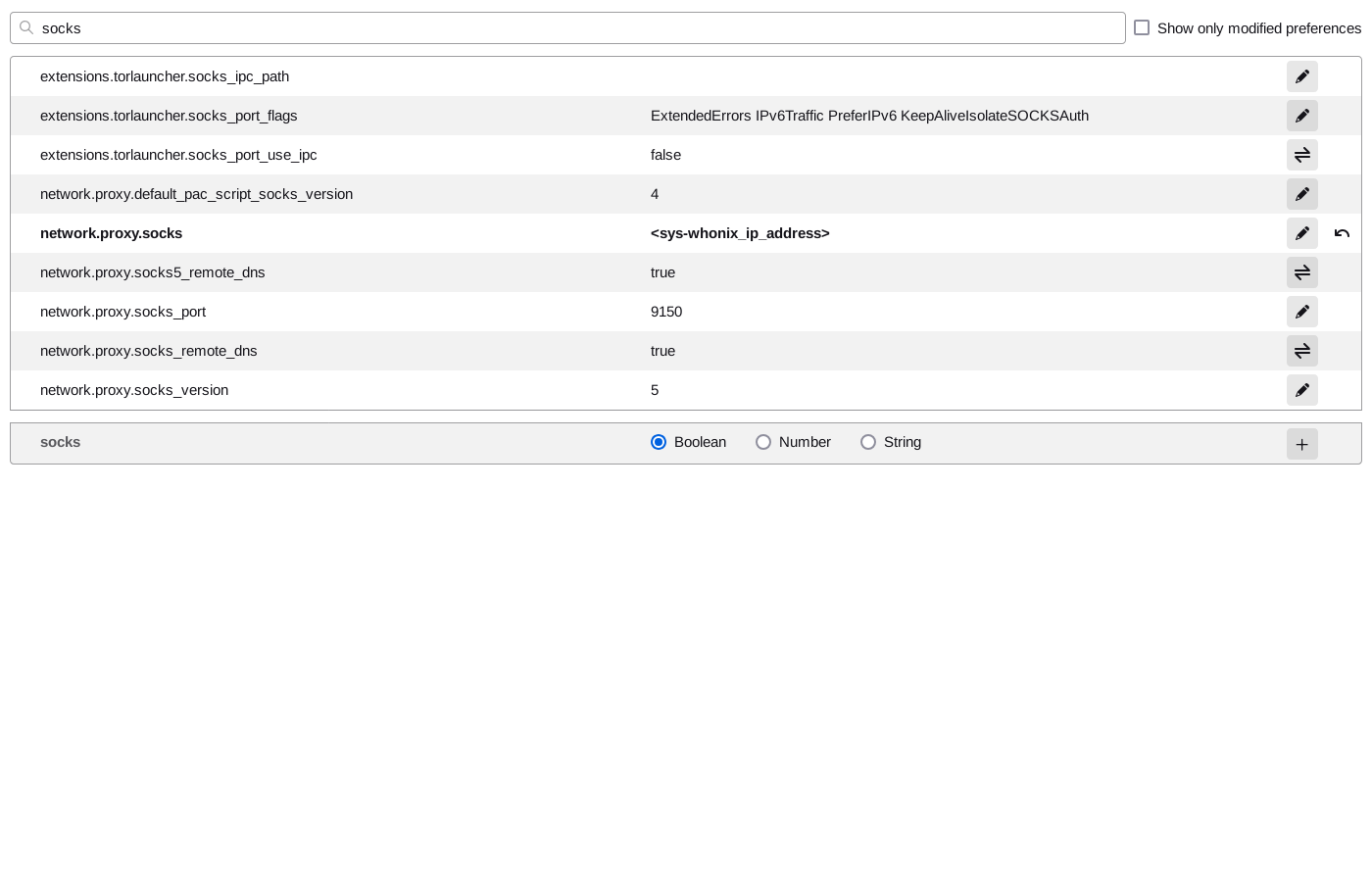


Besides my efforts, it still didn’t work, giving me the same Tor Browser could not connect to Tor page (but with the Tor failed to establish a Tor network connection message instead of Connected to a Tor relay failed (TLS error).) and the following log:
[NOTICE] You configured a non-loopback address '<sys-whonix_ip_address>:9150' for SocksPort. This allows everybody on your local network to use your machine as a proxy. Make sure this is what you wanted.

[NOTICE] DisableNetwork is set. Tor will not make or accept non-control network connections. Shutting down all existing connections.

[NOTICE] You configured a non-loopback address '<sys-whonix_ip_address>:9150' for SocksPort. This allows everybody on your local network to use your machine as a proxy. Make sure this is what you wanted.

[NOTICE] Opening Socks listener on <sys-whonix_ip_address>:9150

[WARN] Could not bind to <sys-whonix_ip_address>:9150: Cannot assign requested address

[WARN] Controller gave us config lines that didn't validate: Failed to bind one of the listener ports.

[NOTICE] You configured a non-loopback address '<sys-whonix_ip_address>:9150' for SocksPort. This allows everybody on your local network to use your machine as a proxy. Make sure this is what you wanted.

[NOTICE] DisableNetwork is set. Tor will not make or accept non-control network connections. Shutting down all existing connections.
A tiny clue I have is when I compare my XMLinux Tor Browser with Whonix Workstation Tor Browser, since it always connect to sys-whonix with no problem. Searching there it seems that Tor Browser on Whonix uses a file that points to the localhost ip address, which might lead me to think it is somehow related to the whole-system tor configuration, although I’m not sure about that. If I’m guessing right, it means I should first deal with step 3:
3 - Connecting my whole HVM to Whonix Gateway
Since currently I have little/no clue on how to do this, I’ll probably open another topic to solve this issue, if necessary.
.
.
.
.
So, does anybody have gone on a similar problem? I would really appreciate if somebody could help me with this, or give me a clue  .
.