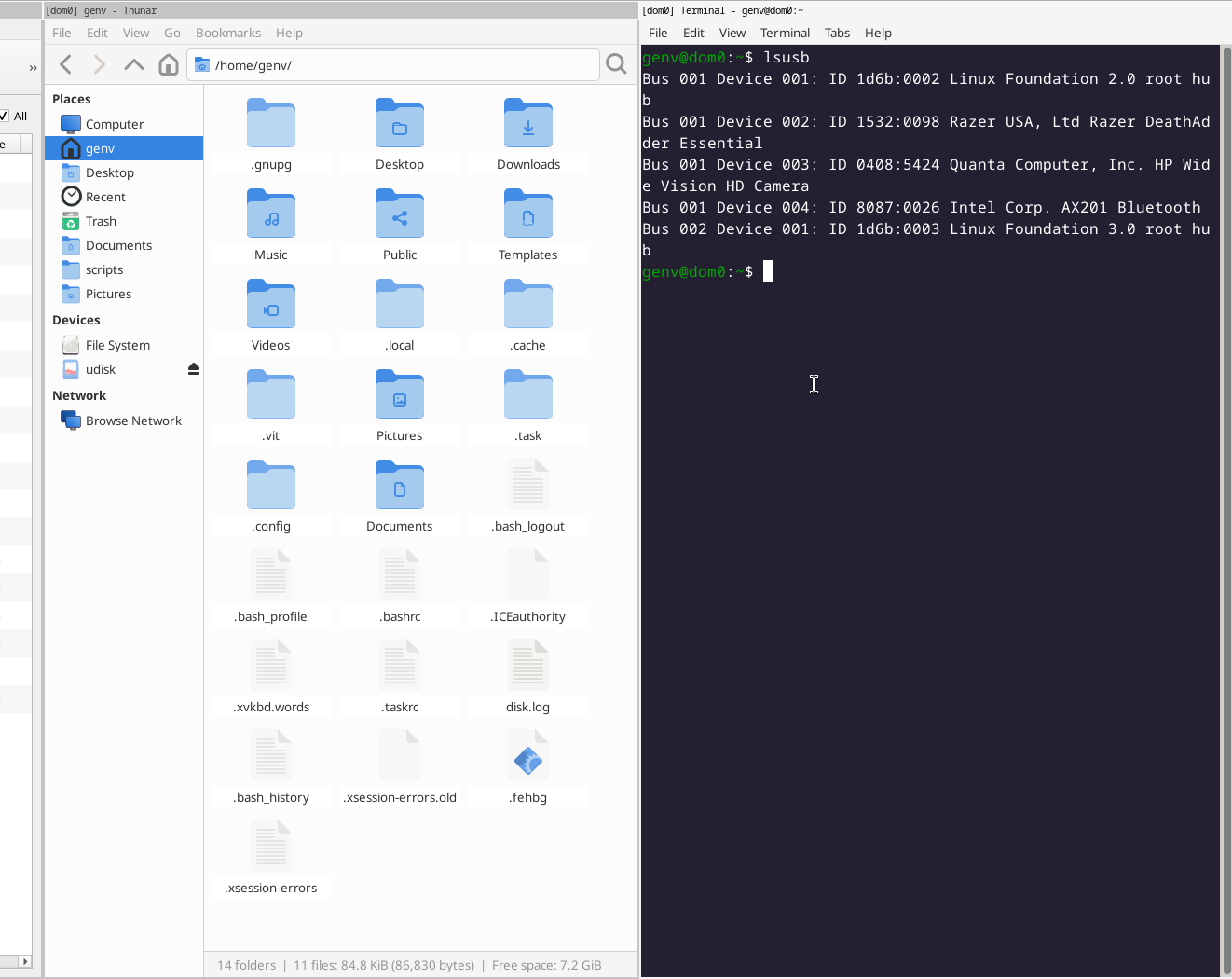
Huge problem! Sys-usb is not configured to start automatically, the USB device was attached to dom0 instead of being left unattached

I’m currently on Qubes R4.3. I disabled the autostart for sys-usb. After rebooting, I found that all USB devices are directly attached to dom0. Even after I manually start sys-usb later, the built-in SD card reader on my laptop is still attached to dom0 from the beginning, which allows me to access the SD card directly in dom0.

I checked the GRUB boot parameters and confirmed that usbcore.authorized_default=0 is indeed present. Rebuilding grub config didn’t solve the problem either. I haven’t made any special changes or custom configurations at all.

I’m not sure what else I should check. Could other R4.3 users please test whether seeing the same behavior?

1 Like

I cannot see the screenshot, but I do not have this behavior.

Like you I disable sys-usb autostart (as a matter of course).
No USB devices are attached to dom0.

The SD card reader may not be a USB device. You can check with lspci.
There is an issue (#2055) about assigning such readers to sys-usb by
default.

I never presume to speak for the Qubes team.
When I comment in the Forum I speak for myself.

1 Like

Thanks for the infos. I’m not sure when this issue started occurring. I mainly want to know how Qubes OS prevents USB devices from being attached to dom0. I’d like to check where things might have gone wrong.

1 Like

Did you physically move or add any PCI cards, or make major changes to the kernel command line or BIOS (enabling/disabling ACS, or an onboard Sound/BlueTooth/WiFi controller)? These are a few things that can cause PCI BDF to change for some devices.

What you’re describing sounds similar to what can happen if you’re assigning via qubes.rd.hide_pci the wrong PCI BDF.

I would double-check lspci/qvm-pci and /proc/cmdline and make sure everything looks correct.

Maybe wrong rabbit hole, but easy enough to check.

genv@dom0:~$ cat /proc/cmdline
placeholder root=/dev/mapper/qubes_dom0-root ro rd.luks.uuid=luks-ac56de15-e3a0-4b76-a7b8-df2050d510cc rd.lvm.lv=qubes_dom0/root rd.lvm.lv=qubes_dom0/swap plymouth.ignore-serial-consoles rhgb quiet usbcore.authorized_default=0

genv@dom0:~$ qvm-pci ls sys-usb
BACKEND:DEVID  DESCRIPTION                                                                USED BY
dom0:00_14.0   PCI_USB: Intel Corporation Comet Lake PCH-LP USB 3.1 xHCI Host Controller  sys-usb (attached: no-strict-reset=True)
dom0:00_14.5   SD Host controller: Intel Corporation Comet Lake PCH-LP SCS3               sys-usb (attached)

genv@dom0:~$ cat /etc/default/grub
GRUB_TIMEOUT=1
GRUB_DISTRIBUTOR="$(sed 's, release .*$,,g' /etc/system-release)"
GRUB_DEFAULT=saved
GRUB_DISABLE_SUBMENU=false
GRUB_TERMINAL_OUTPUT="console"
GRUB_CMDLINE_LINUX="rd.luks.uuid=luks-ac56de15-e3a0-4b76-a7b8-df2050d510cc rd.lvm.lv=qubes_dom0/root rd.lvm.lv=qubes_dom0/swap plymouth.ignore-serial-consoles rhgb quiet"
GRUB_DISABLE_RECOVERY="true"
GRUB_THEME="/boot/grub2/themes/qubes/theme.txt"
GRUB_CMDLINE_XEN_DEFAULT="console=none dom0_mem=min:1024M dom0_mem=max:4096M ucode=scan smt=on sched-gran=thread gnttab_max_frames=2048 gnttab_max_maptrack_frames=4096 "
GRUB_DISABLE_OS_PROBER="true"
GRUB_CMDLINE_LINUX="$GRUB_CMDLINE_LINUX usbcore.authorized_default=0"
. /etc/default/grub.qubes-kernel-vm-support

This is the output after running some diagnostic commands. Although I’ve heavily customized my i3 desktop, I don’t think I’ve touched any low-level configurations, the only exceptions are enabling smt=on and sched-gran=thread. I don’t see qubes.rd.hide_pci anywhere. Well, in the worst case, maybe I’ve been hacked.