How to verify Unman's template

Thanks for being there. Unfortunately, still no luck:

[user@dom0 ~]$ sudo rpm --import /etc/pki/rpm-gpg/RPM-GPG-KEY-unman
[user@dom0 ~]$ sudo qubes-dom0-update --action=upgrade
Using cacher as UpdateVM for Dom0
Downloading updates. This may take a while…
3isec Qubes Dom0 Repository (updates) 525 B/s | 1.5 kB 00:02
Fedora 41 - x86_64 3.2 kB/s | 4.6 kB 00:01
Fedora 41 - x86_64 - Updates 1.1 kB/s | 4.5 kB 00:04
Qubes OS Contrib Repository for dom0 (updates) 1.1 kB/s | 1.5 kB 00:01
Qubes Host Repository (updates) 1.4 kB/s | 3.2 kB 00:02
Qubes Host Repository (updates-testing) 2.0 kB/s | 3.4 kB 00:01
Qubes Host Repository (updates-testing) 84 kB/s | 632 kB 00:07
Qubes Host Repository (security-testing) 3.5 kB/s | 3.6 kB 00:01
Dependencies resolved.

…

Transaction Summary

Install 3 Packages
Upgrade 11 Packages

Total size: 138 M
Total download size: 186 k
DNF will only download packages for the transaction.
Downloading Packages:
[SKIPPED]
[SKIPPED]
[SKIPPED]
Already downloaded
…

Total 46 kB/s | 186 kB 00:04
error: Verifying a signature using certificate 4B1F400DF25651B53C4141B38B3F30F9C8C0C2EF (unman (Qubes OS signing key) unman@thirdeyesecurity.org):
Key FDD1B8244731B36C invalid: key is not alive
because: The subkey is not live
because: Expired on 2022-06-30T14:18:58Z
3isec Qubes Dom0 Repository (updates) 1.3 MB/s | 14 kB 00:00
GPG key at file:///var/lib/qubes/dom0-updates/etc/pki/rpm-gpg/RPM-GPG-KEY-unman (0xC8C0C2EF) is already installed
error: Verifying a signature using certificate 4B1F400DF25651B53C4141B38B3F30F9C8C0C2EF (unman (Qubes OS signing key) unman@thirdeyesecurity.org):
Key FDD1B8244731B36C invalid: key is not alive
because: The subkey is not live
because: Expired on 2022-06-30T14:18:58Z
error: Verifying a signature using certificate 4B1F400DF25651B53C4141B38B3F30F9C8C0C2EF (unman (Qubes OS signing key) unman@thirdeyesecurity.org):
Key FDD1B8244731B36C invalid: key is not alive
because: The subkey is not live
because: Expired on 2022-06-30T14:18:58Z
The GPG keys listed for the “3isec Qubes Dom0 Repository (updates)” repository are already installed but they are not correct for this package.
Check that the correct key URLs are configured for this repository.. Failing package is: 3isec-qubes-cacher-1.17-1.fc41.x86_64
GPG Keys are configured as: file:///var/lib/qubes/dom0-updates/etc/pki/rpm-gpg/RPM-GPG-KEY-unman
Public key for 3isec-qubes-task-manager-1.0-1.x86_64.rpm is not trusted. Failing package is: 3isec-qubes-task-manager-1.0-1.x86_64
GPG Keys are configured as: file:///var/lib/qubes/dom0-updates/etc/pki/rpm-gpg/RPM-GPG-KEY-unman

Try to add ‘–enableplugin=expired-pgp-keys’ to resolve the problem. Note: This plugin might not be installed by default, as it is part of the ‘dnf-plugins-core’ package.

The downloaded packages were saved in cache until the next successful transaction.
You can remove cached packages by executing ‘dnf clean packages’.
Error: GPG check FAILED

Is there any other option I am left with? It was in-place upgrade if that matters and your repo was not upgraded automatically, which I suspect caused all of this fuss. I have the same issue with contrib repo, not being automatically upgraded, so I did that for both manually.

There’s something wrong with your rpm handling. It may be because
you’re running an update, but probably not.

Try running :

  1. rpm -q gpg-pubkey --qf '%{NAME}-%{VERSION}-%{RELEASE}\t%{SUMMARY}\n'
    That will give you a list of keys, with output like:
    gpg-pubkey-c8c0c2ef-576dd3b7 unman (Qubes OS signing key)

Then use the identfier to remove the key:
2. rpm -e gpg-pubkey-c8c0c2ef-576dd3b7

Check that the key has been removed by running 1 again.

Now start again. Check that the key you have in /etc/pki/rpm-gpg/ is up
to date. Import that key:
3. rpm --import /etc/pki/rpm-gpg/RPM-GPG-KEY-unman

I never presume to speak for the Qubes team.
When I comment in the Forum I speak for myself.

That eventually helped. Thanks.

Since I had in-place upgrade, I have leftover keys from 4.2 still imported. Can I safely delete them?

Hi unman,

I downloaded your Kali Core template from:

https://qubes.3isec.org/Templates_4.3/

But your signing key:

pub   rsa4096 2016-06-25 [SC]
      4B1F 400D F256 51B5 3C41  41B3 8B3F 30F9 C8C0 C2EF
uid           [ unknown] unman (Qubes OS signing key) 
sub   rsa4096 2016-06-27 [S] [expires: 2027-06-30]
sub   rsa4096 2016-06-25 [E]

Has expired on 2027-06-30 so when installing I get “Key is not alive” error.
Is there a new version?
Or you may be so kind as to sign it again and provide the new key?

Thanks in advance,

Fatima

Hi, you are too far in the future… unman is full of resources, but I doubt timetraveling is part of his skills, please come back in 2026 :slight_smile: Edit: so the “expiration” is not the issue here, check that you have properly imported the key first?

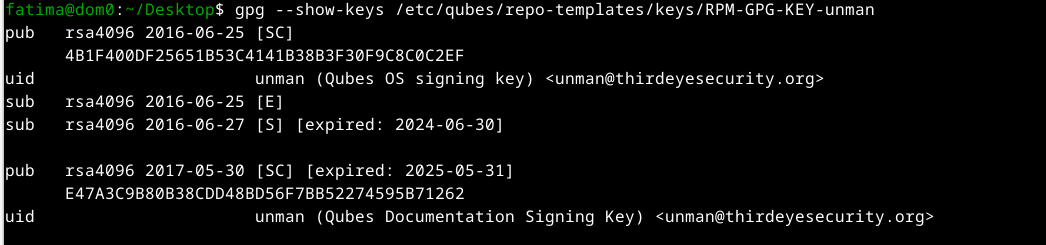
Someone has had issues recently and unman provided feedback: Problem with the certificate of @unman

Sorry, you are right, I was tired and I mistyped.
The actual error is here in the pic:

And this is the key info:

This is how I imported the key:

import

Thank you @parulin for showing me my mistake.

But it looks like @unman key is outdated.

Or am I doing something wrong?

First: How to write useful posts on Qubes forums: images with descriptions

That’s my opinion :slight_smile: I moved your posts to another topic where someone encountered a similar issue. Could you check if unman answers here can help?

Possibly.

You need to get a verified VALID key and move it to dom0. For
templates, using qvm-template all you need to do is replace the key at
/etc/qubes/repo-templates/keys with the valid key.

I’ve added some detail on this at https://qubes.3isec.org/

I never presume to speak for the Qubes team.
When I comment in the Forum I speak for myself.

  1. I have been peeking and poking around, and I found this:

rpm -v -q --qf ‘%{DESCRIPTION}\n’ gpg-pubkey-c8c0c2ef-* | gpg --list-packets

# off=0 ctb=99 tag=6 hlen=3 plen=525

:public key packet:

version 4, algo 1, created 1466815415, expires 0

pkey\[0\]: \[4096 bits\]

pkey\[1\]: \[17 bits\]

keyid: 8B3F30F9C8C0C2EF

# off=528 ctb=b4 tag=13 hlen=2 plen=57

:user ID packet: “unman (Qubes OS signing key) unman@thirdeyesecurity.org”

# off=587 ctb=89 tag=2 hlen=3 plen=567

:signature packet: algo 1, keyid 8B3F30F9C8C0C2EF

version 4, created 1467245944, md5len 0, sigclass 0x13

digest algo 8, begin of digest dc 9b

hashed subpkt 27 len 1 (key flags: 03)

hashed subpkt 11 len 4 (pref-sym-algos: 9 8 7 3)

hashed subpkt 21 len 4 (pref-hash-algos: 10 9 8 11)

hashed subpkt 22 len 4 (pref-zip-algos: 2 3 1 0)

hashed subpkt 30 len 1 (features: 01)

hashed subpkt 23 len 1 (keyserver preferences: 80)

hashed subpkt 2 len 4 (sig created 2016-06-30)

subpkt 16 len 8 (issuer key ID 8B3F30F9C8C0C2EF)

data: \[4094 bits\]

# off=1157 ctb=b9 tag=14 hlen=3 plen=525

:public sub key packet:

version 4, algo 1, created 1466985763, expires 0

pkey\[0\]: \[4096 bits\]

pkey\[1\]: \[17 bits\]

keyid: FDD1B8244731B36C

# off=1685 ctb=89 tag=2 hlen=3 plen=1115

:signature packet: algo 1, keyid 8B3F30F9C8C0C2EF

version 4, created 1782645328, md5len 0, sigclass 0x18

digest algo 8, begin of digest df 31

hashed subpkt 27 len 1 (key flags: 02)

hashed subpkt 33 len 21 (issuer fpr v4 4B1F400DF25651B53C4141B38B3F30F9C8C0C2EF)

hashed subpkt 2 len 4 (sig created 2026-06-28)

hashed subpkt 9 len 4 (key expires after 11y5d11h12m)

subpkt 32 len 540 (signature: v4, class 0x19, algo 1, digest algo 8)

subpkt 16 len 8 (issuer key ID 8B3F30F9C8C0C2EF)

data: \[4095 bits\]

# off=2803 ctb=b9 tag=14 hlen=3 plen=525

:public sub key packet:

version 4, algo 1, created 1466815415, expires 0

pkey\[0\]: \[4096 bits\]

pkey\[1\]: \[17 bits\]

keyid: 6233CD8FA59A87A8

# off=3331 ctb=89 tag=2 hlen=3 plen=543

:signature packet: algo 1, keyid 8B3F30F9C8C0C2EF

version 4, created 1466815415, md5len 0, sigclass 0x18

digest algo 8, begin of digest 05 3b

hashed subpkt 2 len 4 (sig created 2016-06-25)

hashed subpkt 27 len 1 (key flags: 0C)

subpkt 16 len 8 (issuer key ID 8B3F30F9C8C0C2EF)

data: \[4094 bits\]
  1. Subkey FDD1B8244731B36C (which ends in 4731b36c) is present in RPM’s database, but it looks like RPM is rejecting it because of its key usage flags.
hashed subpkt 27 len 1 (key flags: 02)

In OpenPGP specifications:

  • 0x02 = Encryption only (This subkey is flagged solely for encrypting communications/storage).

  • 0x01 or 0x03 = Signing (Allows creating and verifying digital signatures).

The RPM package was signed using 4731b36c, but the subkey’s self-signature explicitely restricts it to encryption only (0x02). Because RPM’s security checks strictly enforce OpenPGP flag compliance, RPM sees that 4731b36c lacks the Signing (0x01) capability and refuses to use it for signature verification—leading to the NOKEY or BAD error.

I think you are wrong.
rpm -qi shows the template is signed by FDD1B8244731B36C

pub rsa4096 2016-06-25 [SC]
4B1F400DF25651B53C4141B38B3F30F9C8C0C2EF
uid unman (Qubes OS signing key) unman@thirdeyesecurity.org
sub rsa4096 2016-06-27 [S] [expires: 2027-06-30]
7473414DF9A181A45244BDACFDD1B8244731B36C
sub rsa4096 2016-06-25 [E]
F4A29C5E2E90B2E0732358E46233CD8FA59A87A8

FDD1B8244731B36C is the signing sub-key

I never presume to speak for the Qubes team.
When I comment in the Forum I speak for myself.

I can confirm that you are right:
Signature : RSA/SHA256, Sat 07 Feb 2026 01:49:02 AM -03, Key ID fdd1b8244731b36c

But maybe (just maybe) both things can be true at the same time.
If (big if) the tool you use to sign does not check the key usage flags for the subkey?
So it lets you sign?
But then when I try to install, the tool I use check the key usage flags and does not let me install?

Out of curiosity, I tried it myself right now and it is working…

Thank you @parulin for doing so.

Out of curiosity, if you run:
rpm -v -q --qf ‘%{DESCRIPTION}\n’ gpg-pubkey-c8c0c2ef-* | gpg --list-packets

For key:
:signature packet: algo 1, keyid 8B3F30F9C8C0C2EF

Do you get:
hashed subpkt 27 len 1 (key flags: 02)
?

Which of the keys are you talking about? The primary or the subkeys?
For the FDD188244731B36C subkey this is right.

I’ve run a quick check across other users and no one else is reporting
this issue.
Take a step back.
Delete your existing unman keys from RPM and qvm-template.
Grab a fresh copy of the key from a keyserver. Confirm, transfer to dom0
and install.
Test again.

For templates all you need to do is replace the key at
/etc/qubes/repo-templates/keys with the new key.

I never presume tmo speak for the Qubes team.
When I comment in the Forum I speak for myself.

Yes, I was talking about Subkey FDD1B8244731B36C

It looks like it has hashed subpkt 27 len 1 (key flags: 02).

And, as far as I can tell, in In OpenPGP specifications:

  • 0x02 = Encryption only (This subkey is flagged solely for encrypting communications/storage).

  • 0x01 or 0x03 = Signing (Allows creating and verifying digital signatures).

So it looks like that is the reason why I get an error.

And yes, I will do as you say and try again with a fresh copy.

You have misunderstood the specification. According to RFC9580, s 5.2.3.29 KeyFlags-

This subpacket contains a list of binary flags that hold information about a key…
0x01…This key may be used to make User ID certifications (Signature Type IDs 0x10-0x13) or Direct Key signatures (Signature Type ID 0x1F) over other keys.
0x02…This key may be used to sign data.
0x04…This key may be used to encrypt communications.

Oups.

Thank you very much for making my ignorance smaller.

Were you able to confirm that all is good using a fresh copy of the key?
Remember to delete the existing key from RPM and qvm-template.
For templates all you need to do is replace the key at
/etc/qubes/repo-templates/keys with the new key.

I never presume to speak for the Qubes team. When I comment in the Forum I speak for myself.
