How to sync/link SimpleX phone app to SimpleX Desktop app on Qubes/Whonix AppVM? Offline Sharing of Qubes LAN?

I have SimpleX Desktop installed on a Qubes/Whonix AppVM. The installation was made as sysmaint user (on Whonix-Workstation-18), using the flatpak version of SimpleX Chat. I also have the SimpleX app on my mobile phone, which only connects to the internet using Wifi. In simpleX Desktop on whonix, there is an option to “Link a mobile” device.

Clicking on the “Link a moble” in the SimpleX Desktop app on my SimpleX AppVM, brings me to a page that says:

This device name: Desktop
The device name will be shared with the connected mobile client.
Discoverable via local network: on
QRCODE
Beneath the QR Code is:
"Open Use from desktop in mobile app and scan QR code."
"Waiting for mobile to connect:"
10.137.0.47 (eth0), port 38339

So essentially, to link a mobile device from my SimpleX Desktop app, I need for the SimpleX AppVM (using syswhonix) to be on the same LAN as my Mobile Device. The problem is, is that the SimpleX AppVM is using sys-whonix as it’s lan, and because my SimpleX on my phone is not behind the same sys-whonix LAN, I cannot get my SimpleX Phone App, to find my SimpleX Desktop app on the same network.

I don’t want to sync SimpleX without using sys-whonix, because that would expose my real IP. I talked to the SimpleX team about how to sync the mobile app with the desktop app, without connecting to the clearnet, and they told me, a workaround, would be to disable my WAN connection on my router, and then put both simpleX devices on that Lan, so they can find each other locally, and sync.

This would be the solution, if I was using SimpleX Desktop on a non-qubes non-whonix installation, such as ubuntu or debian on a bare-metal desktop machine. All I would have to do is unplug my modem, then sync the mobile app with the desktop app, because they would both be clients on the same LAN.

What I need to do, is somehow get my mobile device on the same LAN (or vice versa) as my SimpleX sys-whonix AppVM, so that my mobile device will recognize my SimpleX Desktop app, and my Desktop device will recognize my SimpleX mobile Device, allowing the apps to sync properly.

So my question is, how can I get SimpleX on a sys-whonix AppVM, to use the same LAN as the SimpleX mobile device, without connecting either device to the internet, until syncronization has completed for bothe apps?

I either need to get my Mobile device on the whonix-workstation-18 LAN using the specified port, or my Whonix-workstation-18 on my router’s LAN, using the specified port, all without connecting either app to the internet. Could you please advise me on how to do one or the other, or both, so that I can sync my SimpleX Apps?
Can anyone help and advise me here?

I think the best approach would be to temporarily connect the qube with the desktop SimpleX app directly to sys-net to bypass the Qubes OS firewalls.
You can disconnect the internet to the router, if you are that paranoid.

You sill have to setup the firewall rules of sys-net to allow the communication.

Also check out Port forwarding to a qube from the outside world if you want to do it from the internet.

I did this once by having the qube SimpleX ran in use a qube named sys-net-wifi2 as network qube, upstream of that used mullvad2, upstream of that used mullvad1, and upstream of that used vpn2, then sys-firewall. A machine I run Qubes on has three wireless network interfaces so this was relatively easy to do.

Many users who use SimpleX and Qubes are using VPNs or other overlay networks and use separate SimpleX profiles (on the separate devices) to stay relatively anonymous.

Be mindful that if you link a SimpleX profile on two devices there is some careful thought required to opt out of documenting yourself to the SimpleX servers. Unless there has been some major change to SimpleX I haven’t read about yet, there are still enough temporary identifiers on SimpleX servers to correlate a specific user’s IP addresses.

There is also a lack of diversity in SimpleX servers. There are only two providers where the default SimpleX servers are and the current SimpleX ui doesn’t make switching to one’s own SimpleX server easy nor does it give any hints that one can do so. SimpleX doesn’t currently support using multiple servers which makes migrating off of the default SimpleX servers less easy.

SimpleX is great. There still remains a chasm between where SimpleX is today and the ideal messaging stack.

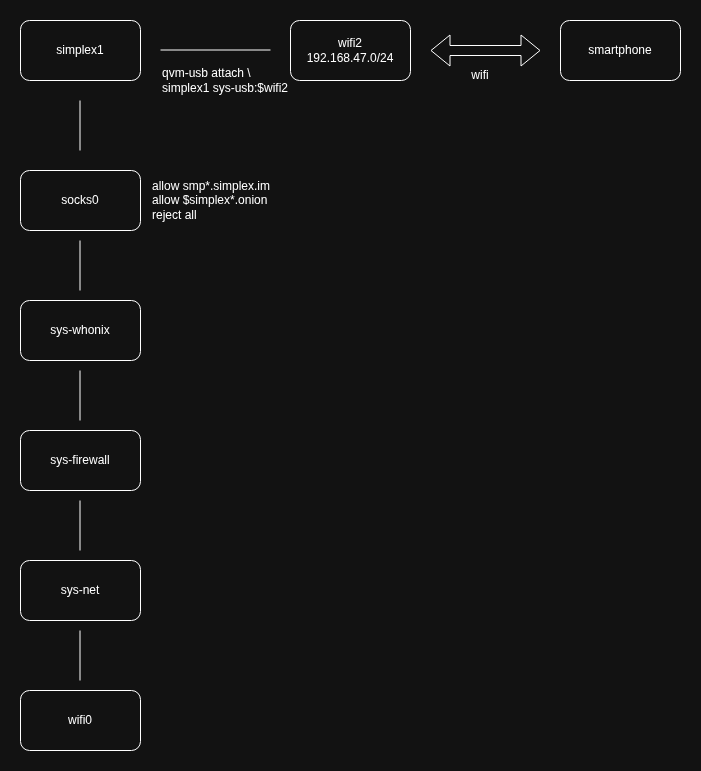
@EveK818 because you are using sys-whonix as the upstream network VM, the best approach may be for you to temporarily attach a spare wireless network interface to the qube for SimpleX (let’s call this qube simplex1), keeping the setting provides_network for simplex1 set to False.

If the spare wireless network interface is not attached by usb but is a pcie device, then setting virt_mode on simplex1 to hvm will be necessary for the duration of doing the “link” with SimpleX.

When you do the “link” with SimpleX on the “phone”, on a subnet hosted by simplex1 on the wireless interface, you may want to have already disabled Tor on the phone to avoid doing Tor over Tor. Keep in mind that all of the other network traffic from your phone would go through Tor, unless you put a SOCKS proxy (running in its own qube, let’s call it socks0) between simplex1 and sys-whonix. The purpose of this optional SOCKS proxy is to only allowing traffic certain domains (such as specific list of .onion) or IPs specified in a whitelist in the SOCKS proxy’s configuration.

The path should look like: simplex1 => socks0 => sys-whonix.

If you wish to preserve anonymity, the socks proxy running in its own qube is recommended and probably necessary. It may be possible to not use socks0 and everything is “fine”, but I recommend to be mindful that some “mainstream” application backends are not going to like unexpected incoming connections from Tor presenting existing valid user credentials or auth tokens. That network traffic profile pattern would also show “this specific user had all of his/her traffic go over Tor at this time”.

I know that this socks proxy configuration is not well documented and users who did not already do this may not be equipped to attempt this on their own. Some Whonix users use this kind of configuration with a SOCKS proxy to whitelist .onion domains.

Speaking for myself, I would use the SOCKS proxy approach and temporarily specify in the SimpleX configuration on the phone to use the SOCKS proxy belonging to the qube socks0 while doing the “link” with the SimpleX app. Then I would have the phone leave the temporary wifi and reconfigure the network settings on SimpleX on the phone to what it was before. I would want only SimpleX traffic and no other traffic attempted to be sent by the phone to reach anywhere durking the “link” process.

Also consider that if you are running SimpleX on GrapheneOS on a Pixel, there is a binary blob running in the kernel and there are also binary blobs running on other cores on the system-on-chip that have higher privilege on the device than the cores that Linux (GrapheneOS) runs on. If you are running SimpleX on an iPhone the situation is worse.

By running SimpleX on a phone, unless you have something not necessarily custom (but not widely distributed either) there, whatever security you enjoy with that is limited to someone else’s security (superseding any interest of your’s) and whatever anonymity you can achieve with that “phone” is highly subject to context. Much more likely than not, your phone will be snooped on just because Tor traffic or SimpleX traffic are seen coming out of it.