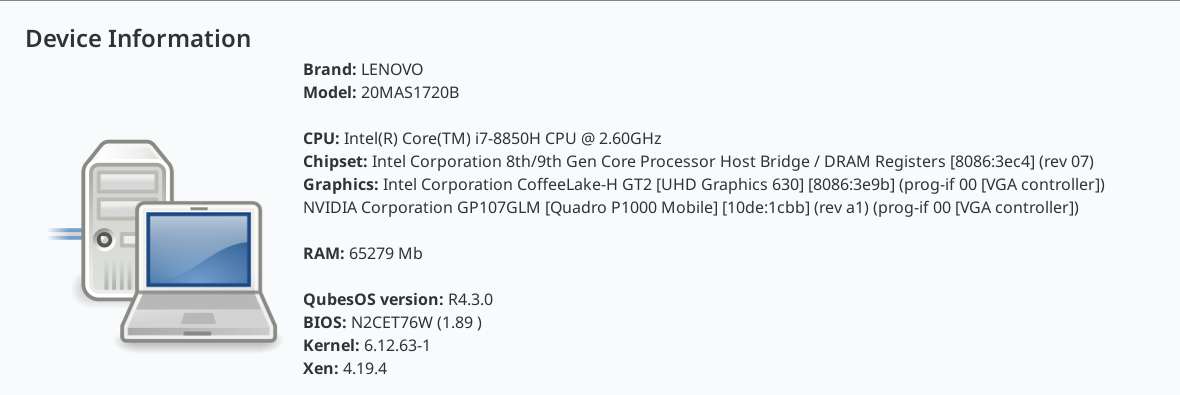
I recently upgraded from 4.2 to 4.3. In addition to bein slow from boot, I also have a problem hitting RAM limits when I open many qubes.
I noticed under Qubes OS Global Config > This Device that Qubes recognizes 16GB RAM on the system.
I hae 32GB, and booting to a Memtest86+ drive shows all 32GB, and shows them as good.
I think it’s possible that the original RAM limits for this laptop were 16GB, and thatonce 8GB sticks came to market it was possible to upgrade to 32GB, which I did, successfully, using Qubes 3, 4, 4.2 for years. Now 4.3 isn’t seeing 32GB.
Any ideas how to troubleshoot? Did 4.3 regress somehow in its ability to recognize RAM?
If the machine is a little old, can it be that there is a necessary BIOS setting for RAM>16G, and the CMOS battery has died?
Edit: Maybe the memtest result indicates this is not the problem…
I’m hesitant to share all of that, because I don’t know how much of that file will be identifying information for my system. Devices and UUIDs and stuff. But I would be happy to post excerpts if you can tell me what you think would be helpful.
You didn’t ask for a quick poke. You asked for a full body scan, and for that to be posted on the internet. It is absurd to ask anyone, especially someone who uses a “reasonably secure operating system” to share the entire boot sequence. Also: you’re no doctor.
That’s a good thought. But there are zero options of any kind in my BIOS. It’s not stock BIOS. Also, there were no problems with 4.2 with the same BIOS.
I’m leaning toward something about Fedora-41, but I haven’t found anything in the release notes. Also I’m not sure what version of Fedora 4.2 was based on.
Hm, I’ve never passed a kernel parameter to Qubes. I’mnot sure how to do it, are you? Everything I search for shows how to do it in a qube, not for the parent OS.
So, I played musical sticks with my RAM in two computers. The result is that the RAM I removed from one machine, runs fine in two other machines (at a faster speed even) and the RAM from those machines runs fine, with all 32GB recognized, and at a faster speed, on this machine. Also memtest gave a passing grade to all sticks in their new homes (and in their old homes).
So I can eliminate Qubes as the problem.
I can also eliminate the RAM as the problem.
I can also eliminate the hardware as the problem.
I have no report yet on whether 4.3 is still sluggish, because right now it feels much faster than when it saw 16GB, and I can’t really remember back to when I was running 4.2. I might do some more testing but for right now, I don’t think this was a 4.3 problem, even though it started with 4.3. Unless there is something very weird about Fedora 41 and Crucial RAM, but that’s a real long shot.
Maybe a slightly bad connection on a DIMM, and the lower system power drain in Memtest86+ gave a little supply boost? A weakening PSU could have contributed.
I am adding the “playing of musical RAM sticks” to my lexicon
I never thought to try another PSU, but anyway I have the heavy duty power brick for this model, so that’s unlikely (although I now do wish I’d tested without the external monitor attached.). But anyway that wouldn’t explain why it worked in 4.2.
But, tracking down RAM problems is usually fruitless. If memtest is happy, and the RAM is seen by the OS, I doubt any more searching will help, so I’ll just call it good. But the OS is still sluggish, like on my other computer where I didn’t have this problem. Something about 4.3 is different in a way that makes everythign open slower. Oh well. One problem at a time.