Hello — I lost important data after adding extra space to a VM/storage in Qubes OS 4.3. Please help.
I basically created a dedicated fedora app VM, to store in my data from other disks partitions
Summary
Qubes OS 4.3, LVM on HDD, using a Fedora appVM to store files from other drives.
I booted Linux Mint from USB to access the Qubes partition and the Fedora appVM (using a file manager / app to copy media into the appVM’s storage).
On the Qubes disk I saw a partition named ending with “bak” ( it was an  backup partition Qubes created itself where i was storing my data in).
In Qubes settings I increased the original VM’s disk size to the non bak partition
After that, the files in the partition name ending in  bak were gone. The partition appears resized as well.
What I know / can provide
Qubes version: 4.3
Disk: HDD with LVM (dom0 LVM / thin pool likely used for VM disks)
I used an external Linux Mint live USB to inspect/copy files
I believe VM disks were thin LVs or images
I have not written further to the affected disks since noticing the loss
What I need
Why would resizing a VM in Qubes cause the backup partition to lose files or be resized too ?
(added extra space to that VM), then rebooted into Linux Mint.
Is the “bak” partition something Qubes created automatically for VM backups or snapshots, or did I misinterpret a thin LV or file?
Could resizing a thin LV or underlying PV overwrite LVM metadata or the end of another LV/partition?
Recommended next steps I should run from a SystemRescue or live USB (safe, read-only commands preferred)? or resizing back the partition like it was to get my data appear again in the ...bak?
Please reply urgently — I can post the lsblk/pvs/lvs outputs or screenshots right away.
do you mean the target drive? its a 10TB external USB HDD lol, i need to recover the media from one partition only, it was 150 i resized it to 330gb then data disapeared in the its …partition ending with …bak…why did it even create this additional partition for and cleared the data after resize of the original one???
You already have the best advice.
Before doing anything else, image the drive (clonezilla or dd from your
live Mint).
Then work on the image.
There is much mystery in what you say. It could be that I just do not
understand you. It is difficult to advise without further information.
I am not aware of a partition created by Qubes called bak. It would
be helpful if you could remember the full name. It would also be helpful
if you could explain how you attached this partition, and what you were
doing with it. I mean provide enough detail for someone else to do this.
Why were you storing data in a mystery partition instead of the
system partition of a named qube?
Can you explain what this means - “In Qubes settings I increased the
original VM???s disk size to the non bak partition.” Do you mean you
increased the size of the private storage?
If these files are important, when was your last backup? Where is that
stored?
sorry that you did not understand me, I did not expressed myself well enough, here I re-explain myself better in 3 posts to reply to you @unman, as Qubes forum doesnt even let me upload 2 photos in one message because I am new and I am stucked…so I had to make a work around…:
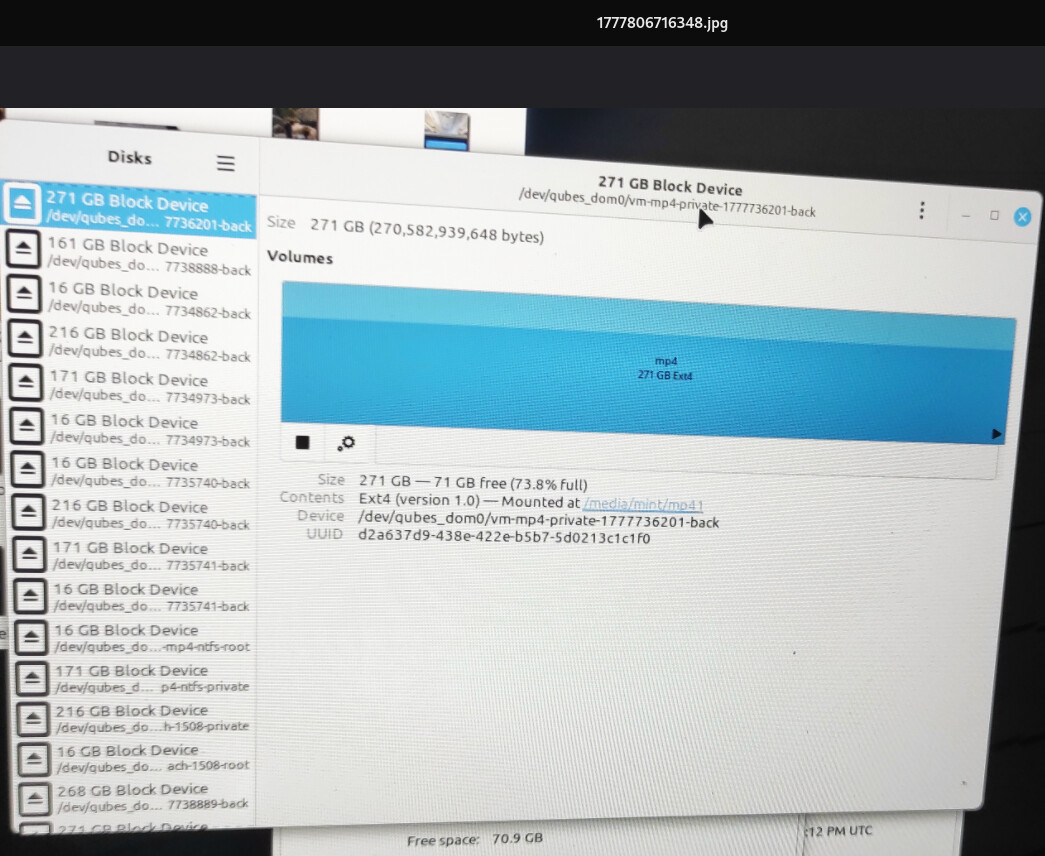
As you can see on the image1, the partition with the data on was 73.8 percent full.*20gb of mp4 videos from my phone camera to be edited for next week…
From a separate Linux Mint live USB, I mounted the Qubes partition and the AppVM disk to use an image application called Pix) to copy media into the AppVM’s storage. The files where copied ended on the partition vm-mp4-private-17777736201-back ” — I believe these were stored on an extra partition Qubes created as a backup. as i got one without the ending in …6201-back
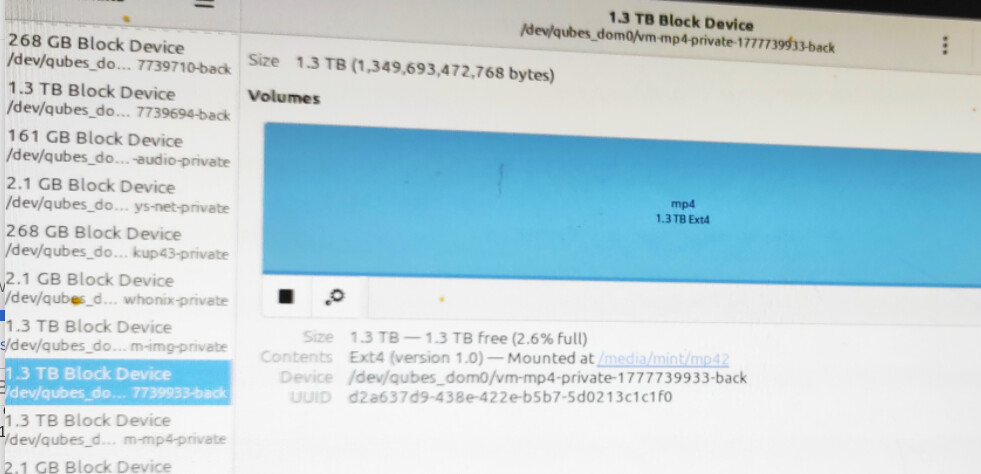
In Qubes settings I increased the AppVM’s VM vm-mp4-disk size (added extra space) and then rebooted into Linux Mint to add more the files.- the partition vm-mp4-private-17777736201-backfiles where gone, and the only vm-mp4 i had was ending in 9933-back was there. This is how the partition ended after the resize:2.6 percent full, none of my previous 200gb data there=
The files that were previously visible in the “.back” partition disappeared after I increased the AppVM’s storage. That partition appears to have been resized and the data is no longer accessible.
Questions — what I need to know and do
Why would resizing an AppVM in Qubes cause an external/backup partition to be resized or its files to disappear?
Is there a safe way to attempt recovery of the lost files (preferred: step-by-step commands or tools to run from a Linux live USB)?
Any Qubes-specific files, logs, or commands I should collect now that might help recovery experts diagnose the issue?
Are there recommended recovery procedures for AppVM disks, LVM volumes, or any qvm-* tools that could help?
System details,I can provide more infos values if needed.
Qubes OS 4.3
AppVM: Fedora-based
I used Linux Mint live USB to mount and inspect partitions, is this a matter of recovering data from the partition from the image 2 or a matter to find the previous 71GB partition from the image 1?
I am sorry that you did not understand me, I did not expressed myself well enough, here I re-explain myself better in 3 posts to reply to you @unman, as Qubes forum doesnt even let me upload 2 photos in one message because I am new and I am stucked…so I had to make a work around…:
As you can see on the image1, the partition with the data on was 73.8 percent full.*20gb of important mp4 videos projects from my phone camera to be edited for next week…
From a separate Linux Mint live USB, I mounted the Qubes partition and the AppVM disk to use an image application called Pix) to copy media into the AppVM’s storage. The files where copied ended on the partition vm-mp4-private-17777736201-back ” — I believe these were stored on an extra partition Qubes created as a backup. as i got one without the ending in …6201-back
In Qubes settings I increased the AppVM’s VM vm-mp4-disk size (added extra space) and then rebooted into Linux Mint to add more the files.- the partition vm-mp4-private-17777736201-backfiles where gone, and the only vm-mp4 i had was ending in 9933-back was there. This is how the partition ended after the resize:2.6 percent full, none of my previous 200gb data there=
The files that were previously visible in the “.back” partition disappeared after I increased the AppVM’s storage. That partition appears to have been resized and the data is no longer accessible.
Questions — what I need to know and do
Why would resizing an AppVM in Qubes cause an external/backup partition to be resized or its files to disappear?
Is there a safe way to attempt recovery of the lost files (preferred: step-by-step commands or tools to run from a Linux live USB)?
Any Qubes-specific files, logs, or commands I should collect now that might help recovery experts diagnose the issue?
Are there recommended recovery procedures for AppVM disks, LVM volumes, or any qvm-* tools that could help?
System details,I can provide more infos values if needed.
Qubes OS 4.3
AppVM: Fedora-based
I used Linux Mint live USB to mount and inspect partitions, is this a matter of recovering data from the partition from the image 2 or a matter to find the previous 71GB partition from the image 1?
I’m working off your descriptions, not the pictures, but what you say
is clear enough.
The volumes named *back are indeed automatically created, but they are transient. If you run qvm-volume info QUBE:private (replacing QUBE
with the name of one of your qubes) you will see that by default Qubes
will create revisions_to_keep. These are backup volumes that allow you
to revert to a previous state of the qube.
This is documented here
Unfortunately there are only two revisions kept. They are not
intended for use for file storage. As you use or change the qube, the
oldest volume will be removed and a new one created. This is what has
happened in your case.
Things look pretty bleak.
You may be able to recover some of the data. If you had backups of the
lvm data, for example. But generally it’s not possible, although a
dedicated data recovery unit may be able to do something. It will
cost.
/etc/lvm in dom0 is important - back it up on regular basis.
Your data is important - back it up. (I’ve said before why I dont think
that Qubes Backup and Wyng are adequate tools for this, but if that’s
what you like use them.)
If you lose a volume, or a qube loses data, stop immediately -
any writes to the disk may make things worse. Take a full copy of the
drive and try recovery on the copy - put the original in a safe place.
Did I say you should backup your data?
@heyson - I dont know if you have backups, but I hope you are now
arranging to take a copy of the drive. Once you have it, you could mount
it ro from a live iso/usb. You could try to look at the LVM metadata and
history - what you’re hoping to see is a reference to the missing
snapshot. Look in /etc/lvm/archive - if you can find some metadata you might be able to restore the snapshot.
Thank you infinitely, I indeed realized using Qubes OS volumes to store my backups is not a good idea, I did it trusting the encryption method Qubes OS uses for creating LUKS2 volumes was top notch in the world unlike Mint uses LUKS1 version which is unsecure, I ordered another 10TB HDD to create like you said a full image of the drive, ounce delivery is successfull, I will be using gnome disks in Mint LMDE7… Then use that diskimage mounted with its tons of useless partitions Qubes OS created to try to work hard on it myself, I cant afford data recovery centers, I may possibly have luck with the offer Seagate offered to me on that first and second drive= a 1 year data protection with its Data Rescue Services??? Amazon.com: Seagate Expansion Desktop 10TB, External Hard Drive, USB 3.0, Data Rescue Services (STKP10000400) : Health & Household +Next time I will use Tails OS instead to create a top secure one full disk LUKS2 volume on my new drive to store my data securely on it and i am taking Qubes OS out of my drives…
Best of luck. I doubt that gnome disks will help at all. You will have
to work at a deeper level than that if you want to recover removed
snapshots.
As to dropping Qubes, you will be losing a good deal by returning to
Mint, but that’s your choice. Offline Tails is no different from any
other live system, but if it does what you want, well and good.
Had you asked about your plan to use ephemeral volumes to store data,
you would have avoided this. Similarly, if you had created a specific
storage qube and put the data in the private storage. I expect you are
feeling pretty wounded at this stage, and Qubes seems an obvious
culprit, but it was after all your mistake, not the OS.
I never presume to speak for the Qubes team.
When I comment in the Forum I speak for myself.