I just installed Qubes 4.3.0 on a PC using an ASRock B660M motherboard, with intel i5 12th gen processor.
I used default settings with the exception that the default template would be Debian instead of Fedora. I checked the install media’s Sha256 as detailed in the installation guide prior to installing on my harddrive and used the ‘test media and install’ option.
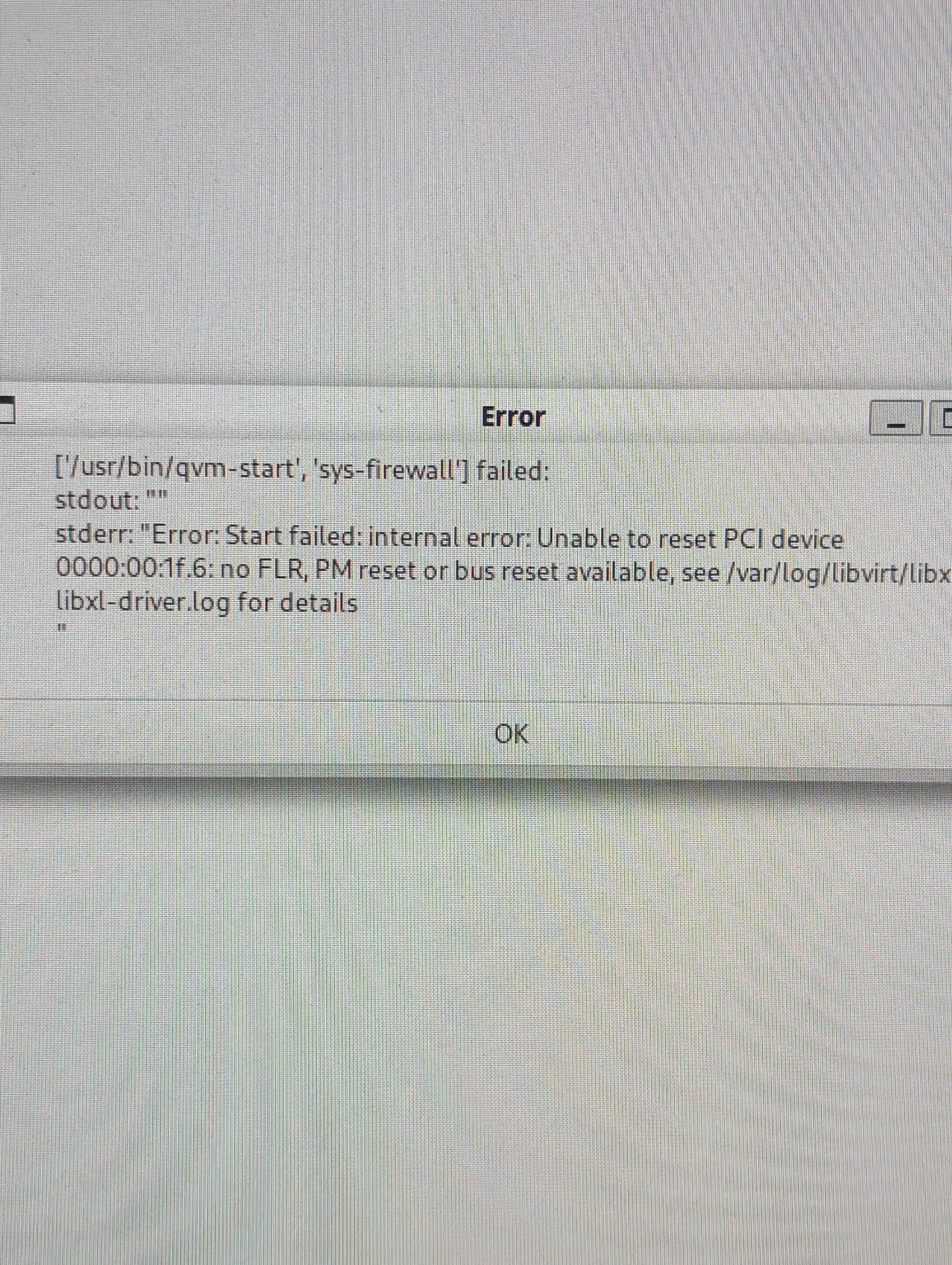
Prior to first boot, i received this error message
Progress. Under the device management of sys-net, I removed the specific driver for my Ethernet card (00:1f.6) from the right side of the screen to the left.
This allowed me to run sys-net and connect to my wifi
I’m trying to open firefox from the sys-net instance and it is taking a couple of minutes to open and is unresponsive when it does.
I can not open any other qubes. I get a new error that
PCI device 00:02:00.0 is in use by driver xenlight, domain sys-net. This error message is the same for all attempts reguardless of qube
Update.
Device 00:02 is the display system. I tried to move that system from the left to the right in sys-net>settings>devices. Bad idea. As soon as i applied the setting my screen went black and i could not engage with the system. I attempted to power cycle the machine, but was not able to get back into my system, the computer would go dark and loop me back to the disk unlock screen at boot.
Trying to reboot into a usb and reinstall the system.
New system installed. I kept all settings default, same issue.
I tried to view /var/logs/libvirt/libx/libxl-driver.log but was denied. I cannot sudo into it either.
Do i need to make a root password to view dm0 logs?
I went back and followed @murdock instructions on sys-net and that seems to have fixed the issue. I tried following those instructions on other qubes to no effect, it had to be the sys-net qube.
Thank you @appih5587 for pointing that out to me.
And thank you @murdock for your help.
A general question, but especially for @murdock , @appih5587 who seem to have more familiarity than me:
Is it normal that the PCI error message for sys-net is showing up with only a reference to sys-firewall, in the screenshot* of initial report of @Horomancer?
It is very misleading. Is it a bug in error handling?
Unfortunately, I don’t think I can test very easily.
Offtopic: What camera can give me near-perfectly registered photos of a display like that?
Hmm, it is maybe a bug, but hopefully any QubesOS-Dev can answer that better than me (i’m only a QubesOS user with spended some time on his own system).
sys-net is started as dependency to sys-firewall and the problematic pci-device is normally attached to sys-net (not to sys-firewall) In my humble opinion, the error message about the pci-reset should mention the sys-net Qube and not the sys-firewall Qube.
Update: tested it on my own system (the ethernet device requires that setting also). The error message mention sys-net (what is correct).
So i wonder, why at your system the message referenced sys-firewall.