Feedback on Documentation & HCL

I read the Qubes documentation and here are some notes I made on it. Some minor and some major suggestions.

  • Docs. PDF version: The table of contents doesn’t include any subchapters.
  • Docs. PDF version: Sections in 1.3 are empty and obviously lacking embedded video/links.
  • Docs. Some links in the “Qubes-certified hardware” section are dead.
  • Docs. In section 2.12.9, bulletpoint 2, last sentence, typo: “their” should be “there”.
  • Docs. In section 2.3, AMD is placed before Intel in the parentheses. Intel should be placed before AMD, because in the previous section 2.1.4 it’s mentioned that Intel should be prefered over AMD (because AMD has infrequent security updates).
  • HCL. A link named “read more” is broken for the entry Lenovo ThinkPad X200 (2024B53) by Kevin Lipe
  • Comment. For a newcomer, especially a tech noob, it’s very difficult to make sense of which PC to use and what features they would actually need for their use case. The wisdom shared in the documentation that “you should just install Qubes anyways, since it’s still better than everything else” is soothing, but what if I want to have the best security possible security for my PC? There doesn’t seem be a systematic, comprehensive guide for that case.
  • Comment. There is a huge question that remains unanswered: Section 2.6.1. What can I do to ensure my hardware is safe? There are tools and ways to clean RAM, firmware, etc, but none of them are approached except for non-descript links to coreboot/heads/skulls. Arguably this is the most important step, especially if your only option is to buy an used ebay computer which must be assumed to be malware-infected. Consider that some trusted, tested devices can’t be bought new anymore, only used, and that there are some people who can’t afford to buy brand new hardware. This is something which should be put serious thought into: Clean used hardware, remove any possible malware. If I understand this section, coreboot & co. can only clean the BIOS and some parts of the computer, but there are still other places like RAM or PCI firmware where malware can sleep. Is this correct?
  • Suggestions for HCL:
  1. Hovering over headers on the HCL list shows me the “I” prompt pointer, instead of the click hand button! I use firefox. Additionally, the headers should be bolded and have a slightly darkened background to highlight that they’re headers and can be sorted.
  2. Add more sorting options to the table: by price class and release year. For some people, price is a big factor. Year is a good way to eyeball how good the device is.
    2 Make it possible to filter away entries based on criterias, e.g. tested Qubes version, release year, brand name.
  3. It seems to me very important to have a big list of compatible hardware. It seems to me wise to encourage people to contribute. For this effect, a bulletin notifying this importance could be added, together with a link to a standardized test checklist and a list of “high demand” hardware/brands/criteria for hunting. The “high demand list” doesn’t need to make sense, just increase the chance that whoever sees the text feels themself in a specially important position to contribute. Sample text: Paragraph 1: “Qubes needs a long and comprehensive list of compatible hardware, otherwise Qubes will die! We need your input to add more computers to the list (the more the merrier). To help us, please donate 2 hours of your time by checking out this test checklist link to test your computers. (Inside the link: An easy/automated process which even tech illiterate people can do. E.g → The latest Qubes Live USB includes Test tools to help you rapidly test your PC. Sections: graphics, sound, graphics, microphone, camera, usb external, etc etc)” Sample Paragraph 2: “We are specifically in HIGH DEMAND for HP and Compaq computers, and any hardware produced after 2023.”
3 Likes

There is no such thing as “best security”, it depends on your threat model, there is no all-in-one solution.

Same problem as above.

Same argument for the smaller list:

4 Likes

Price changes with time and location, year alone is not a good way to eyeball how good device is. One option is to develop a script or a little self-hosted application that gathers current information from places like userbenchmark.com, but even then it can have incorrect price (or incorrect data lol, or missing data). Any ideas?

HCL can be found here: GitHub - QubesOS/qubes-hcl: HCL reports for Qubes OS Project · GitHub (it includes remarks and links btw)

Reader is free to process this data however they want, and I think this link could be useful on the documentation page. Only problem is .yml format, but you probably can find some program to import .yml into a spreadsheet program, or convert, or ask AI to help, etc., plenty of options.

Related: Prompt to suggest generating HCL report after installation · Issue #6231 · QubesOS/qubes-issues · GitHub

3 Likes

Does not cover geographical changes, residential proxies may or may not be sufficient.

2 Likes

FranklyFlawless: I am new to Qubes OS and the whole concept of firmware/hardware security. I understand that there’s only limited time and resources, and that you probably know a lot of these things like coreboot or TPM by heart, but I don’t. I want to learn, but I have only limited time.

I think it’s fair to give technoobs like me a wiki page for further reading, at the very least. If you already know all these websites and documentations, then it should be easy to plop links to them on a wikipage.

I can’t see any reason why not to.

otter2: Same thing, I think. The info exists out there, on github apparantly, but it would be much user-friendlier to add the functionality to the HCL. As far as I know, filtering tables is easy addition, and I don’t see any reason why it shouldn’t be added to the TO-DO list.

Thank you for your times.

1 Like
  1. HCL Suggestion: Make the top bar with titles “IOMMU”, “HVM” etc follow as you scroll down, so it’s always visible at top. This saves the action of scrolling to the top again to view the columns meanings. UI FTW
2 Likes

But you can sort HCL the way it is :sweat_smile:, just click the column title you want it to be sorted by. Filtering is not there, don’t know how hard that would be

2 Likes

I get that threat modeling is important, but I disagree with the statement. There is such think as “best security” for a task, but the trade-off is functionality.

Technically inclined people will always gravitate toward projects like QubesOS, but the vast majority of people that really need this security are not.
It’d be great to at least have a super noob-friendly guide on setting up Qubes for the “best security” for, messaging, emails, browsing, etc. Include the limitations of each in simple language. Maybe provide a ready to use template, or some other turnkey solution.

If you are someone that just got hacked, or organized crime is after you, or you are in a Will Smith in ‘Enemy of the State’ kind of situation, you don’t have the luxury to spend months learning about cyber security and threat-modeling.
If Will Smith didn’t have Gene Hackman, he’d be in a ‘car accident’ 5min into the movie.
These are the people that need QubesOS the most!

3 Likes
  1. install Qubes OS
  2. curl kuhbs .com/install.sh | bash

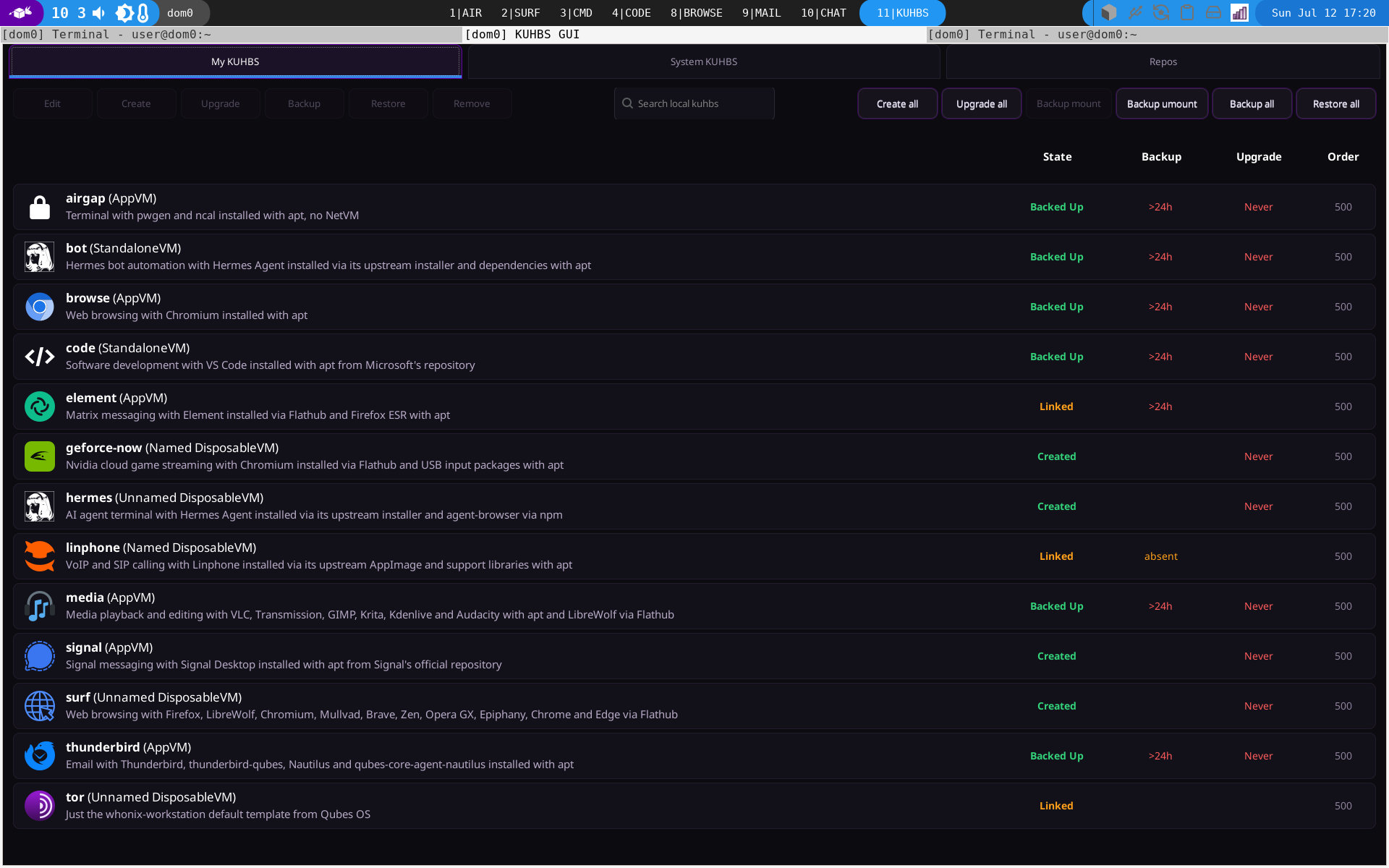
work in progress :wink: I’m quite happy with the gui today, hope to be able to release something beta soon :slight_smile: Think appstore, hehe :slight_smile:

These are the people that need QubesOS the most!

I massively agree! I think I will quote some of what you said on the website / doc later on. Its SO true. SO MANY PEOPLE who need good security can’t use Qubes. Its such a shame. I really hope my kuhbs can fix that, and I’m pretty confident that it can.

If only this whole windows crap were not so UTTERLY annoying… Sadly they will need windows “kuhb’s” xD

2 Likes

You write 100% my own thoughts.

FEED THE NOOBS!!

2 Likes

Shameless plug :rofl: but if you do get a working turnkey solution it’d make a difference.
1 Like

hehe. Your post was just SO what I am thinking about Qubes. I love it, but I know how to configure and use it. I’ve been thinking what you wrote for so long - I couldnt resist :wink:

And yeah, in the end the goal is to have the user open a terminal in dom0 and enter one command - will be a bit longer, sth like qvm-run bla –dispvm and what not. But in a nutshell curl | bash.

After that he should have his gui.

There are a few things I have to keep technical, because there is no way around it, but I think thats ok.

Couldn’t resist but post a screenshot of current dev version hehe:

1 Like

@MYuhter honestly, I think the best way is to install it, click around, and then ask a LLM like chatgpt - this is so much faster than the oldschool approach of reading / searching in wikis.

If you have a paid account (like the 20 usd one) you can tell it to “read the source” if in doubt, and it will go through the Qubes source to find the answer for even the most complex questions.

I hate to advertise for LLMs here, but honestly, for a newby with not to much tech skillz, this is by far the best solution atm. It would beat even a very very well organized wiki in my opinion.

1 Like

While I agree with the basic view that vulnerable people need it the most, my personal experience has taught me that you have to be willing to change your habits to a large extent and understand what you are doing and why to be (a bit more) secure.

You can’t rely on cookbook instructions; quite the opposite is true: if you rely on technical measures alone, you’ll become vulnerable. Simply by relying on them. QubesOS is a set of tools, not a goal. It can’t protect you from social engineering or your own … how should I put it … misbehaviour?

You need to practise and learn as much as you need the proper tools. The first step is to think about what you are defending against and why. ‘Real’ adversaries ‘in a Will Smith situation’ (spying on a partner or colleague out of jealousy would suffice as a more low-level example) will exploit you without that exercise, whether or not you have tools. That’s why I think ‘set-and-forget’ one-size-fits-all solutions are extremely dangerous, no matter how well-intentioned they may be or what goals they may pursue. Help the newcomers to become experts. Don’t let them starve mentally.

That said, when it comes to usability and transparency in UX, there’s certainly room to offer some support—just not in the form of pre-configured ‘solutions’.

2 Likes

@OvalZero I think you are right, but we do have to meet in the middle a bit.

If the alternative is ubuntu with all in one box, clicking “install thunderbird” in Qubes (kuhbs) still sets up an appvm from debian-13-minimal (or kicksecure if I get that running) with a firewall and what not.

I’m sure theres a lot of ways to get thunderbird more secure - most notably by using sth less shitty than thunderbird lol - but for individual applications, its also not THAT much to do.

Teaching endusers how to use the browser might be a larger approach - but even there. Telling them “click here for just surfing the internet”, which opens a browser in a dispvm, is still much more secure than just firefox + ubuntu.

That being said, security is a process, not a solution.

However the fact remains - a (my) turnkey solution for Qubes is a large bit more secure than any enduser-friendly alternatives I know.
My next recommendation after kuhbs to a privacy/security focused enduser would be ubuntu.

The issue with Qubes is the entry - it takes them to long to just get their migration done. If they are coming from windows or OSX, just that entry into getting started is already pretty hefty I think.

1 Like

You’re right, provided that such a secure system fails in a user-friendly way: “Oh really? It doesn’t work $THATWAY anymore? No new bookmarks in the (D)VM? Why?”

It’s not as if anyone would end up simply reinstalling Windows or boot up that MacBook because it’s so wonderfully “easy”.

I’m sure you’re familiar with Felix von Leitner’s concept of “partial security”?

2 Likes

Do you have a vision on this? Documenting all possible use cases could be hard (and navigating that - pehaps worse). I’m thinking maybe a brief guide on hardware features.

A short explanation of what TPM, firmware security (BIOS, stuff like coreboot) and secure boot are, the impact… What else should be in the list?

Perhaps instead there should be a link to a better resource on this topic? It might not be reasonable for an OS project to document hardware.

On the other hand providing it can be bad too. People should maintain enough agency to research things on their own.

1 Like

You’re right, provided that such a secure system fails in a user-friendly way: “Oh really? It doesn’t work $THATWAY anymore? No new bookmarks in the (D)VM? Why?”

Users have to bring a bit of determination to switch to Qubes, even with kuhbs. I can’t play the max osx designer team alone of course, and I’m not trying to, but I can make the first steps a good bit simpler and get them hooked on Qubes faster, so they don’t loose motivation in the first steps.

Daher muß eine verläßliche Firewall immer von Anwendungen und dem Zugriff auf das System geschützt werden.
[...]
Sobald es eine Möglichkeit gibt, daß ein Angreifer auf
der Firewall-Kiste Code ausführen kann (weil der Anwender wo drauf
geclickt hat oder aus welchem Grund auch immer), dann kann man sich
nicht auf ihre Funktion verlassen!

I’m quite familiar with fefe but I didn’t read this one. I kinda completely stopped reading him since he said turning palestine into a parking-space was a good idea and the fault of the palestinians, that f-ing moron.

Also i don’t fully get the point he’s trying to make in that post, or better said the relation to the topic. kuhbs brings a firewall (Qubes-Snitch, sth I wrote recently, kinda like Open Snitch but for Qubes and MUCH less code). A “kuhb” has firewall rules pre-configured, where possible, and Qubes-Snitch makes it easy for half way computer-talented users to do the rest themselves (as I can’t know which mail provider they use for example). It certainly is much more easy to use as qvm-firewall + wireguard to find out what to allow/block.
Qubes-Snitch is not as cool as mirage, but its very user friendly and in the end you get the same nftables (just not in a unikernel lol).

I’m not sure if the user will want to “do other things” on the firewall VM. Only way to prevent him from doing that would be mirage LOL.

But enough joking, back to the point of fefe, which would be “a security mechanism is useful as a dependable security boundary only if an attacker cannot disable it from the thing it is supposed to protect.” I’m not sure why an enduser would do that. He can of course, I mean this is Linux, you can do whatever you want, thats one of the design ideas.

I can’t write code that fixes humans. Not sure what the actual point of your post is tbh.

My point is Qubes is not enduser-firendly enough rn , and I think that should be adressed by making the entry more easy, so more ppl keep the motivation to stick with it and then learn about it.

2 Likes

As far as I understand, his point was that security is deterministic. This is why there is no such thing as partial security in the strict sense. It is also impossible to judge whether a QubesOS setup is even slightly more secure than a MacBook or Windows machine without knowing the user’s situation and needs. So the question remains: in what sense is it more secure?

To be clear, kuhbs surely is of good use for people who know, what they want. I didn’t mean to criticise any of it.

I am just sceptical of the idea of some all-round safe defaults (as suggested by Privacc).

1 Like

I can’t fully answer that, as tbh I’m an admin, not the greatest of coders and certainly not an OS engineer that understands how windows/osx or even linux works in the very deep parts of it.
I make for a pretty good admin though, and I’m really good at automation / config management :wink:

That being said, kuhbs makes use of most defaults that Qubes OS brings with it. I’m not sure how to describe that better without falling into a massive textwall. Many of the small bells and whistles we as Qubes users take for granted are accessible to an enduser, because in a nutshell he can click “install signal” and then he can click “launch signal” and then he can use signal, in a way that is properly setup in Qubes.

The alternative is that he does apt install signal in the default work VM, where all of his other files live too, because it took him an hour to get this to work in the first place.

Its an appstore, and a “kuhb” lets you define VERY precisely how you want the required VMs to be setup and configured. It allows for pretty much any paranoid nonsense you can think of when setting up VMs (it has limits).

Ultimately its a bridge between “check out my rather complicated forum post about how I setup xzy” to an enduser, because that forum post can be easily converted into a “kuhb”, and then the uesr can click install on that and use it.

Thats one of the design ideas - to have sth less annoying than salt or ansible to just share code / approaches / ideas in how to setup applications / VMs in Qubes.

A kuhbs managed box wont be as secure as your box of course, but you know exactly what you are doing, and I can’t really replicate that (or I can, but like my point is yours is for your usecase).

It is very likely though that you can define your usecases in kuhb’s though.

Does that answer your question?

1 Like