I’m quite curious to know what are the Qubes OS features that are seen as the most valuable by its users, or what Qubes OS offered you that you couldn’t achieve in another operating system?
(this is a personal topic, nothing official )
Edit:
summary of the answers
The following items with emphasis (bold) are mentioned more than once:
Xen-level compartmentalization/isolation:
to control the software
to protect myself from a hostile WAN and a browser (any browser) with organization-level cross-incentives
… that already worked enough (within reason) out of the box
Helpful user community, active forum that celebrates useful ideas, people, and solutions.
accessible and careful devs
ability to set up offline qubes for storing secrets such as passwords and GPG keys
Idea of templates, appVM, and dvm is brilliant:
working with many Linux distros, Windows, it is fast and it takes up little disk space
using cool tools that work only with older Debian/Ubuntu versions, without worrying about it
installing apps without worrying about dependencies
using many VPNs simultaneously.
Disposable vms:
for security
The ability to create nuanced disposable templates to investigate and test with save so much prep work.
excellent and very convenient forensic protection, thanks to the large fantastic community for guides.
ability to run virtual machines with integration between VMs
minimize any damage from Malware, phishing, and other unpleasant efforts
the UI:
a single app running in a VM can integrate well in the GUI domain, almost as a regular app in a regular distro
VM-dependent description and window colors help to refrain from doing stupid things
Isolating base OS from the network and letting only virtual vm’s to have network/internet.
the possibility of attaching a webcam to a virtual machine and have it working out-of-the-box for video calls
The security that allows a complex Windows 7 environment to still be used
For testing, the creation of VM clones at a click, stopping to make disastrous tests expensive, with client/server environments on just one machine
The peace of mind when doing things like going to dangerous websites or opening documents of doubtful origin.
Having a modern software system showing, in teaching, where software development is / should be going nowadays.
Tails-like amnesic behavior when wanted, but with full customization and the ability to install whatever apps
And the flexibility to run any OS in isolated qubes, with strong security guarantees, is unmatched.
The networking that gives absolute control (up to what sys-net is doing within itself) because each netvm is a router we can audit and monitor
That networking allowed me to build complex systems using many VPNs, although it was possible on OpenBSD using multiple routing tables or Linux with ip rules, it was easier to use on Qubes OS
in freelance/professional activity, being able to separate the systems used for each client and their VPN was a must
to be able to npm install ... to get work done and I don’t want to have to worry about getting infected everytime I need to do so.
separating applications into qubes allows better stability: when I’m “fidgeting”, installing or making changes in certain qubes (media, personal) it will never affect my work qubes.
Qubes seems to be the only option which gives actual protection against digital fingerprinting:
ability to run whatever apps without worrying that I will end up with identity stolen.
make Youtube show me only the content I want. If I want to learn a skill I can create a vm for this topic. And Youtube will show me videos about this topic specifically
Pretty good integration with Whonix/Tor- the anonymous internet currently a dangerous and very unsavory place, but we will need it going into the future
And, not unique to Qubes but necessary for adoption:
I would say the most obvious advantages are the isolated compartments and the ability to set up offline qubes for storing secrets such as passwords and GPG keys.”
I like that I work with many distros and it takes up little disk space. Idea of templates, appVM, and dvm is brilliant. Often I find cool tools that work only with older Debian/Ubuntu versions, and I don’t have to worry about it. I can use many VPNs simultaneously. And I also have excellent and very convenient forensic protection - thanks to the large fantastic community for guides. @solene thank you too, your guides are really helpful!
Yep, I was looking for the integration between VMs and how a single app running in a VM can integrate well in the GUI domain, almost as a regular app in a regular distro. I don’t think I really understood the template system before switching.
The ability to use Whonix to torify arbitrary applications without fearing leaks and without having to feel like I’m using a VM (only the application window itself shows). This was and still is the #1 selling point of Qubes OS to me.
Agree, was already a Whonix user, managing different OSes. Though the ability to do everything at once does at times have its downsides in terms of focusing on one realm.
Isolating base OS (later learned it’s called dom0 in Qubes) from the network and letting only virtual vm’s (later learned they’re called qubes in Qubes OS) to have network/internet. None had that feature at the time.
Contrary to the motto of reasonable security, I think it was the features first and foremost back then. For example, the possibility of attaching a webcam to a virtual machine and have it working out-of-the-box for video calls, the templating system, and the seamless integration between virtual machines, despite the strong isolation.
And to a lesser extent the UI (I don’t recall seeing the non-flat widgets and the fonts with maximum hinting applied to them ever again after upgrading from Qubes OS 4.0)
Though I had more experience with VMware Workstation, rather than virt-manager back then, and integration features I was using back then allowed for an easier migration to the slightly different workflows, like clipboard sharing and templating systems working differently.
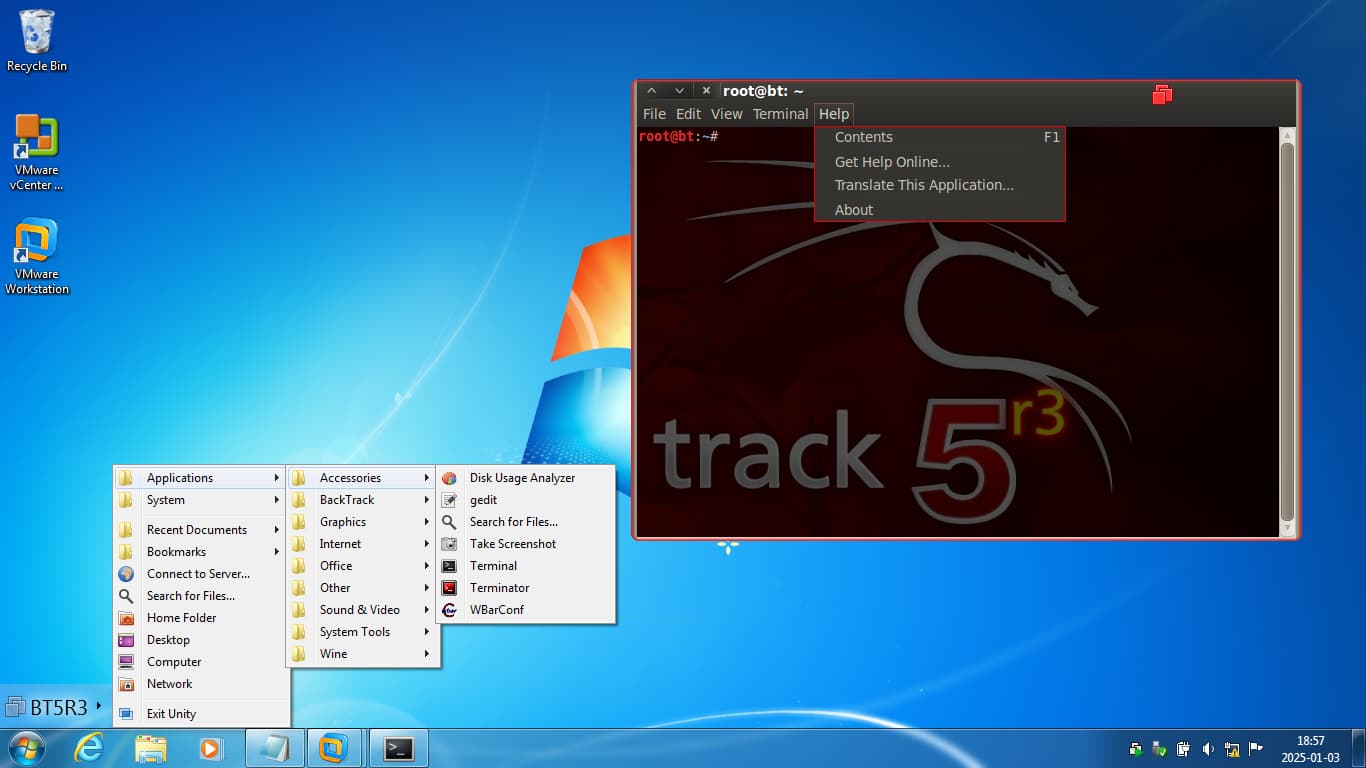
Keep in mind that I’m talking about the version, which has the Unity View working before it was deprecated, so seeing windows from a virtual machine projected into a common desktop, having their icons on the taskbar and having a dedicated desktop menu for browsing virtual machines’ programs was obvious to me, and I know that people coming from different backgrounds might have had a harder time getting to know these concepts.
Here’s a screenshot, how this looked like. Notice the additional menu, the icon on the taskbar and how the window is marked with red border and the icon in the top right.
Compartmentalization along with all of the appropriate pieces and developer attention behind those pieces, even if the specific technology pieces were not my favorite ones.
I was casually targeted by an entity with access to nation state resources and needed something that had strong security isolation that already worked enough (within reason) out of the box. So it was time to finally “grow up” on that issue.
Malware, phishing, and other unpleasant efforts are continually being improved, so I switched to security-focused Qubes to help minimize any damage from these possible attacks. The few other similar-focused options are government-focused, costly, and out-of-reach to most.
Joanna Rutkowska’s writing’s have been most helpful in understanding why Qubes is a reasonably secure OS, while most are not. Many internet posts [incorrectly] describe Qubes as a virtual machine based system like Docker or Windows VM’s and assume they all share the same security benefits, but virtualization doesn’t bring any security advantage by itself. The Qubes OS architecture design is worth the read for those interested. Fortunately, Joanna Rutkowska has written a number of papers and presentations on the subject.
The slickness of the compartmentalization. Before I was doing the same thing with vmware, packer and ansible on a mac. Then switched that to virtualbox to isolate usb. Even had a netvm on a usb wifi that my mac didn’t support. Qubes is better in every way except nested virtualization. Its not that it has compartmentalization. Its the streamlined integration.
The only thing I miss from vmware is being able to copy from the password keeper and having it type into the vm that needed it instead of pasting. For both vmware and virtualbox, copy pasting between vms was a pain.
It is a way to force myself further into the world of virtualization, networking, and security that doesn’t have a suspicious license agreement (looking at proxmox)
The clear isolation features, being a more modern and more flexible version of the old comparmented mode workstations some 40 years ago - described excellently in Joanna’s papers.
The security that allows a complex Windows 7 environment to still be used, although M$ stopped the support for the last usable version of this system.
The possibility to test and compare different Linux and Windows versions - much faster than on physical machines.
For testing, the creation of VM clones at a click, stopping to make disastrous tests expensive.
The peace of mind when doing things like going to dangerous websites or opening documents of doubtful origin.
Performing complicated tests of client/server environments on just one machine, without needing a complex physical environment consisting of a lot of hardware.
Having a modern software system showing, in teaching, where software development is / should be going nowadays.

 )
)