Dom0 memory leaks

I’ve performed an in-place upgrade from 4.2 to 4.3 yesterday. Among multiple things that seem to stop working for multiple users (such as sys-usb, screensaver, crashing update tool, “sluggish” experience), it looks like the graphical environment in dom0 is eating RAM.

I use i3.

RAM relatively early on:

[me@dom0 ~]$ free -m
               total        used        free      shared  buff/cache   available
Mem:            3879        1043        2310         119         706        2836
Swap:           4015           0        4015
[me@dom0 ~]$ free -m
               total        used        free      shared  buff/cache   available
Mem:            3879        1027        2325         113         700        2851
Swap:           4015           0        4015
[me@dom0 ~]$ free -m
               total        used        free      shared  buff/cache   available
Mem:            3879        1081        2270         113         700        2797
Swap:           4015           0        4015
[me@dom0 ~]$ free -m
               total        used        free      shared  buff/cache   available
Mem:            3879        1274        2074         165         756        2605
Swap:           4015           0        4015
[me@dom0 ~]$ free -m
               total        used        free      shared  buff/cache   available
Mem:            3879        1107        2232         125         725        2772
Swap:           4015           0        4015

RAM after configuring VMs for a few hours:

[me@dom0 ~]$ free -m
               total        used        free      shared  buff/cache   available
Mem:            3879        2201         317         486        1907        1677
Swap:           4015           0        4015
[me@dom0 ~]$ free -m
               total        used        free      shared  buff/cache   available
Mem:            3879        2194         325         486        1907        1685
Swap:           4015           0        4015

RAM 30 minutes later after doing more setup work:

[me@dom0 ~]$ free -m
               total        used        free      shared  buff/cache   available
Mem:            3879        2443         194         557        1898        1435
Swap:           4015           0        4015
[me@dom0 ~]$ free -m
               total        used        free      shared  buff/cache   available
Mem:            3879        2442         195         556        1897        1436
Swap:           4015           0        4015

Running top -c shows that it’s indeed /usr/bin/X using more RAM.

I wonder if reports of instability and crashes and the updater crash others appear to be experiencing aswell are related to this. Soon there will be no RAM to eat anymore.

I’m yet to really use the system, but if it continues like this, I must fear that something will crash soon, which is pretty problematic.

Update note:
I forgot to add, just two days ago, right before upgrading, I bumped my LUKS key to 2 GB RAM right from within dom0, there was at least 2.5 G or 3 G available on 4.2. I wasn’t monitoring it as 4.2 was working great for me, but it appears that this didn’t happen before.
2 Likes

After another day of configuration, I must add that I observed dom0 releasing RAM from time to time.

However, this is how it looked like at some point in time last night:

brother@dom0:~$ free -m
               total        used        free      shared  buff/cache   available
Mem:            3879        3379         137         953        1412         500
Swap:           7918         432        7486

I’ve let the computer idle over night. It looked like this at some point in the morning earlier today:

brother@dom0:~$ free -m
               total        used        free      shared  buff/cache   available
Mem:            3879        3173         327         941        1415         706
Swap:           7918         589        7329

There were 13 qubes running with nothing really crazy going on. Just a few open terminals, two KeePass instances and most were just net/firewall/VPN-VMs.

It had enough time to free RAM in dom0 I think.

I will also have to say this period of configuring is a time where dom0 tools like the Qubes Manager, VM creation/altering, starting and stopping VMs are used more than they are usually. Also I have done a clean 4.3 install in the meantime after I chose the in-place release upgrade initially.

Still on a relatively default Qubes 4.3 dom0, the official i3 and i3 configuration package and a few adjustments like enabling discards for the swap partition in fstabs. Most VMs run either Kicksecure 18 or Whonix 18, but I don’t think this is related to dom0 memory.

It would be great if others could monitor their dom0 /usr/bin/X RAM usage, especially as they are setting up 4.3.

1 Like

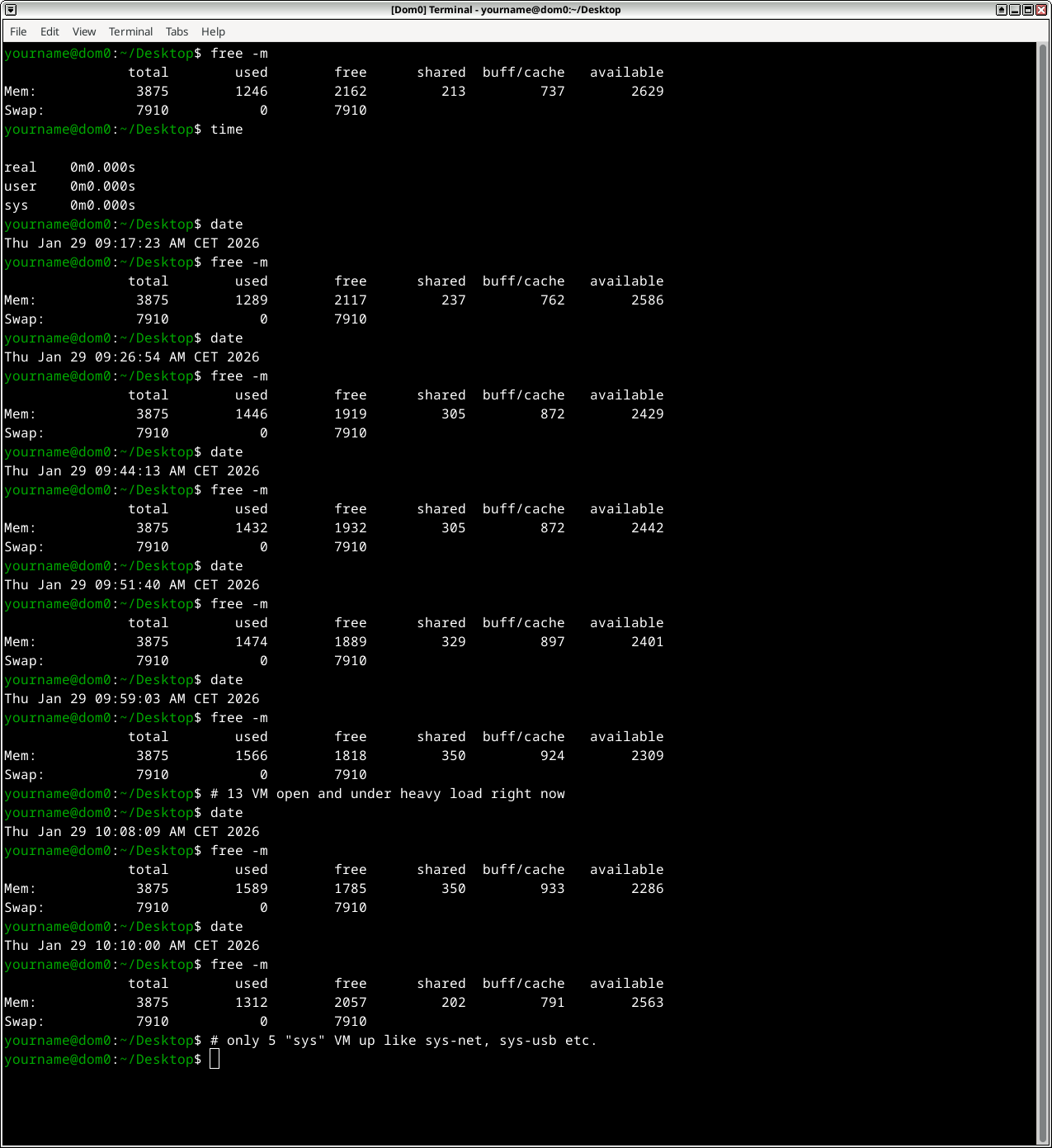
Thanks for sharing. This is what I saw today when putting more and more load on the system. In the end I had 13 VM running with heavy CPU and disk load. The last “free-m” command showed a “basic” system with virtually no load, just 5 VM up.
(comments under the “free -m” commands)

Question is, are these numbers on two different machines “comparable”?

1 Like

Thank you for sharing your RAM usage.

I take it you were using the system how most people presumably use it after setup, mostly being in VMs and not using dom0 tools excessively. Is this correct?

After a full day of work in VMs and not in dom0 using tools like the Qubes Manager etc., my RAM was very stable, even below your numbers at most times.

As I somewhat suspected here, luckily it’s only when working in dom0. Working in VMs doesn’t seem to have any impact on dom0’s /usr/bin/X.

I guess this makes it highly related to the updater crash someone reported: qubes-update-gui: OOM crash · Issue #10473 · QubesOS/qubes-issues · GitHub

But for now, this is something one can live with I think. I’ll just use the CLI updater to make sure I don’t run into that issue and everything is fine.

well, I’ve over read your remarks regarding heavy load in dom0. If it helps I might “simulate” that and post the RAM usage here.

Question is: how do we define “heavy load” in dom0?

What about creating a defined script with a bunch of VM creation/altering, starting and stopping VM, and measuring before and after execution of this script? And maybe after some time of “cooldown”.

Advantage: we could both use the very same script and the results would be more comparable.

In r4.2 qubes manager had big memory leak
Also Conky with cario have big memory leak

I assume it’s less related to the backend but the GUI itself. But we could surely test it out.