log
Aug 04 12:15:35 dom0 systemd-logind[11876]: Lid closed.
Aug 04 12:15:35 dom0 systemd-logind[11876]: Suspending...
Aug 04 12:15:35 dom0 systemd[1]: /usr/lib/systemd/system/qubes-suspend.service:9: Standard output type syslog is obsolete, automatically updating to journal. Please update your unit file, and consider removing the setting altogether.
Aug 04 12:15:35 dom0 dbus-daemon[14084]: [session uid=1000 pid=14084] Activating service name='org.xfce.Xfconf' requested by ':1.152' (uid=1000 pid=31745 comm="xfconf-query -c xfce4-session -p /general/LockComm")
Aug 04 12:15:35 dom0 dbus-daemon[14084]: [session uid=1000 pid=14084] Successfully activated service 'org.xfce.Xfconf'
Aug 04 12:15:35 dom0 systemd[1]: /usr/lib/systemd/system/qubes-suspend.service:9: Standard output type syslog is obsolete, automatically updating to journal. Please update your unit file, and consider removing the setting altogether.
Aug 04 12:15:35 dom0 systemd[1]: Starting qubes-suspend.service - Qubes suspend hooks...
Aug 04 12:15:35 dom0 qubesd[11981]: INFO: vm.default-dvm: Removing excess qube(s) from preloaded list because system wants to suspend: 'disp4848, disp3422'
Aug 04 12:15:35 dom0 systemd-homed[11875]: block device /sys/devices/virtual/block/dm-178 has been removed.
Aug 04 12:15:35 dom0 systemd-homed[11875]: block device /sys/devices/virtual/block/dm-178 has been removed.
Aug 04 12:15:35 dom0 systemd-homed[11875]: block device /sys/devices/virtual/block/dm-125 has been removed.
Aug 04 12:15:35 dom0 systemd-homed[11875]: block device /sys/devices/virtual/block/dm-125 has been removed.
Aug 04 12:15:36 dom0 systemd-homed[11875]: block device /sys/devices/virtual/block/dm-156 has been removed.
Aug 04 12:15:36 dom0 systemd-homed[11875]: block device /sys/devices/virtual/block/dm-156 has been removed.
Aug 04 12:15:36 dom0 systemd-homed[11875]: block device /sys/devices/virtual/block/dm-177 has been removed.
Aug 04 12:15:36 dom0 systemd-homed[11875]: block device /sys/devices/virtual/block/dm-177 has been removed.
Aug 04 12:15:36 dom0 systemd-homed[11875]: block device /sys/devices/virtual/block/dm-157 has been removed.
Aug 04 12:15:36 dom0 systemd-homed[11875]: block device /sys/devices/virtual/block/dm-157 has been removed.
Aug 04 12:15:36 dom0 systemd-homed[11875]: block device /sys/devices/virtual/block/dm-126 has been removed.
Aug 04 12:15:36 dom0 systemd-homed[11875]: block device /sys/devices/virtual/block/dm-126 has been removed.
Aug 04 12:15:36 dom0 qubesd[11981]: INFO: Removing appmenus for 'disp4848' in 'dom0'
Aug 04 12:15:36 dom0 systemd[1]: Starting systemd-hostnamed.service - Hostname Service...
Aug 04 12:15:36 dom0 qubesd[11981]: INFO: Removing appmenus for 'disp3422' in 'dom0'
Aug 04 12:15:36 dom0 systemd[1]: Started systemd-hostnamed.service - Hostname Service.
Aug 04 12:15:36 dom0 qubesd[11981]: INFO: vm.disp3422: Removing volume root: qubes_dom0/vm-disp3422-root
Aug 04 12:15:36 dom0 qubesd[11981]: INFO: vm.disp3422: Removing volume private: qubes_dom0/vm-disp3422-private
Aug 04 12:15:36 dom0 qubesd[11981]: INFO: vm.disp3422: Removing volume volatile: qubes_dom0/vm-disp3422-volatile
Aug 04 12:15:36 dom0 qubesd[11981]: INFO: vm.disp3422: Removing volume kernel: 7.0.14-1.fc41
Aug 04 12:15:36 dom0 52qubes-pause-vms[31765]: 0
Aug 04 12:15:36 dom0 systemd[1]: Finished qubes-suspend.service - Qubes suspend hooks.
Aug 04 12:15:36 dom0 qubesd[11981]: INFO: vm.disp4848: Removing volume root: qubes_dom0/vm-disp4848-root
Aug 04 12:15:36 dom0 qubesd[11981]: INFO: vm.disp4848: Removing volume private: qubes_dom0/vm-disp4848-private
Aug 04 12:15:36 dom0 qubesd[11981]: INFO: vm.disp4848: Removing volume volatile: qubes_dom0/vm-disp4848-volatile
Aug 04 12:15:36 dom0 qubesd[11981]: INFO: vm.disp4848: Removing volume kernel: 7.0.14-1.fc41
Aug 04 12:15:36 dom0 systemd[1]: Reached target sleep.target - Sleep.
Aug 04 12:15:36 dom0 systemd[1]: Starting systemd-suspend.service - System Suspend...
Aug 04 12:15:36 dom0 systemd-sleep[32036]: This is not recommended, and might result in unexpected behavior, particularly
Aug 04 12:15:36 dom0 systemd-sleep[32036]: in suspend-then-hibernate operations or setups with encrypted home directories.
Aug 04 12:15:36 dom0 systemd-sleep[32036]: Performing sleep operation 'suspend'...
Aug 04 12:34:29 dom0 rtkit-daemon[13612]: The canary thread is apparently starving. Taking action.
Aug 04 12:34:29 dom0 systemd-logind[11876]: Lid opened.
Aug 04 12:34:29 dom0 rtkit-daemon[13612]: Demoting known real-time threads.
Aug 04 12:34:29 dom0 systemd-logind[11876]: Lid closed.
Aug 04 12:34:29 dom0 rtkit-daemon[13612]: Successfully demoted thread 14103 of process 14090 (/usr/bin/pipewire).
Aug 04 12:34:29 dom0 rtkit-daemon[13612]: Successfully demoted thread 14090 of process 14090 (/usr/bin/pipewire).
Aug 04 12:34:29 dom0 rtkit-daemon[13612]: Successfully demoted thread 14110 of process 14089 (/usr/bin/wireplumber).
Aug 04 12:34:29 dom0 rtkit-daemon[13612]: Successfully demoted thread 14089 of process 14089 (/usr/bin/wireplumber).
Aug 04 12:34:29 dom0 rtkit-daemon[13612]: Successfully demoted thread 14096 of process 14088 (/usr/bin/pipewire).
Aug 04 12:34:29 dom0 rtkit-daemon[13612]: Successfully demoted thread 14088 of process 14088 (/usr/bin/pipewire).
Aug 04 12:34:29 dom0 rtkit-daemon[13612]: Demoted 6 threads.
Aug 04 12:34:30 dom0 systemd-sleep[32036]: System returned from sleep operation 'suspend'.
Aug 04 12:34:30 dom0 systemd[1]: systemd-suspend.service: Deactivated successfully.
Aug 04 12:34:30 dom0 systemd[1]: Finished systemd-suspend.service - System Suspend.
Aug 04 12:34:30 dom0 systemd[1]: Stopped target sleep.target - Sleep.
Aug 04 12:34:30 dom0 systemd[1]: Reached target suspend.target - Suspend.
Aug 04 12:34:30 dom0 systemd[1]: Stopped target suspend.target - Suspend.
Aug 04 12:34:30 dom0 systemd[1]: Stopping qubes-suspend.service - Qubes suspend hooks...
Aug 04 12:34:30 dom0 systemd-logind[11876]: Operation 'suspend' finished.
Aug 04 12:34:30 dom0 systemd-logind[11876]: Suspending...
Aug 04 12:34:30 dom0 dbus-daemon[14084]: [session uid=1000 pid=14084] Activating service name='org.xfce.Xfconf' requested by ':1.157' (uid=1000 pid=32113 comm="xfconf-query -c xfce4-session -p /general/LockComm")
Aug 04 12:34:30 dom0 dbus-daemon[14084]: [session uid=1000 pid=14084] Successfully activated service 'org.xfce.Xfconf'
Aug 04 12:34:30 dom0 systemd[1]: Starting fprintd.service - Fingerprint Authentication Daemon...
Aug 04 12:34:30 dom0 fprintd[32161]: Failed to install a sleep delay inhibitor: GDBus.Error:org.freedesktop.login1.OperationInProgress: The operation inhibition has been requested for is already running
Aug 04 12:34:30 dom0 systemd[1]: Started fprintd.service - Fingerprint Authentication Daemon.
Aug 04 12:34:30 dom0 upowerd[11878]: Could not acquire inhibitor lock: GDBus.Error:org.freedesktop.login1.OperationInProgress: The operation inhibition has been requested for is already running
Aug 04 12:34:32 dom0 systemd-logind[11876]: Lid opened.
Aug 04 12:34:33 dom0 qrexec-policy-daemon[12667]: qrexec: qubes.GetDate+nanoseconds: secure -> @default: allowed to dom0
Aug 04 12:34:33 dom0 qrexec-policy-daemon[12667]: qrexec: qubes.GetDate+nanoseconds: personal -> @default: allowed to dom0
Aug 04 12:34:33 dom0 qrexec-policy-daemon[12667]: qrexec: qubes.GetDate+nanoseconds: development -> @default: allowed to dom0
Aug 04 12:34:33 dom0 qrexec-policy-daemon[12667]: qrexec: qubes.GetDate+nanoseconds: sys-firewall -> @default: allowed to dom0
Aug 04 12:34:33 dom0 qrexec-policy-daemon[12667]: qrexec: qubes.GetDate+nanoseconds: untrusted -> @default: allowed to dom0
Aug 04 12:34:33 dom0 qrexec-policy-daemon[12667]: qrexec: qubes.GetDate+nanoseconds: sys-usb -> @default: allowed to dom0
Aug 04 12:34:33 dom0 qubesd[11981]: INFO: vm.default-dvm: Received preload event 'start' because system resumed
Aug 04 12:34:33 dom0 qubesd[11981]: INFO: vm.default-dvm: Preloading '2' qube(s)
Aug 04 12:34:33 dom0 qubesd[11981]: INFO: vm.disp7526: Marking preloaded qube
Aug 04 12:34:33 dom0 qubesd[11981]: INFO: vm.disp7526: Creating directory: /var/lib/qubes/appvms/disp7526
Aug 04 12:34:33 dom0 qubesd[11981]: INFO: vm.disp7058: Marking preloaded qube
Aug 04 12:34:33 dom0 qubesd[11981]: INFO: vm.disp7058: Creating directory: /var/lib/qubes/appvms/disp7058
Aug 04 12:34:33 dom0 qubesd[11981]: INFO: Updating appmenus for 'disp7526' in 'dom0'
Aug 04 12:34:33 dom0 qubesd[11981]: INFO: Removing appmenus for 'disp7526' in 'dom0'
Aug 04 12:34:33 dom0 qubesd[11981]: INFO: Updating appmenus for 'disp7058' in 'dom0'
Aug 04 12:34:33 dom0 qubesd[11981]: INFO: Removing appmenus for 'disp7058' in 'dom0'
Aug 04 12:34:33 dom0 qubesd[11981]: INFO: Updating appmenus for 'disp7526' in 'dom0'
Aug 04 12:34:33 dom0 qubesd[11981]: INFO: Updating appmenus for 'disp7058' in 'dom0'
Aug 04 12:34:33 dom0 52qubes-pause-vms[32118]: 0
Aug 04 12:34:33 dom0 systemd[1]: qubes-suspend.service: Deactivated successfully.
Aug 04 12:34:33 dom0 systemd[1]: Starting qubes-suspend.service - Qubes suspend hooks...
Aug 04 12:34:34 dom0 qubesd[11981]: INFO: vm.default-dvm: Removing excess qube(s) from preloaded list because system wants to suspend: 'disp7526, disp7058'
Aug 04 12:34:34 dom0 qubesd[11981]: INFO: vm.disp7526: Starting qube disp7526
Aug 04 12:34:34 dom0 qubesd[11981]: INFO: vm.disp7058: Starting qube disp7058
Aug 04 12:34:34 dom0 dmeventd[11129]: No longer monitoring thin pool qubes_dom0-vm--pool-tpool.
Aug 04 12:34:34 dom0 dmeventd[11129]: Monitoring thin pool qubes_dom0-vm--pool-tpool.
Aug 04 12:34:34 dom0 dmeventd[11129]: No longer monitoring thin pool qubes_dom0-vm--pool-tpool.
Aug 04 12:34:34 dom0 dmeventd[11129]: Monitoring thin pool qubes_dom0-vm--pool-tpool.
Aug 04 12:34:34 dom0 52qubes-pause-vms[32256]: 0
Aug 04 12:34:34 dom0 systemd[1]: Finished qubes-suspend.service - Qubes suspend hooks.
Aug 04 12:34:34 dom0 systemd[1]: Reached target sleep.target - Sleep.
Aug 04 12:34:34 dom0 systemd[1]: Starting systemd-suspend.service - System Suspend...
Aug 04 12:34:34 dom0 systemd-sleep[32565]: This is not recommended, and might result in unexpected behavior, particularly
Aug 04 12:34:34 dom0 systemd-sleep[32565]: in suspend-then-hibernate operations or setups with encrypted home directories.
Aug 04 12:34:34 dom0 systemd-sleep[32565]: Performing sleep operation 'suspend'...
Aug 04 12:34:36 dom0 systemd-sleep[32565]: System returned from sleep operation 'suspend'.
Aug 04 12:34:36 dom0 systemd[1]: systemd-suspend.service: Deactivated successfully.
Aug 04 12:34:36 dom0 systemd[1]: Finished systemd-suspend.service - System Suspend.
Aug 04 12:34:36 dom0 systemd[1]: Stopped target sleep.target - Sleep.
Aug 04 12:34:36 dom0 systemd[1]: Reached target suspend.target - Suspend.
Aug 04 12:34:36 dom0 systemd-logind[11876]: Operation 'suspend' finished.
Aug 04 12:34:36 dom0 systemd[1]: Stopped target suspend.target - Suspend.
Aug 04 12:34:36 dom0 systemd[1]: Stopping qubes-suspend.service - Qubes suspend hooks...
Aug 04 12:34:38 dom0 qubesd[11981]: INFO: vm.disp7526: Setting Qubes DB info for the qube
Aug 04 12:34:38 dom0 qubesd[11981]: INFO: vm.disp7526: Starting Qubes DB
Aug 04 12:34:38 dom0 qubesd[11981]: INFO: vm.disp7526: Activating qube
Aug 04 12:34:38 dom0 dmeventd[11129]: No longer monitoring thin pool qubes_dom0-vm--pool-tpool.
Aug 04 12:34:38 dom0 dmeventd[11129]: Monitoring thin pool qubes_dom0-vm--pool-tpool.
Aug 04 12:34:38 dom0 dmeventd[11129]: No longer monitoring thin pool qubes_dom0-vm--pool-tpool.
Aug 04 12:34:39 dom0 dmeventd[11129]: Monitoring thin pool qubes_dom0-vm--pool-tpool.
Aug 04 12:34:40 dom0 qubesd[11981]: INFO: vm.disp7058: Setting Qubes DB info for the qube
Aug 04 12:34:40 dom0 qubesd[11981]: INFO: vm.disp7058: Starting Qubes DB
Aug 04 12:34:40 dom0 qubesd[11981]: WARNING: vm.disp7058: Failed to run qubes.SuspendPostAll: Domain 'disp7058' is paused
Aug 04 12:34:40 dom0 qubesd[11981]: WARNING: vm.disp7526: Failed to run qubes.SuspendPostAll: Domain 'disp7526': qrexec not connected
Aug 04 12:34:40 dom0 qubesd[11981]: INFO: vm.disp7058: Activating qube
Aug 04 12:34:40 dom0 qrexec-policy-daemon[12667]: qrexec: qubes.GetDate+nanoseconds: development -> @default: allowed to dom0
Aug 04 12:34:40 dom0 qrexec-policy-daemon[12667]: qrexec: qubes.GetDate+nanoseconds: personal -> @default: allowed to dom0
Aug 04 12:34:40 dom0 qrexec-policy-daemon[12667]: qrexec: qubes.GetDate+nanoseconds: sys-firewall -> @default: allowed to dom0
Aug 04 12:34:40 dom0 qrexec-policy-daemon[12667]: qrexec: qubes.GetDate+nanoseconds: secure -> @default: allowed to dom0
Aug 04 12:34:40 dom0 qrexec-policy-daemon[12667]: qrexec: qubes.GetDate+nanoseconds: untrusted -> @default: allowed to dom0
Aug 04 12:34:40 dom0 qrexec-policy-daemon[12667]: qrexec: qubes.GetDate+nanoseconds: sys-usb -> @default: allowed to dom0
Aug 04 12:34:40 dom0 qubesd[11981]: INFO: vm.default-dvm: Received preload event 'start' because system resumed
Aug 04 12:34:40 dom0 qubesd[11981]: INFO: vm.default-dvm: Preloading '2' qube(s)
Aug 04 12:34:40 dom0 qubesd[11981]: INFO: vm.disp1631: Marking preloaded qube
Aug 04 12:34:40 dom0 qubesd[11981]: INFO: vm.disp1631: Creating directory: /var/lib/qubes/appvms/disp1631
Aug 04 12:34:40 dom0 qubesd[11981]: INFO: vm.disp5428: Marking preloaded qube
Aug 04 12:34:40 dom0 qubesd[11981]: INFO: vm.disp5428: Creating directory: /var/lib/qubes/appvms/disp5428
Aug 04 12:34:40 dom0 qubesd[11981]: INFO: Updating appmenus for 'disp1631' in 'dom0'
Aug 04 12:34:40 dom0 qubesd[11981]: INFO: Removing appmenus for 'disp1631' in 'dom0'
Aug 04 12:34:40 dom0 qubesd[11981]: INFO: Updating appmenus for 'disp5428' in 'dom0'
Aug 04 12:34:40 dom0 qubesd[11981]: INFO: Removing appmenus for 'disp5428' in 'dom0'
Aug 04 12:34:40 dom0 52qubes-pause-vms[32627]: 0
Aug 04 12:34:40 dom0 qubesd[11981]: INFO: Updating appmenus for 'disp1631' in 'dom0'
Aug 04 12:34:40 dom0 systemd[1]: qubes-suspend.service: Deactivated successfully.
Aug 04 12:34:40 dom0 systemd[1]: Stopped qubes-suspend.service - Qubes suspend hooks.
Aug 04 12:34:40 dom0 qubesd[11981]: INFO: Updating appmenus for 'disp5428' in 'dom0'
Aug 04 12:34:41 dom0 qubesd[11981]: INFO: vm.disp5428: Starting qube disp5428
Aug 04 12:34:41 dom0 qubesd[11981]: INFO: vm.disp1631: Starting qube disp1631
Aug 04 12:34:41 dom0 dmeventd[11129]: No longer monitoring thin pool qubes_dom0-vm--pool-tpool.
Aug 04 12:34:41 dom0 dmeventd[11129]: Monitoring thin pool qubes_dom0-vm--pool-tpool.
Aug 04 12:34:41 dom0 dmeventd[11129]: No longer monitoring thin pool qubes_dom0-vm--pool-tpool.
Aug 04 12:34:41 dom0 dmeventd[11129]: Monitoring thin pool qubes_dom0-vm--pool-tpool.
Aug 04 12:34:43 dom0 qubesd[11981]: INFO: vm.disp5428: Setting Qubes DB info for the qube
Aug 04 12:34:43 dom0 qubesd[11981]: INFO: vm.disp5428: Starting Qubes DB
Aug 04 12:34:43 dom0 qubesd[11981]: INFO: vm.disp5428: Activating qube
Aug 04 12:34:43 dom0 dmeventd[11129]: No longer monitoring thin pool qubes_dom0-vm--pool-tpool.
Aug 04 12:34:43 dom0 dmeventd[11129]: Monitoring thin pool qubes_dom0-vm--pool-tpool.
Aug 04 12:34:43 dom0 dmeventd[11129]: No longer monitoring thin pool qubes_dom0-vm--pool-tpool.
Aug 04 12:34:43 dom0 dmeventd[11129]: Monitoring thin pool qubes_dom0-vm--pool-tpool.
Aug 04 12:34:45 dom0 qubesd[11981]: INFO: vm.disp1631: Setting Qubes DB info for the qube
Aug 04 12:34:45 dom0 qubesd[11981]: INFO: vm.disp1631: Starting Qubes DB
Aug 04 12:34:45 dom0 qubesd[11981]: WARNING: protocol error for call b'admin.vm.device.webcam.Attached'+b'' (b'dom0' → b'disp7526') with payload of 0 bytes
Aug 04 12:34:45 dom0 qubesd[11981]: INFO: vm.disp1631: Activating qube
Aug 04 12:34:45 dom0 qubesd[11981]: WARNING: protocol error for call b'admin.vm.device.webcam.Attached'+b'' (b'dom0' → b'disp7058') with payload of 0 bytes
Aug 04 12:34:45 dom0 qrexec-policy-daemon[12667]: qrexec: qubes.Notifications+: disp7526 -> @default: allowed to dom0
Aug 04 12:34:45 dom0 qrexec-policy-daemon[12667]: qrexec: qubes.Notifications+: disp7058 -> @default: allowed to dom0
Lid opened and closed too fast:
Aug 04 12:34:29 dom0 systemd-logind[11876]: Lid opened.
...
Aug 04 12:34:29 dom0 systemd-logind[11876]: Lid closed.
...
Aug 04 12:34:32 dom0 systemd-logind[11876]: Lid opened.
After lid is closed, it suspends:
Aug 04 12:34:29 dom0 rtkit-daemon[13612]: Demoted 6 threads.
Aug 04 12:34:30 dom0 systemd-sleep[32036]: System returned from sleep operation 'suspend'.
Aug 04 12:34:30 dom0 systemd[1]: systemd-suspend.service: Deactivated successfully.
Aug 04 12:34:30 dom0 systemd[1]: Finished systemd-suspend.service - System Suspend.
Aug 04 12:34:30 dom0 systemd[1]: Stopped target sleep.target - Sleep.
Aug 04 12:34:30 dom0 systemd[1]: Reached target suspend.target - Suspend.
Aug 04 12:34:30 dom0 systemd[1]: Stopped target suspend.target - Suspend.
Aug 04 12:34:30 dom0 systemd[1]: Stopping qubes-suspend.service - Qubes suspend hooks...
Aug 04 12:34:30 dom0 systemd-logind[11876]: Operation 'suspend' finished.
Aug 04 12:34:30 dom0 systemd-logind[11876]: Suspending...
Aug 04 12:34:30 dom0 dbus-daemon[14084]: [session uid=1000 pid=14084] Activating service name='org.xfce.Xfconf' requested by ':1.157' (uid=1000 pid=32113 comm="xfconf-query -c xfce4-session -p /general/LockComm")
Aug 04 12:34:30 dom0 dbus-daemon[14084]: [session uid=1000 pid=14084] Successfully activated service 'org.xfce.Xfconf'
Aug 04 12:34:30 dom0 systemd[1]: Starting fprintd.service - Fingerprint Authentication Daemon...
Aug 04 12:34:30 dom0 fprintd[32161]: Failed to install a sleep delay inhibitor: GDBus.Error:org.freedesktop.login1.OperationInProgress: The operation inhibition has been requested for is already running
Aug 04 12:34:30 dom0 systemd[1]: Started fprintd.service - Fingerprint Authentication Daemon.
Aug 04 12:34:30 dom0 upowerd[11878]: Could not acquire inhibitor lock: GDBus.Error:org.freedesktop.login1.OperationInProgress: The operation inhibition has been requested for is already running
Then lid is opened and system resumes:
Aug 04 12:34:32 dom0 systemd-logind[11876]: Lid opened.
...
Aug 04 12:34:33 dom0 qubesd[11981]: INFO: vm.default-dvm: Received preload event 'start' because system resumed
Aug 04 12:34:33 dom0 qubesd[11981]: INFO: vm.default-dvm: Preloading '2' qube(s)
Aug 04 12:34:33 dom0 qubesd[11981]: INFO: vm.disp7526: Marking preloaded qube
Aug 04 12:34:33 dom0 qubesd[11981]: INFO: vm.disp7526: Creating directory: /var/lib/qubes/appvms/disp7526
Aug 04 12:34:33 dom0 qubesd[11981]: INFO: vm.disp7058: Marking preloaded qube
Aug 04 12:34:33 dom0 qubesd[11981]: INFO: vm.disp7058: Creating directory: /var/lib/qubes/appvms/disp7058
Aug 04 12:34:33 dom0 qubesd[11981]: INFO: Updating appmenus for 'disp7526' in 'dom0'
Aug 04 12:34:33 dom0 qubesd[11981]: INFO: Removing appmenus for 'disp7526' in 'dom0'
Aug 04 12:34:33 dom0 qubesd[11981]: INFO: Updating appmenus for 'disp7058' in 'dom0'
Aug 04 12:34:33 dom0 qubesd[11981]: INFO: Removing appmenus for 'disp7058' in 'dom0'
Aug 04 12:34:33 dom0 qubesd[11981]: INFO: Updating appmenus for 'disp7526' in 'dom0'
Aug 04 12:34:33 dom0 qubesd[11981]: INFO: Updating appmenus for 'disp7058' in 'dom0'
But suspend is started again, you see the disposables are removed from the preload list because system wants to suspend, but the disposables continue their startup:
Aug 04 12:34:33 dom0 52qubes-pause-vms[32118]: 0
Aug 04 12:34:33 dom0 systemd[1]: qubes-suspend.service: Deactivated successfully.
Aug 04 12:34:33 dom0 systemd[1]: Starting qubes-suspend.service - Qubes suspend hooks...
Aug 04 12:34:34 dom0 qubesd[11981]: INFO: vm.default-dvm: Removing excess qube(s) from preloaded list because system wants to suspend: 'disp7526, disp7058'
Aug 04 12:34:34 dom0 qubesd[11981]: INFO: vm.disp7526: Starting qube disp7526
Aug 04 12:34:34 dom0 qubesd[11981]: INFO: vm.disp7058: Starting qube disp7058
Aug 04 12:34:34 dom0 dmeventd[11129]: No longer monitoring thin pool qubes_dom0-vm--pool-tpool.
Aug 04 12:34:34 dom0 dmeventd[11129]: Monitoring thin pool qubes_dom0-vm--pool-tpool.
Aug 04 12:34:34 dom0 dmeventd[11129]: No longer monitoring thin pool qubes_dom0-vm--pool-tpool.
Aug 04 12:34:34 dom0 dmeventd[11129]: Monitoring thin pool qubes_dom0-vm--pool-tpool.
Aug 04 12:34:34 dom0 52qubes-pause-vms[32256]: 0
Aug 04 12:34:34 dom0 systemd[1]: Finished qubes-suspend.service - Qubes suspend hooks.
Aug 04 12:34:34 dom0 systemd[1]: Reached target sleep.target - Sleep.
Suspend is started again:
Aug 04 12:34:34 dom0 systemd[1]: Starting systemd-suspend.service - System Suspend...
Aug 04 12:34:34 dom0 systemd-sleep[32565]: This is not recommended, and might result in unexpected behavior, particularly
Aug 04 12:34:34 dom0 systemd-sleep[32565]: in suspend-then-hibernate operations or setups with encrypted home directories.
Aug 04 12:34:34 dom0 systemd-sleep[32565]: Performing sleep operation 'suspend'...
Aug 04 12:34:36 dom0 systemd-sleep[32565]: System returned from sleep operation 'suspend'.
Aug 04 12:34:36 dom0 systemd[1]: systemd-suspend.service: Deactivated successfully.
Aug 04 12:34:36 dom0 systemd[1]: Finished systemd-suspend.service - System Suspend.
Aug 04 12:34:36 dom0 systemd[1]: Stopped target sleep.target - Sleep.
Aug 04 12:34:36 dom0 systemd[1]: Reached target suspend.target - Suspend.
Aug 04 12:34:36 dom0 systemd-logind[11876]: Operation 'suspend' finished.
Aug 04 12:34:36 dom0 systemd[1]: Stopped target suspend.target - Suspend.
Aug 04 12:34:36 dom0 systemd[1]: Stopping qubes-suspend.service - Qubes suspend hooks...
Disposables continue their startup:
Aug 04 12:34:38 dom0 qubesd[11981]: INFO: vm.disp7526: Setting Qubes DB info for the qube
Aug 04 12:34:38 dom0 qubesd[11981]: INFO: vm.disp7526: Starting Qubes DB
Aug 04 12:34:38 dom0 qubesd[11981]: INFO: vm.disp7526: Activating qube
Aug 04 12:34:38 dom0 dmeventd[11129]: No longer monitoring thin pool qubes_dom0-vm--pool-tpool.
Aug 04 12:34:38 dom0 dmeventd[11129]: Monitoring thin pool qubes_dom0-vm--pool-tpool.
Aug 04 12:34:38 dom0 dmeventd[11129]: No longer monitoring thin pool qubes_dom0-vm--pool-tpool.
Aug 04 12:34:39 dom0 dmeventd[11129]: Monitoring thin pool qubes_dom0-vm--pool-tpool.
Aug 04 12:34:40 dom0 qubesd[11981]: INFO: vm.disp7058: Setting Qubes DB info for the qube
Aug 04 12:34:40 dom0 qubesd[11981]: INFO: vm.disp7058: Starting Qubes DB
The internal API internal.SuspendPost is called, but it tries to resumt the previously preloaded disposables, this service should never have been called for those qubes, but the error is earlier:
Aug 04 12:34:40 dom0 qubesd[11981]: WARNING: vm.disp7058: Failed to run qubes.SuspendPostAll: Domain 'disp7058' is paused
Aug 04 12:34:40 dom0 qubesd[11981]: WARNING: vm.disp7526: Failed to run qubes.SuspendPostAll: Domain 'disp7526': qrexec not connected
Aug 04 12:34:40 dom0 qubesd[11981]: INFO: vm.disp7058: Activating qube
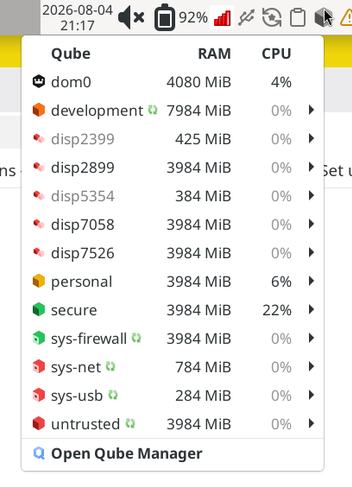
I don’t know what to make of this right now.
- Do you have a custom suspend script?
- Do you have configured suspend in Xfce different than the default? If yes, could you please share?
- Do you know what triggers the fast lid open close open?