I’ve managed to install Qubes on the new Dell XPS 14 DA14260, but I have a lot of Intel Corporation unknown pci device:
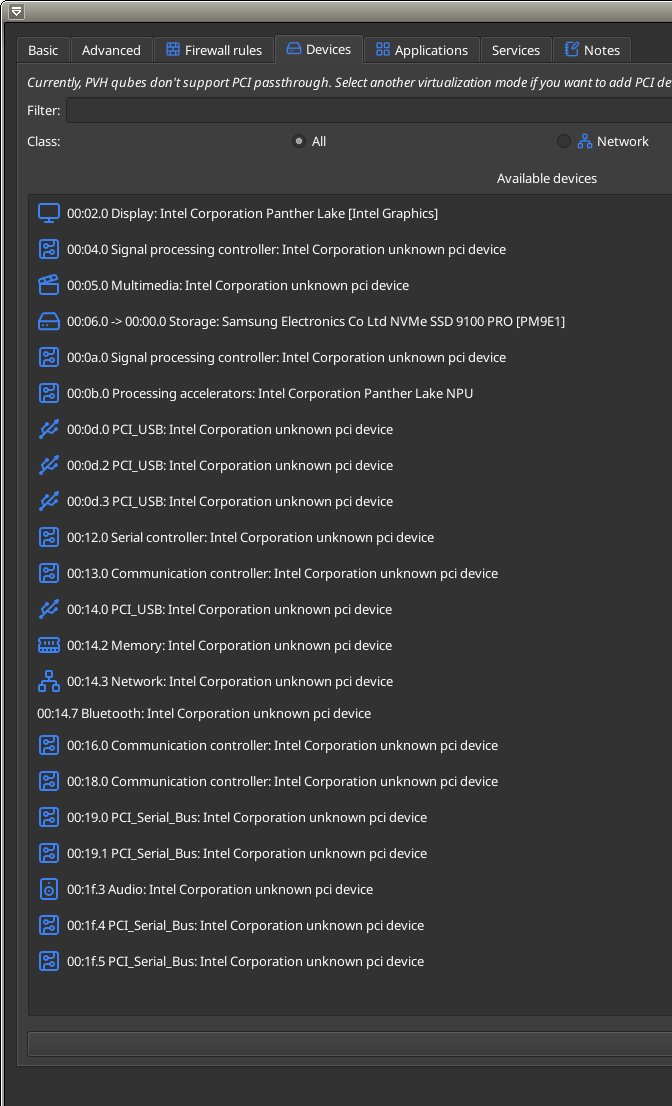
I’m running on kernel-latest and dom0 is up-to-date.
What else can I do to have these PCI devices recognized ?
Here is the output of lspci -nnk in dom0:
lspci -nnk
pierre@dom0:~$ lspci -nnk
00:00.0 Host bridge [0600]: Intel Corporation Device [8086:b001] (rev 04)
	Subsystem: Dell Device [1028:0db9]
	Kernel driver in use: igen6_edac
	Kernel modules: igen6_edac
00:02.0 VGA compatible controller [0300]: Intel Corporation Panther Lake [Intel Graphics] [8086:b080] (rev 04)
	Subsystem: Dell Device [1028:0db9]
	Kernel driver in use: xe
	Kernel modules: xe
00:04.0 Signal processing controller [1180]: Intel Corporation Device [8086:b01d] (rev 04)
	Subsystem: Dell Device [1028:0db9]
	Kernel driver in use: proc_thermal_pci
	Kernel modules: processor_thermal_device_pci
00:05.0 Multimedia controller [0480]: Intel Corporation Device [8086:b05d] (rev 04)
	Subsystem: Dell Device [1028:0db9]
	Kernel modules: intel_ipu7
00:06.0 PCI bridge [0604]: Intel Corporation Device [8086:e461] (rev 01)
	Subsystem: Dell Device [1028:0db9]
	Kernel driver in use: pcieport
00:07.0 PCI bridge [0604]: Intel Corporation Device [8086:e44e] (rev 01)
	Subsystem: Dell Device [1028:0db9]
	Kernel driver in use: pcieport
00:07.1 PCI bridge [0604]: Intel Corporation Device [8086:e44f] (rev 01)
	Subsystem: Dell Device [1028:0db9]
	Kernel driver in use: pcieport
00:07.2 PCI bridge [0604]: Intel Corporation Device [8086:e460] (rev 01)
	Subsystem: Dell Device [1028:0db9]
	Kernel driver in use: pcieport
00:0a.0 Signal processing controller [1180]: Intel Corporation Device [8086:b07d] (rev 04)
	Subsystem: Dell Device [1028:0db9]
	Kernel driver in use: intel_vsec
	Kernel modules: intel_vsec
00:0b.0 Processing accelerators [1200]: Intel Corporation Panther Lake NPU [8086:b03e] (rev 04)
	Subsystem: Dell Device [1028:0db9]
	Kernel modules: intel_vpu
00:0d.0 USB controller [0c03]: Intel Corporation Device [8086:e431] (rev 01)
	Subsystem: Dell Device [1028:0db9]
	Kernel driver in use: pciback
	Kernel modules: xhci_pci
00:0d.2 USB controller [0c03]: Intel Corporation Device [8086:e433] (rev 01)
	Subsystem: Dell Device [1028:0db9]
	Kernel driver in use: pciback
	Kernel modules: thunderbolt
00:0d.3 USB controller [0c03]: Intel Corporation Device [8086:e434] (rev 01)
	Subsystem: Dell Device [1028:0db9]
	Kernel driver in use: pciback
	Kernel modules: thunderbolt
00:12.0 Serial controller [0700]: Intel Corporation Device [8086:e445] (rev 01)
	Subsystem: Dell Device [1028:0db9]
	Kernel driver in use: intel_ish_ipc
	Kernel modules: intel_ish_ipc
00:13.0 Communication controller [0780]: Intel Corporation Device [8086:e462] (rev 01)
	Subsystem: Dell Device [1028:0db9]
00:14.0 USB controller [0c03]: Intel Corporation Device [8086:e47d] (rev 01)
	Subsystem: Dell Device [1028:0db9]
	Kernel driver in use: xhci_hcd
	Kernel modules: xhci_pci
00:14.2 RAM memory [0500]: Intel Corporation Device [8086:e47f] (rev 01)
	Subsystem: Dell Device [1028:0db9]
	Kernel driver in use: intel_pmc_ssram_telemetry
	Kernel modules: intel_pmc_ssram_telemetry
00:14.3 Network controller [0280]: Intel Corporation Device [8086:e440] (rev 01)
	Subsystem: Intel Corporation Device [8086:4110]
	Kernel driver in use: pciback
	Kernel modules: iwlwifi
00:14.7 Bluetooth [0d11]: Intel Corporation Device [8086:e476] (rev 01)
	Subsystem: Intel Corporation Device [8086:0011]
	Kernel driver in use: pciback
	Kernel modules: btintel_pcie
00:16.0 Communication controller [0780]: Intel Corporation Device [8086:e470] (rev 01)
	Subsystem: Dell Device [1028:0db9]
	Kernel driver in use: mei_me
	Kernel modules: mei_me
00:18.0 Communication controller [0780]: Intel Corporation Device [8086:e45d] (rev 01)
	Subsystem: Dell Device [1028:0db9]
00:19.0 Serial bus controller [0c80]: Intel Corporation Device [8086:e450] (rev 01)
	Subsystem: Dell Device [1028:0db9]
	Kernel driver in use: intel-lpss
	Kernel modules: intel_lpss_pci
00:19.1 Serial bus controller [0c80]: Intel Corporation Device [8086:e451] (rev 01)
	Subsystem: Dell Device [1028:0db9]
	Kernel driver in use: intel-lpss
	Kernel modules: intel_lpss_pci
00:1f.0 ISA bridge [0601]: Intel Corporation Device [8086:e402] (rev 01)
	Subsystem: Dell Device [1028:0db9]
00:1f.3 Audio device [0403]: Intel Corporation Device [8086:e428] (rev 01)
	Subsystem: Dell Device [1028:0db9]
	Kernel driver in use: sof-audio-pci-intel-ptl
	Kernel modules: snd_sof_pci_intel_ptl, snd_hda_intel
00:1f.4 SMBus [0c05]: Intel Corporation Device [8086:e422] (rev 01)
	Subsystem: Dell Device [1028:0db9]
	Kernel driver in use: i801_smbus
	Kernel modules: i2c_i801
00:1f.5 Serial bus controller [0c80]: Intel Corporation Device [8086:e423] (rev 01)
	Subsystem: Dell Device [1028:0db9]
	Kernel driver in use: intel-spi
	Kernel modules: spi_intel_pci
01:00.0 Non-Volatile memory controller [0108]: Samsung Electronics Co Ltd NVMe SSD 9100 PRO [PM9E1] [144d:a810]
	Subsystem: Samsung Electronics Co Ltd Device [144d:a801]
	Kernel driver in use: nvme
	Kernel modules: nvme