Debian 13 templates available

The following new Debian 13 templates are now available for both Qubes OS 4.2 (stable) and Qubes OS 4.3 (release candidates):

  • debian-13-xfce (default Debian template with the Xfce desktop environment)
  • debian-13 (alternative Debian template with the GNOME desktop environment)
  • debian-13-minimal (minimal template for advanced users)

There are two ways to upgrade a template to a new Debian release:

  1. Recommended: Install a fresh template to replace the existing one. This option is simpler for less experienced users, but it won’t preserve any modifications you’ve made to your template. After you install the new template, you’ll have to redo your desired template modifications (if any) and switch everything that was set to the old template to the new template. If you choose to modify your template, you may wish to write those modifications down so that you remember what to redo on each fresh install. In the old Debian template, see /var/log/dpkg.log and /var/log/apt/history.log for logs of package manager actions.

  2. Advanced: Perform an in-place upgrade of an existing Debian template. This option will preserve any modifications you’ve made to the template, but it may be more complicated for less experienced users.

Note: No user action is required regarding the OS version in dom0 (see our note on dom0 and EOL).


This is a companion discussion topic for the original entry at https://www.qubes-os.org/news/2025/10/30/debian-13-templates-available/
6 Likes

OK, following the bread crumbs, it says I can download these with the template manager.

However the template manager only shows me what I already have installed (debian-12-minimal and debian-12-xfce).

I just do the following in dom0 terminal (never had much luck with template manager)

Sudo qubes-dom0-update qubes-template-debian-13-xfce

Thank you, but…

qvm-template: error: Template 'debian-13-xfce' not found.

Which might explain why template manager doesn’t show it; but why can’t it be found by command line?

Apparently qvm-template throws a “usage” message when you ask for a template it doesn’t know about. Which seems inappropriate to me; the command syntax is legit.

As a test, can you get a positive result if you do the same command for fedora-42 (I assume you already have xfce for it but not gnome) ?

Sudo qubes-dom0-update qubes-template-fedora-42

Once it starts downloading you can Ctrl C to abort

Nope. It can’t find Fedora-42 either.

It claims to be “redirecting to ‘qvm-template install fedora-42’”

qvm-template list --available (which should match everything) says there are no matching templates to list.

(by the way I don’t use Fedora templates at all)

Yes qvm-template install is the new replacement

That’s very odd, like you don’t have the repository enabled. What repos are checked in qubes global settings for update tab ?

I downloaded and installed fedora-42-xfce a few days ago so at least that should be in there

Official templates (grayed out and checked), community templates, community testing templates. But not official testing templates.

Dom0 update proxy is sys-firewall-wifi (which is to say the sys-firewall qube on my system that interacts with the wifi controller).

I have the same repos checked. I just did the command for debian-13-xfce and it’s currently downloading the template. Weird

Your wifi must be fine, it was able to connect and confirm no templates (vs timing out)

Sorry, I’m out of ideas. Hopefully someone wiser can help out

Yeah I am pretty confident in my wifi being fine…since that’s how I am able to visit this site!

Thanks for the effort!

1 Like

My laptop is downloading debian-13 (and soon to be doing debian-13-minimal) without any apparent trouble. (I am using the command line there.)

It’s just as well since I generally test new releases on it anyway. It’ll likely be the first of my two qubes machines to get 4.3, too.

1 Like

The whonix-18 templates are going to be switching to Debian-13 with LXQt
desktop environment. I value UX consistency between my whonix-18 qubes
and debian-13 qubes. So, which template should I download? I am
thinking debian-13-xfce shouldn’t be the one I use. What desktop
environment is the debian-13 shipped with? Gnome? (yuck!)

Is there going to be qubes-os-specific buttons on the LXQt file manager
(PCManFM) as well (right click options such as Move to qube or Open in qube, etc)? If not by default, how can one get them to LXQt desktop environment?

Why don’t just install xfce on whonix? Afaik they’re switching for wayland which I suspect you don’t have on xfce qubes (unless you’re running testing system)

Why don’t just install xfce on whonix?

I don’t want to go against the upstream whonix, and I want to stay with
their system config. I don’t want to mess with the whonix template so
much as it has lots of moving parts and configurations that work
together in various ways (that are mostly invisible to me).

Instead, I want to get the debian-13 with LXQt as well, so that I have
some UX parity between these two templates.

Clone the debian-13-minimal template to debian-13-lxqt
Open a root shell in the new template and run:
apt install lxqt

If you want to use the new template for other purposes, see this page
Use the Template Switcher to change your qubes to use the new template.

I never presume to speak for the Qubes team.
When I comment in the Forum I speak for myself.

1 Like

Instead, I want to get the debian-13 with LXQt as well, so that I
have some UX parity between these two templates.

Clone the debian-13-minimal template to debian-13-lxqt
Open a root shell in the new template and run:
apt install lxqt

Will this setup going to have the qubesos-additions, like, right click
on file manager > Move to qube, etc.???

Also, can somebody answer my original question: what
desktop-environment-specific packages does debian-13 come with? With
debian-13-xfce, it is in the name. But debian-13 itself is ambiguous.

As far as I’m aware the regular “debian” or “fedora” are by default GNOME. And there’s a package you can download (and a plugin for Thunar?) that’ll add the move/copy-to feature. But that should come by default with anything but minimal.

And it couldn’t hurt to just download debian-13 and see. Let the download take place in the background, boot it up, if you don’t like it, delete it.

Of course it will have it. Screenshot:

debian-13-xfce → Of course XFCE
debian-13 → GNOME DE
debian-13-minimal → Just xterm and some minimal GUI tools. Feel free to clone it and install morph it to LXQt

Before asking why not shipping a pre-built LXQt, KDE, … flavor of the Debain or Fedora, the ultimate answer is for Qubes OS team to answer. But I believe a limitation of available resources, build infra, time, …
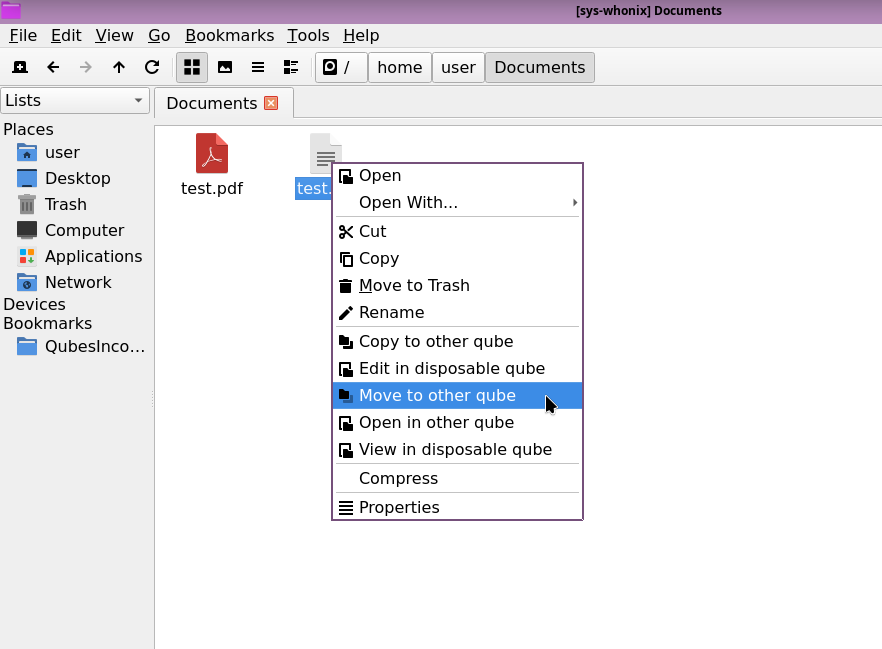
2 Likes

Of course it will have it. Screenshot:

pcmanfm-qt

The screenshot is showing sys-whonix (based on whonix-18, I guess?), while we were talking about:

  1. debian-13 template
  2. installing lxqt packages to it

Whether that one will have right click > move to qube integration.