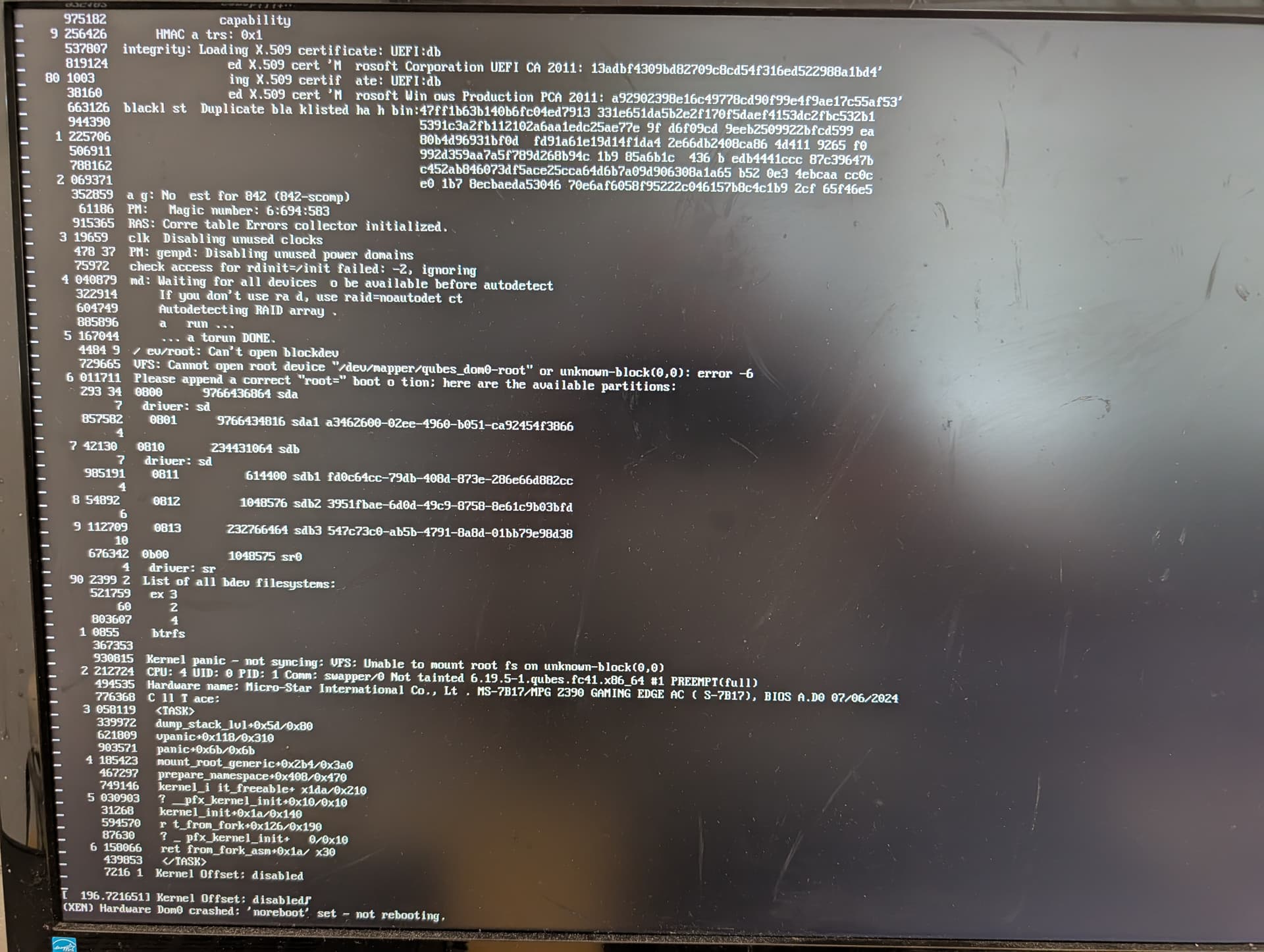
Hi! I’ve been using Qubes succesfuly for over a year but seems I need some help now.
After the 4.3 upgrade I can no longer get past the grub uefi screen to the luks encryption screen. Screen goes black and resets the machine. The problem seems to be fedora 41 version of Dom0. Using kernel 6.19.5-1.fc37 allows me to enter Qubes as normal. Everything else is seemingly ok. The VMs are working normally while using 6.19.5-1.fc41 kernel. Only Dom0 is affected with this.
I did not find a similar problem while browsing the forum.
More info:
I did in place upgrade
needed to exclude some custom (windows) templates to for the upgrade script to work
Could you try and edit the GRUB options for the default/faulty kernel and:
remove quiet from the line starting module2 /vmlinuz-..
replace console=none with console=vga vga=,keep loglvl=all guest_loglvl=all noreboot=1 earlyprintk=xen as options to Xen
and boot with this options (Ctrl-x or F10, iirc).
These options should make the machine boot in a very verbose/slow mode - and print all messages, so you can see them … and without the machine rebooting.
00:00.0 Host bridge: Intel Corporation 8th/9th Gen Core 8-core Desktop Processor Host Bridge/DRAM Registers [Coffee Lake S] (rev 0a)
00:01.0 PCI bridge: Intel Corporation 6th-10th Gen Core Processor PCIe Controller (x16) (rev 0a)
00:08.0 System peripheral: Intel Corporation Xeon E3-1200 v5/v6 / E3-1500 v5 / 6th/7th/8th Gen Core Processor Gaussian Mixture Model
00:12.0 Signal processing controller: Intel Corporation Cannon Lake PCH Thermal Controller (rev 10)
00:14.0 USB controller: Intel Corporation Cannon Lake PCH USB 3.1 xHCI Host Controller (rev 10)
00:14.2 RAM memory: Intel Corporation Cannon Lake PCH Shared SRAM (rev 10)
00:14.3 Network controller: Intel Corporation Cannon Lake PCH CNVi WiFi (rev 10)
00:16.0 Communication controller: Intel Corporation Cannon Lake PCH HECI Controller (rev 10)
00:17.0 SATA controller: Intel Corporation Cannon Lake PCH SATA AHCI Controller (rev 10)
00:1d.0 PCI bridge: Intel Corporation Cannon Lake PCH PCI Express Root Port #9 (rev f0)
00:1f.0 ISA bridge: Intel Corporation Z390 Chipset LPC/eSPI Controller (rev 10)
00:1f.3 Audio device: Intel Corporation Cannon Lake PCH cAVS (rev 10)
00:1f.4 SMBus: Intel Corporation Cannon Lake PCH SMBus Controller (rev 10)
00:1f.5 Serial bus controller: Intel Corporation Cannon Lake PCH SPI Controller (rev 10)
00:1f.6 Ethernet controller: Intel Corporation Ethernet Connection (7) I219-V (rev 10)
01:00.0 VGA compatible controller: NVIDIA Corporation GB203 [GeForce RTX 5080] (rev a1)
01:00.1 Audio device: NVIDIA Corporation GB203 High Definition Audio Controller (rev a1)
02:00.0 Non-Volatile memory controller: Samsung Electronics Co Ltd NVMe SSD Controller SM981/PM981/PM983
I run Qubes from an SSD, have another M2.NVME SSD with Windows 10 on it for gaming (these do not interact) and a big HDD which contains no OS. There was no hardware change done after upgrade to 4.3.
Yeah, it’s connected with a standard SATA cable. The older v37 is on 6.19 kernel too and works fine so indeed this looks strange… Since this is only Dom0 running it’s old version it should not affect overall security right? I have not found any buggy behavior otherwise and the UI is from 4.3.
Hi guys. It’s me again. I have some more information. Looking at the contents of /boot inside Dom0 I see I have initramfs-6.19.5-1.qubes.fc37.x86_64.img but no initramfs-6.19.5-1.qubes.fc41.x86_64.img. I’ve tried running sudo dracut -f /boot/initramfs-6.19.5-1.qubes.fc41.x86_64.img 6.19.5-1.qubes.fc41.x86_64 and it regenerated the initramfs file but the system is still not booting. How do I regenerate this file properly? Or should I run the script with --all-post-reboot again?
Ok guys, thanks for the help, both of you. So it turns out the upgrade did not generate initramfs files for the new Dom0 kernel. After doing that Qubes can now boot again. Solved