In case anyone else is looking for a more official source for the RPC policy for an audio qube, I found this one in the qubes-mgmt-salt-dom0-virtual-machines repository. You can switch to the branch for your Qubes OS version if it makes a difference.
1 Like
But did you test it? 
Yes, on my Qubes 4.2 system, I followed most of the guide but with the RPC policy from the repository in place of the one from the guide. In a simple test, I was able to both play and record audio in a VM other than the AudioVM, despite some RPC denial notifications. I experienced some glitches that I haven’t investigated, but I don’t think they were related to RPC policy. Because my motivation for using an AudioVM was to use Bluetooth headphones, not concern about the attack surface of audio in dom0, I decided to revert to audio in dom0 so I don’t have to live with the glitches unless/until I need the AudioVM again.
The two policy files are very similar, as you can see if you diff them (it helps to sort the lines first). AFAICT the only things allowed by the policy in the guide and not in the repository are admin.vm.feature.CheckWithTemplate +audio-low-latency and +supported-service.pipewire; those might be relevant to features I didn’t test. The policy in the guide also suppresses the denial notifications for admin.vm.property.GetAll. The policy in the repository provides an alternative for security-conscious users who feel it’s sufficiently clear that most of the guide is harmless but aren’t sure about the policy, which was my case.
1 Like
So, my HVM owns dGPU and its audio device. HVM is sent to TV via HDMI/DP. HVM’s audiovm is set to sys-audio, but naturally no sound there, because sys-audio doesn’t own sound device and the only way to get the audio is on TV’s speakers.
Can I get this HVM’s audio via sys-audio at all? I am not sure I can split dGPU to HVM and its audio device to sys-audio and HVM to start successfully.
For the sake of clarity, I’m replying to myself:
Actually it is possible to split audio device from its dGPU and to assign it to sys-audio and everything works smoothly!
Jesus, and I tortured myself for so long with a shitty TV sound, so thanks @solene for an inspiration!
Now, new idea: does it make sense to create separate sys-audio for each audio device for the goal of compartmentalization?
1 Like
Thank you so much for this post! It’s really help me!
Sys-audio qube doesn’t work for Windows HVM. Can’t set as audio-vm. I am using 4.2
1 Like
Tested it, it seems to be broken. module-vchan-sink seems to be ignoring the domid parameter. Haven’t tried to debug it yet
This breaks when upgrading the other qubes (not audio qube) from debian 12 to 13. Does anyone have any ideas?
Turned out it’s because I did a manual upgrade instead of swapping the template where some packages broke
1 Like
This guide up to date?
Stuck at Audio qube , V56, 4.3.0rc2, from this point don’t have any sound from device.
also service audiovm don’t available for choose in sys-audio services.
You need to add custom services (by typing it names):
audiovm
network-manager
where network-manager must be unchecked (so it’s not loading, but without it, it won’t be recognized as service qube)
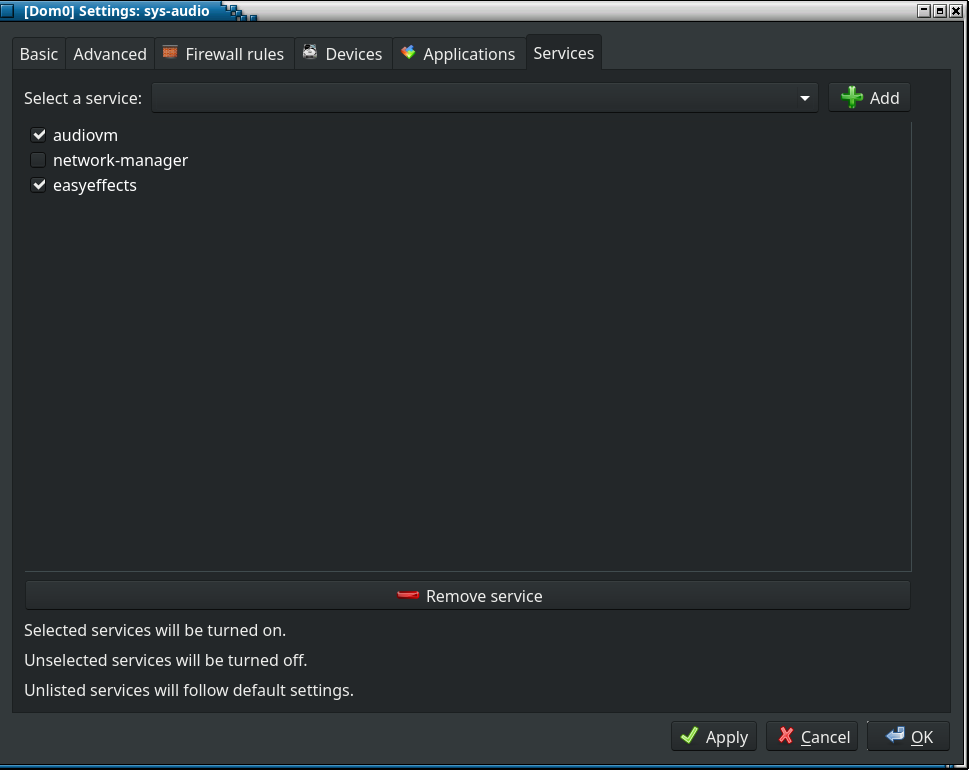
2 Likes
Look like big step forward, now I can see additional sound bar control related to sys-audio.
But in settings it don’t show any audio devices, only microphone.
Within sys-audio:
aplay /usr/share/sounds/alsa/Noise.wav
Result in error:
aplay main:850: audio open error: Host is down

Yes and strict reset was requested to start sys-audio after that.
Does alsactl info shows any cards?
$ alsactl info
#
# Sound card
#
- card: 0
  id: PCH
  name: HDA Intel PCH
  longname: HDA Intel PCH at 0xf2100000 irq 59
  driver_name: HDA-Intel
  mixer_name: Realtek ALC257
  components: HDA:10ec0257,17aa22e8,00100001 HDA:8086281c,80860101,00100000
  controls_count: 16
  pcm:
    - stream: PLAYBACK
      devices:
        - device: 0
          id: ALC257 Analog
          name: ALC257 Analog
          subdevices:
            - subdevice: 0
              name: subdevice #0
    - stream: CAPTURE
      devices:
        - device: 0
          id: ALC257 Analog
          name: ALC257 Analog
          subdevices:
            - subdevice: 0
              name: subdevice #0
alsactl: rawmidi_device_list:109: snd_ctl_rawmidi_next_device: Inappropriate ioctl for device
1 Like
Yes, it is and very similar to your info report.
Just with another realtek model
systemctl --user status pipewire{,-pulse} wireplumber
is everything active and running?
2 Likes
active, but with 3 errors:
*data, time* sys-audio systemd[737]: Started pipewire.service - PipeWire Multimedia service.
*data, time* sys-audio pipewire[736]: mod.qubes-audio no /qubes-audio-domain-xid entry in QubesDB
*date, time* sys-audio pipewire[736] mod.qubes-audio: unknown peer domain, cannot create stream
*date, time* sys-audio pipewire[736]: mod.qubes-audio: unknown peer domain, cannot create stream
you could run it in template or in sys-audio
sudo dnf list --installed pipewire-qubes
1 Like