I had previously installed R4.3.0rc3 and now I just reinstalled completely R4.3.0rc4.
In both cases, I have lost the applications icons on the right click menu on the background.
On R4.2.4, there is a coloured icon next to every application in that menu.
Is this an expected behaviour?
I have the same issue. Clean R4.3.0 installation from the other day.
“shows icons in menu” is checkboxed in applications menu item setting inside panel preferences. so there is no reason to not show the icons…
@moderators i dont have a github account and have no phone number to sign up. How can I report the bug? obviously devs dont read posts (or dont care about them)
I did not (yet) redo a fresh R4.3.0 installation but after a while in my R4.3.0-rc4 installation, after some updates on top of it and reboots, I got the icons back.
You can have hope!
I was almost done creating the bug report on github. I m logged in qubes 4.3 now and I do not have the icons. I Have no updates available for dom0. I rebooted but still no icons here for some reason…
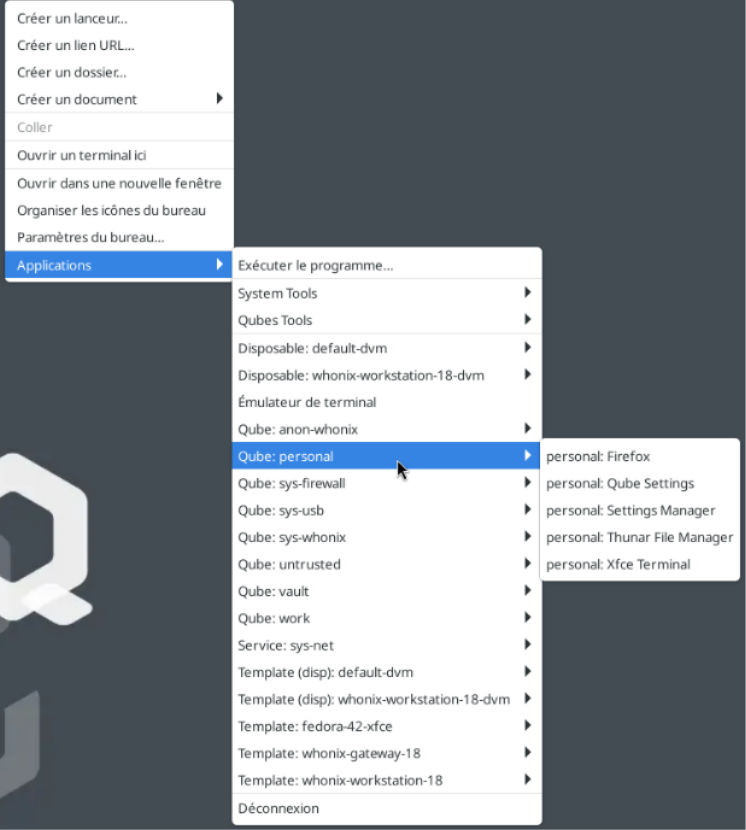

 i was posting it for reference
 I closed the issue also since I found the fix