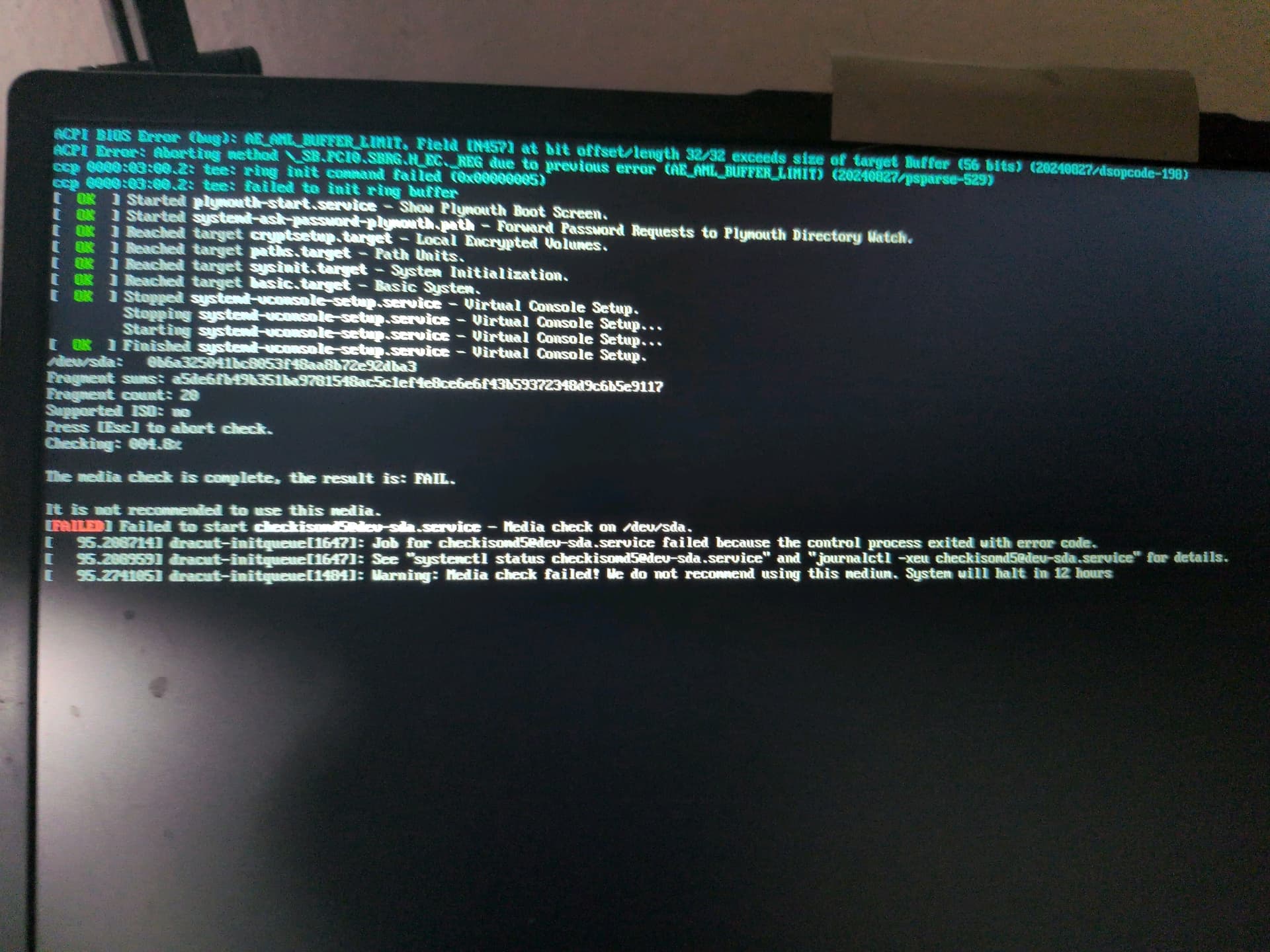
I’m trying to update 4.2 to 4.3 but it is giving black screens and errors and never finishes installing. I have Acer Aspire 3 Laptop | AMD Ryzen 5 7430U CPU | 15.6 FHD IPS Display | 16GB RAM | 1TB PCIe SSD |
I don’t know anything about linux or qubes or AMD or firmware. I just know that 4.2 support is ending and just buying another laptop isn’t an option (unless someone wants to buy me one or something). I have to make do with what I have and get it to work. It fails the media test when I try to test media and install from a usb iso. Fortunately by just pulling out the USB and restarting a few times I can boot 4.2 back up. Even before this, during 4.2, sometimes it had an issue where it would boot to a black screen, and I’d have to enter the disk pass blindly, hit enter, then the user pass, then enter.
I need some kind of real solution, GPT takes 8 housr to walk me through how to install a program in qubes nonsensical anti-user UI (who or what even is sudo, why wouldn’t you just have an ‘install’ option when clicking a repo?), and is no help for this. Like I said simply not using AMD isn’t really a viable answer for me. It’s what I have
Before you begin detailed troubleshooting, I see this:
If you did not fix it, then probably nothing else will help.
Can you tell us which installation guide you used, and did you search for anything to find a solution on this forum or in docs?
Or what did you ask ChatGPT ? It is not sure to give helpful answers - they could even be dangerous, but the questions are interesting.
I’;m not sure, I was using GPT to help try to walk me through it, but for this one I was simply using rufus to build the ISO of 4.3 on a USB (MBI or some such I think it said to use). anyway I plugged it in and fired it up, and tried the media test, which failed, and then decided to hit install and see if it would load the installation GUI anyway. it spat out a bunch of console commands that I’ve come to associate with some kind of graphical failure (when qubes works its supposed to go to a GUI, not ms dos style data spam with something about lightsomething fialing to boot or whatever). I rebooted back to 4.2 which still works for now, and depending on the kernsel used it boots to a black screen or boots normally (4.2 I mean) but with 4.2 it still LOADS you just have to enter disk/login pass bilnd and hit enter, then it goes to the normal GUI desktop.
I have no friends who can help and I rarely use forums except as absolute last resort, so it told me a few vaguely confusing things, though it can (eventually) be coaxed into vaguely accurate commands (it took like 20 hours but I got a program installed using that ridiculous sudo install nonsense in a terminal, and a weke later it bothered to tell me you have ot install to template VMs if you want programs to stay)
No but it does suggest that the official docs might be a better guide
than chatgpt.
As to the lack of GUI on the install it would help if you provided more
information about your computer hardware, and what you have tried so
far. Help us to help you.
I never presume to speak for the Qubes team.
When I comment in the Forum I speak for myself.
Two people have asked about where you have searched for solutions and what you have tried.
This is to allow us to understand where to start, and to avoid repeating things which we hope you would have found in documentation.
It is also because ChatGPT can give very clear and easy to follow instructions which introduce persistent problems that we cannot possibly anticipate. I would also like to know if there are other reasons to use it in place of the documentation, such as accessibility problems.
There are other reasons why people here ask questions, but in all cases the people here need you to help. Failure to be open, pertinent, and helpful can lead some of us to suspect that a user is actually run by a malicious chatbot. It is a problem of online interactions without face-to-face presence.
Lastly, without knowing what instructions you have tried, we do not know that you have seen the first and most important one in the upgrade guide.
Assuming that your current 4.2 system has been modified by ChatGPT, it may be better to go back to trying to upgrade by making a new installation, using a carefully prepared and verified USB key…
…after making and verifying a full backup of all your data.
I guess I wasn’t aware of the endemic of chatbots in the qubes help forum. I try to avoid forums like the plague lest questions be deemed unworthy of being questions by people who make sure to let you know that your question is unworthy, offended by the notion that someone is just beginning their precious hobby or missed something in a wall of text.
And I’ve tried here because trying to search for a solution on my own didn’t work.
And I said I tried following a guide to put a 4.3 ISO on a USB (in DD image mode like the guide said). I specified AMD because I did actually notice that there seems to be an issue with it.
In 4.2 you could get around blackscreens by just entering the disk key, hit enter, user login password, hit enter, and that blind login would work, annoying though it was.
With the 4.3 USB, it seems to fail completely, as did trying to install via those awful terminal commands (in both case some process or thing called light something or other fails, I don’t have a screenshot on hand). As far as I’ve been able to find its something to do with AMD, but eventually I might stumble on some kind of workaround, but I expected to simply have to use 4.2 past its support point.
I took gpts advice and put in nomodeset rd.driver.blacklist=nouveau rd.driver.blacklist=radeon rd.driver.blacklist=amdgpu video=vesa:off inst.text at the kernel thingy (pressing E on install qubes and going to vmlinux or whatever the second line down is) and now its saying failed to adjust memory pressure threshhold etc as before, but now is in a text console with a green bar at the bottom, asking for 1 (x) lagnuage settings, 2 Time settings 3) installation source 4) software selection 5 installation destination 7 user creation
Now, I have no guarnatee if this will actually work once installed (qubes is GUI based after all, and I dont think I could handle perpetual ms dos-esque mode privacy or not), but for what its worth that does make the installer actually load options instead of just failing out:
anaconda 41.28-4.fc41 for qubes OS R4.3 started. failed to adjust memory pressure threshhold, ignoring: device or resoource busy queyed start job for default target default.target failed to adjust memory pressure threshhold, ignoring: devie or resource busy startup finished in 369ms 00:11:16 X startup failed, aborting installation the installation cannot continue and the systme will be rebooted, presse enter to continue
so that didn’t work, whether with a USB or the terminal upgrade process, the qubes pool fundamentally breaks, and things like lightdm.service can’t start.
I guess since there was no help, AMD simply cahnnot work with 4.3, period. Thanks for trying, GPT.
This is the first time you mention dd. We must still guess whether that means dd mode in Rufus, or a dd command in linux or Qubes. You mention a guide, but not which one.
We must guess what USB key you used, or what size, and we do not know if you have used Rufus or any other method to test the data on the key after it was written. I do not know Rufus - does it allow to do a test like that?
Even when you try using the key:
you seem to prefer to provide an unclear description of the observed behaviour : “light something or other fails” is not helpful communication.
Again, we are guessing: is this immediately after booting from the USB? After reboot? Did you try the “latest kernel” boot option? Did you try any version, or both versions, with the work-around suggested by @anon40243023? Did you try with a screen attached to the external port of the laptop?
I suspect that some, or maybe most people here are thinking that your lack of clarity and failure to reply to simple questions are strategies designed to waste time and frustrate. Personally, I am rather curious… but I have no idea what you have tried so far, except for that slightly strange text-only installation method.
Do you care to try to give clearer, more methodical, and less obfuscated descriptions?
I mean Renehoj is the only one that offered a concrete solution. I don’t actually know or udnerstand qubes or linux. That’s why I’m here. I absolutely hate linux and would never touch it or qubes if not for the regime currently entrenching itself. It’s why I just use gpt. It at least tries to help, and understands that I don’t understand what I’m looking at necessarily. Somethign regarding failure to launch lightdm I think. Anyway I did eventually find a way by trying random things at gpt’s suggestion: booting in BIOS legacy rather than UEFI, and then adding Renehoj’s linked suggestion afterwards (booting in BIOS enabled the installer to load at all, and Renehoj’s link got it to stabilize when rebooting), and about 3 hours later found out how to go through the clunky process of making that permanently part of the boot (Everything is needlessly difficult in linux, its like MS DOS made a comeback). The stick was made using rufus as suggested, 128gb, and yes I did make it with DD. I assumed the size wasn’t relevant since it was capable of holding the ISO to begin with. And the issue with AMD is that when it boots in 4.3, without that workaround (BIOS and that adjustment to the boot, GRUP or something its called apparently), the display drivers just crash out, so you have to blacklist them specifically. The guide is the one linked on the qubes website.
I don’t know why you’d think I’d come here just to waste time. I figured it was a waste of time than to bother with forums, getting such answers as “it worked for me”. Great. thanks. For beings that are not you, that may not be anything excepts elf validation. But I threw a hail mary and with a little help from AI figured out how to get it to boot at least, through a ridiculous workaround.