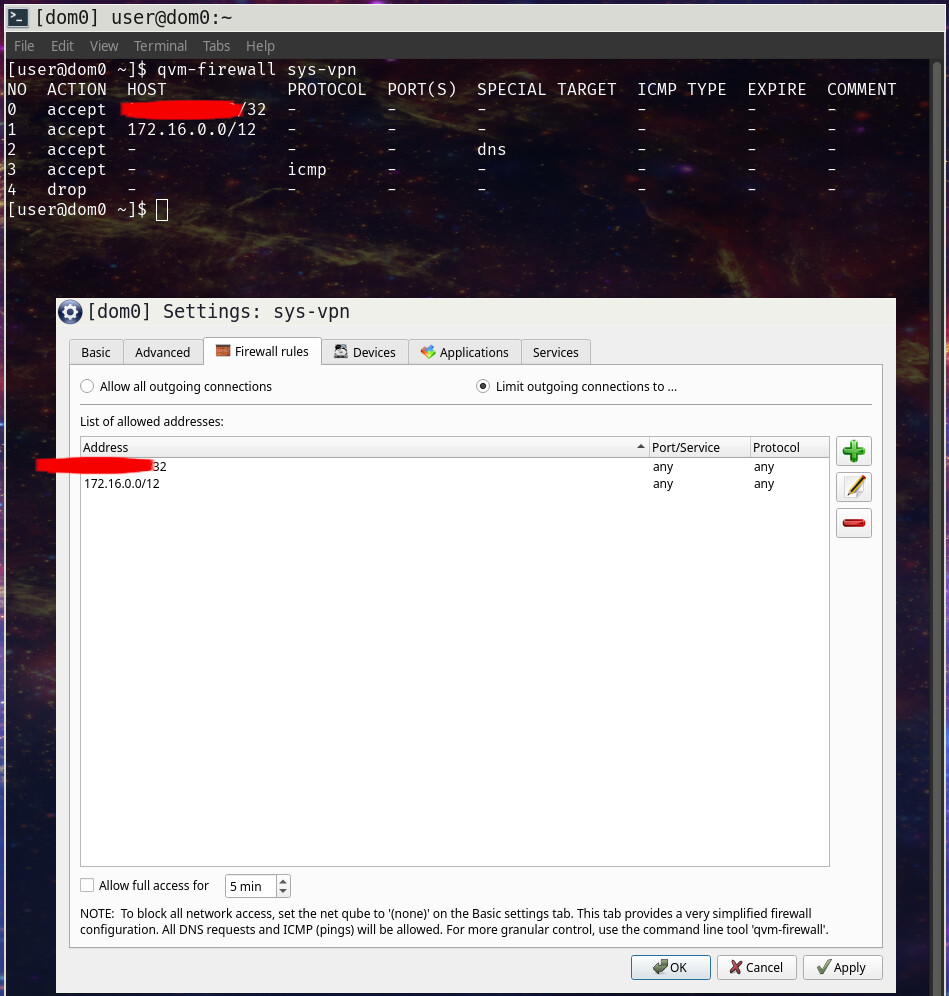
I do not have a wireguard server at home. I only have a wireguard client, which exists only in the sys-vpn qube that I created using this guide. There are no other wireguard components, except for the remote ProtonVPN server.
I connect to my private subnet through my router. Very simple. For example, some-qube → sys-firewall → sys-net will allow me to reach my private subnet without any wireguard configuration anywhere.
In this case, you need to modify the allowed IPs of the VPN to create a “hole” for your Lan subnet, and also allow it on the firewall, this should work.
If you need to reach a specific service, you may prefer to connect using a connectTCP rpc call, basically this allows your Qube behind the VPN to ask another Qube to handle the connection to your destination, this is a method to mix multiple netvm.
The process I described here should work then, right?
Is there some testing I can do to troubleshoot? Because I am still not able to reach my LAN subnet despite putting this hole in the AllowedIPs and also updating the Firewall Rules on sys-vpn.
After some more troubleshooting, I have realized that I had two nmcli entries for vpn-client, and that seemed to cause some conflict. It looked something like this:
user@sys-vpn:~$ nmcli connection show
NAME            UUID                                  TYPE       DEVICE
VM uplink eth0  de85f79b-8c3d-405f-a652-00163e5e6c00  ethernet   eth0
lo              1046d055-695f-4869-b1ff-ace11b8a02e1  loopback   lo
vpn-client      5139b90a-05e3-407a-ae71-df002e48ea0f  wireguard  vpn-client
vpn-client      dfbf512b-5349-4eb5-9a14-ebdb3483b477  wireguard  --
I neglected to delete my earlier entry (which did not have the pinhole for the private subnet).
So, first I had to run nmcli connection delete vpn-client and then re-import the updated wireguard config with nmcli connection import type wireguard file vpn-client.conf. Doing so allows me then to connect to the private subnet, but then I cannot connect to WAN networks.
So, to summarize, and after using the correct nmcli commands to delete/re-add the wireguard config and restarting the sys-vpn qube:
Having 1.2.3.4/32 (the ProtonVPN endpoint) in my Firewall allow list + using AllowedIPs = 0.0.0.0/0 in my Wireguard config file - this only allows me to connect to WAN networks. No private subnet access.
Having 172.16.0.0/12 AND 1.2.3.4/32 (the ProtonVPN endpoint) in my Firewall allow list + using AllowedIPs = 0.0.0.0/1, 128.0.0.0/3, 160.0.0.0/5, 168.0.0.0/6, 172.0.0.0/12, 172.32.0.0/11, 172.64.0.0/10, 172.128.0.0/9, 173.0.0.0/8, 174.0.0.0/7, 176.0.0.0/4, 192.0.0.0/2 in my Wireguard config file - this only allows me to connect to private networks. No WAN access.
How can I use split tunneling to access 172.16.0.0/12 without the VPN, and all other traffic goes through wireguard?
Let’s build from this. This seems fine to me but it doesn’t work for you so there must be some small thing that is wrong in the setup.
Can you try a ping 1.1.1.1? This would allow to check if wan is working at least for this address. It’s in the range of the first allowedips. Maybe DNS isn’t working but everything else is good.
As root, when you do network requests, you could use the output of wg in the tx field of the peer to see if your system is using the VPN for those packets. If you do some networking and the tx counter does not increase, this mean the traffic does not use the VPN. If it increases, then check Rx counter, it increases when you receive data over the VPN.
If it’s Okay for you, could you try a few network requests with the firewall disabled to see if it works?
I cannot reach 1.1.1.1. The issue does not appear to be DNS.
I’m not exactly sure I’m following this, but I think this is the information you are looking for?
user@sys-vpn:~$ sudo wg
interface: vpn-client
  public key: [REDACTED BY 0x9060 for QubeOS Forum post]
  private key: (hidden)
  listening port: 42579

peer: [REDACTED BY 0x9060 for QubeOS Forum post]
  endpoint: [REDACTED BY 0x9060 for QubeOS Forum post]:51820
  allowed ips: 0.0.0.0/1, 128.0.0.0/3, 160.0.0.0/5, 168.0.0.0/6, 172.0.0.0/12, 172.32.0.0/11, 172.64.0.0/10, 172.128.0.0/9, 173.0.0.0/8, 174.0.0.0/7, 176.0.0.0/4, 192.0.0.0/2
  transfer: 0 B received, 296 B sent
user@sys-vpn:~$
user@sys-vpn:~$
user@sys-vpn:~$
user@sys-vpn:~$
user@sys-vpn:~$
user@sys-vpn:~$
user@sys-vpn:~$ ping 1.1.1.1 -s 5600
PING 1.1.1.1 (1.1.1.1) 5600(5628) bytes of data.
^C
--- 1.1.1.1 ping statistics ---
11 packets transmitted, 0 received, 100% packet loss, time 10270ms

user@sys-vpn:~$
user@sys-vpn:~$
user@sys-vpn:~$
user@sys-vpn:~$ sudo wg
interface: vpn-client
  public key: [REDACTED BY 0x9060 for QubeOS Forum post]
  private key: (hidden)
  listening port: 42579

peer: [REDACTED BY 0x9060 for QubeOS Forum post]
  endpoint: [REDACTED BY 0x9060 for QubeOS Forum post]:51820
  allowed ips: 0.0.0.0/1, 128.0.0.0/3, 160.0.0.0/5, 168.0.0.0/6, 172.0.0.0/12, 172.32.0.0/11, 172.64.0.0/10, 172.128.0.0/9, 173.0.0.0/8, 174.0.0.0/7, 176.0.0.0/4, 192.0.0.0/2
  transfer: 0 B received, 2.75 KiB sent
user@sys-vpn:~$
user@sys-vpn:~$
user@sys-vpn:~$
user@sys-vpn:~$
user@sys-vpn:~$
user@sys-vpn:~$ ping 172.22.132.1 -s 5600
PING 172.22.132.1 (172.22.132.1) 5600(5628) bytes of data.
5608 bytes from 172.22.132.1: icmp_seq=1 ttl=62 time=10.4 ms
5608 bytes from 172.22.132.1: icmp_seq=2 ttl=62 time=8.04 ms
5608 bytes from 172.22.132.1: icmp_seq=3 ttl=62 time=8.90 ms
5608 bytes from 172.22.132.1: icmp_seq=4 ttl=62 time=9.52 ms
5608 bytes from 172.22.132.1: icmp_seq=5 ttl=62 time=7.29 ms
^C
--- 172.22.132.1 ping statistics ---
5 packets transmitted, 5 received, 0% packet loss, time 4006ms
rtt min/avg/max/mdev = 7.286/8.831/10.410/1.093 ms
user@sys-vpn:~$
user@sys-vpn:~$
user@sys-vpn:~$
user@sys-vpn:~$ sudo wg
interface: vpn-client
  public key: [REDACTED BY 0x9060 for QubeOS Forum post]
  private key: (hidden)
  listening port: 42579

peer: [REDACTED BY 0x9060 for QubeOS Forum post]
  endpoint: [REDACTED BY 0x9060 for QubeOS Forum post]:51820
  allowed ips: 0.0.0.0/1, 128.0.0.0/3, 160.0.0.0/5, 168.0.0.0/6, 172.0.0.0/12, 172.32.0.0/11, 172.64.0.0/10, 172.128.0.0/9, 173.0.0.0/8, 174.0.0.0/7, 176.0.0.0/4, 192.0.0.0/2
  transfer: 0 B received, 3.32 KiB sent
So I see that wg sent traffic increased from 296 B (immediately after I re-started sys-vpn) to 2.75 KiB after sending 11 packets size 5600 B, and received traffic remained 0 B.
Sorry, I neglected to address these in my earlier post.
I have just tried the same with “Allow all outgoing connections” applied in the Firewall Settings for sys-vpn. Same result, no connection to 1.1.1.1.
I do not believe so. I have only configured the sys-vpn according to your original post if I recall correctly. Is there some way for me to check this? Anyway, with AllowedIPs = 0.0.0.0/0, I am able to reach 1.1.1.1, so if I had some nft rules in sys-vpn that I do not recall, that would not allow me to reach 1.1.1.1 in any instance, right?
Also, FWIW, here is my entire wireguard config file, with sensitive parts redacted:
At the risk of asking too much, is anyone able to replicate this, either successfully or unsuccessfully? Does anyone have other troubleshooting suggestions?
Should I open a ticket for this? Is it Qubes related? I think so, because I have tried all sorts of split-tunneling WG configs I’ve seen online and none of it works.
I don’t think it’s a qubes os issue but the setup itself is qubes specific.
When trying the changes, are you on the same setup or a clone or something that should be identical but might be different?
The current issue makes no sense to me. Maybe the allowed ips list is malformed or incorrect, but with a quick eyes glance it looks fine, but it doesn’t mean it’s all good.
If this doesn’t work, I think we can circumvent this with a nft rule that will force redirect the traffic to a different interface instead of wireguard.
It is on the same setup. This is why I have to run nmcli connection delete vpn-client and nmcli connection import type wireguard file vpn-client.conf each time making changes to my wireguard config.
What do you mean by this? I am ready to try anything at this point…
I just spent 3 hours going in circles with ChatGPT on this. I believe I have tried everything recommended and provided all the info I have. How do I setup the nft rule you are talking about?
Would you be willing to replicate this? i.e., try to ping your router gateway and your favorite DNS IP from your sys-vpn Qube.
Can you help me validate that this issue is not specific to my configuration as you are suggesting?
Modifying allowedips didn’t work for me either, the VPN never established. I used this solution once for a VPN that had some 10.0.0.0/8 allowed IPs to allow a Lan subnet of mine that was in the range, it worked fine. But it’s not working when starting from a 0.0.0.0/0 range.
By the way, I found the route trick on a allowedips range calculator.
How do you guys get port forwarding to work? Before I used wg-quick with qvm-connect-tcp, which worked flawlessly.
Do I have to do anything special with network-manager? I guess not using qrexec connections and only using nft rules in the vpn-qube and client-qube would be a lot better.
I think changing the ip here to the client and then applying the first snipped in the vpn qube only and then the second snipped in the client should be enough? IDK
Then, on Qubes OS it’s a bit more convoluted. If the vpn is established in a dedicated VPN Qube, in addition to this you need to forward the local port of the destination qube from the port of the VPN qube.