dom0:sda1 Block_Storage: sub-device of dom:sda <device label> <qube> (attached)
The last field with <qube> (attached) may be empty. The info here is stating that device sda is under the control of dom0, but it is not mounted to dom0. If sda or it’s partitions were mounted they would not show up in the qvm-block list command. I believe any device connected to your motherboard is going to be dom0:<device>, while things attached via usb will having something like sys-usb:<device>
I’m using 4.3, so maybe things are different, but the qvm-block list command does not tell me mount points of anything, just what block devices are available or attached to my various qubes.
If i need mount points of things, I need to run lsblk in dom0 to see what is system wide, or ‘lsblk’ in a qube terminal to see what that qube has available to mount. The qube can only see devices that have been attached with qvm-block attach command from dom0
All my disks and any other devices are listed on Qubes Devices. I have drive-vm and to access additional disks, I normally attach parent block storage to my drive-vm and go from there.
There are a lot of technical nuances in this thread that go over my head. Despite reading the responses to the best of my ability I’m still left scratching my head as to how to view all attached disks, in a modern, easy to use interface (like Gnome Disks, which is my preferred application), as opposed to the cryptic (for me) interface shown in the tray icon and with things like fdisk -l, df -h, and lsblk.
I think the major question is why? What is it that you want to do that
you need this utility?
@unman Put simply, because with Gnome Disks I can see my disk setup at a moment’s glance but with the tray icon display and the other utilities I mentioned, I can’t, at least not as easily. I really think that tray icon needs improvement in the way it displays disks.
This seems like a general caveat for such tools in dom0: You don’t want to use a tool that automatically scans each and every “disk”
@rustybird Correct me if I’m wrong, but what you’re saying is that there is no secure way to view all disks in dom0 in the standard way you would in any other Linux distribution?
Most disk viewer tools are probably fine to use, but I’m guessing that some are not: If they automatically scan all the content of all disks (including VM volumes) for partitions/filesystems/LUKS/etc., they should not be used in dom0.
Can we be clear about what you want to view please?
Do you want to view disks wired in to the machine, or do you want to
view disks attached to the machine through USB?
I never presume to speak for the Qubes team.
When I comment in the Forum I speak for myself.
Either @rustybird has been reading my Drafts and stealing my thoughts, or I’m not alone in thinking life would be much better with a lot less Dom0 in it!
It is so easy to get accustomed to using it, and it’s only when I try to show Qubes to someone else that I realise just how dangerous it is.
This is what information is shown on the tray icon:
Block_Storage: hosted by dom0 SHPP41-2000GM
	dom0:nvme0n1

Block_Storage: sub-device of dom0:4-4 USB3.0 NEW
	dom0:sdb

Block_Storage: sub-device of dom0:nvme0n1 SHPP41-2000GM
	dom0:nvme0n1p1

Block_Storage: sub-device of dom0:nvme0n1 SHPP41-2000GM
	dom0:nvme0n1p2

Block_Storage: sub-device of dom0:nvme0n1 SHPP41-2000GM
	dom0:nvme0n1p3

Block_Storage: sub-device of dom0:sdb USB3.0 NEW
	dom0:sdb1
I don’t know about anyone else but this is inadequate. Perfectly acceptable layout when troubleshooting something in a terminal. Completely unacceptable for every day use. It is not immediately clear what Block_Storage I need to transfer to my desired qube. It shares very little information and what information it does share is not useful. It’s not immediately obvious that sdb is a luks encrypted partition and that sdb1 is the appropriate Block_Storage to pass to my qube. And why are they out of order? sdb and sdb1 should be together.
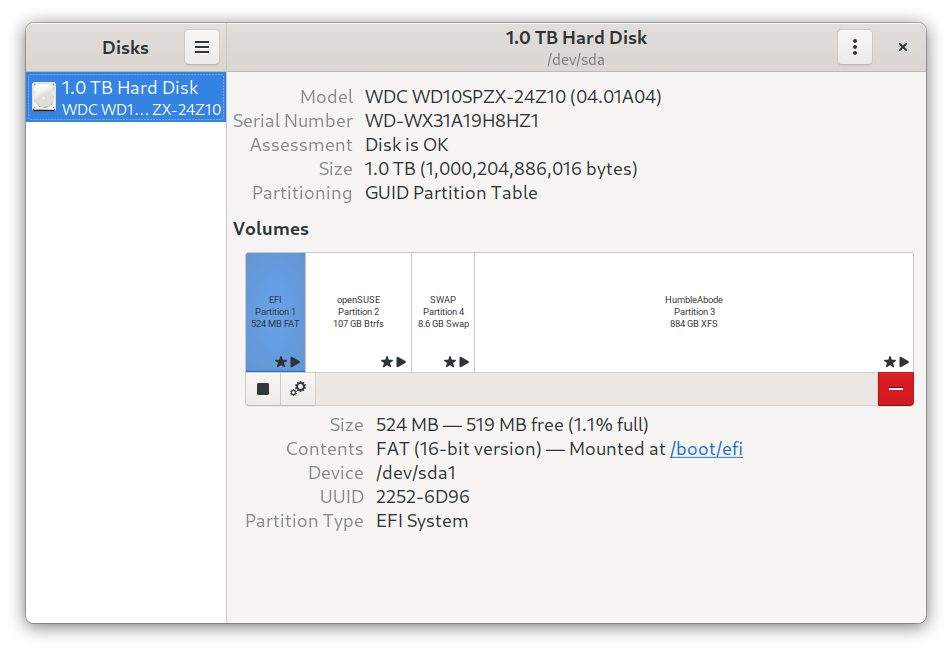
Meanwhile Gnome Disks has all the information you need and you don’t even need to think about it:
There was a similar thread quite recently.
What do you want to do? What do you mean by “view disks” and “find my
disks”. What information about such disks do you want? What do you wnat
to do to/with them?