[Merged with previous post]
[Deleted]
Hi dwpk20
Silly me – I tried the commands in a Fedora 44 VM (I’m on a Qubes OS v4.3.2 machine) and not a Fedora 40 .. :-/
From the Fedora 40 machine, is it possible to do a
sudo dnf install grub2-efi-x64-modules
? If that works and the multiboot2 is visible with:
rpm -ql grub2-efi-x64-modules | grep multiboot
then maybe the “build from source” isn’t needed (?)
At the moment, I don’t have a Fedora 40 machine - so I’m guessing and I hope you can/will test and report the results back. 
Sorry for this slow reply – the weekend started and time vanished .. :-/

Did as you asked 
Results:
dwpk20@fedora:~$ rpm -ql grub2-efi-x64-modules | grep multiboot
/usr/lib/grub/x86_64-efi/multiboot.mod
/usr/lib/grub/x86_64-efi/multiboot2.mod
Hi dwpk20
I got a bit of time and took a look at Fedora v40, GRUB and USB-stick.
I’ve included the first steps, to help the next person to read these posts – you should already have a working Fedora v40 and can skip to step 5 ..
It will be optimal, if you have 3 USB stick
- one for Qubes OS v4.3.2 (> 8GB)
- one for Fedora Workstation (> 2GB)
- one for GRUB, as a bootloader for Qubes OS with
multibootmodules (>=2GB)
Steps:
-
Download an Fedora v40 ISO from
https://archives.fedoraproject.org/pub/archive/fedora/linux/releases/40/Workstation/x86_64/iso/ -
Write the ISO to an USB stick - just like with a Qubes OS - eg
dd if=Fedora-Workstation-Live-x86_64-40-1.14.iso of=/dev/sdY status=progress bs=1M conv=fsyncFor other platforms, see Installation guide — Qubes OS 4.3.2 documentation
-
Try to boot from the USB stick
- if it boots, just install a Fedroa v40
- if it still doesn’t boot, there is a different problem with the machine ..
-
Once Fedora v40 is up an running, install the package called
grub2-efi-x64-modules:dnf install grub2-efi-x64-modules -
Plug in an USB stick you can erase without problem and locate it
lsblk– if you run the command before inserting the USB stick and again afterwards, you should see a difference!
-
Wipe the informatoin from the drive:
WARNING: Check twice that you don’t need anything from the drive – where will be no undo!!dd if=/dev/zero of=/dev/sdY bs=1M count=100WARNING: Check twice that you don’t need anything from the drive – where will be no undo!!
Note: You will (probably?) need to replace
sdYwith the device name you found in the step before! -
Add partitions to the drive
fdisk /dev/sdYby typing:
-
n(new parition) -
p(primary) -
enter (accept default number)
-
enter (accept default first sector)
-
+500M(make the partition 550MB) -
n(new partition) -
p(primary) -
enter (accept default number)
-
enter (accept default first sector)
-
+1G(make the partition 1GB) -
t(change the type) -
1(of the 1 partition) -
ef(to EFI) -
w(write the net partition table to the stick)
-
-
Create filesystems to the USB stick and mount them
mke2fs /dev/sdY1 mke2fs /dev/sdY2 mount /dev/sdY2 /mnt/ mkdir -p /mnt/boot/efi mount /dev/sdY1 /mnt/boot/efi/ -
Install GRUB on the USB stick:
grub2-install /dev/sdY --boot-directory=/mnt/boot/ --efi-directory=/mnt/boot/efi/ -
Unmount the USB
umount /mnt/ -
Try and reboot – can you now get a GRUB prompt from the USB?
If you get something like:GRUB version 2.12 Minimal BASH-like line editing is supported. For the first word, TAB lists possible command completions. Anywhere else TAB lists possible device or file completions. To enable less(1)-like paging, "set pager=1". grub>the next step is to insert both the new USB stick and the Qubes OS v4.3.2 USB at the same time and see if the BOOT-USB can read the config from the Qubes USB – something like the:
configfile (hdfrom before. If it complains about missing modules, try with:
insmod multiboot2before loading the configuration.
I hope this will allow you to run the installer on your MB ..
Hello hello! TY for this mega guide
Step 5: OK
Step 6: OK
Step 7: OK
Step 8: OK
Step 9: NOK:
dwpk20@fedora:\~$ lsblk
NAME        MAJ:MIN RM   SIZE RO TYPE MOUNTPOINTS
sda           8:0    0   9.1T  0 disk
├─sda1        8:1    0    16M  0 part
└─sda2        8:2    0   9.1T  0 part
sdb           8:16   1   7.5G  0 disk
├─sdb1        8:17   1   500M  0 part
└─sdb2        8:18   1     1G  0 part /run/media/dwpk20/799e6184-6deb-4844-88b2-13e17d0d69c2
zram0       252:0    0     8G  0 disk \[SWAP\]
nvme0n1     259:0    0   1.8T  0 disk
├─nvme0n1p1 259:1    0   100M  0 part
├─nvme0n1p2 259:2    0    16M  0 part
├─nvme0n1p3 259:3    0   1.6T  0 part
├─nvme0n1p4 259:4    0 195.3G  0 part
└─nvme0n1p5 259:5    0   660M  0 part
nvme1n1     259:6    0   1.8T  0 disk
├─nvme1n1p1 259:7    0   600M  0 part /boot/efi
├─nvme1n1p2 259:8    0     1G  0 part /boot
└─nvme1n1p3 259:9    0   1.8T  0 part /home
                                      /
nvme2n1     259:10   0   1.8T  0 disk
└─nvme2n1p1 259:11   0   1.8T  0 part
dwpk20@fedora:\~$ sudo grub2-install /dev/sdb --boot-directory=/mnt/boot/ --efi-directory=/mnt/boot/efi/
Installing for x86_64-efi platform.
grub2-install: error: This utility should not be used for EFI platforms because it does not support UEFI Secure Boot. If you really wish to proceed, invoke the --force option.
Make sure Secure Boot is disabled before proceeding.
dwpk20@fedora:\~$ sudo grub2-install /dev/sdb --boot-directory=/mnt/boot/ --efi-directory=/mnt/boot/efi/ --force
Installing for x86_64-efi platform.
grub2-install: error: failed to get canonical path of \`/mnt/boot/efi/'.
Meanwhile I continue troubleshooting with AI help.
TY!
Edit: secure boot is disabled.
Looks like your /dev/sdb2 is auto mounted a strange/unexpected place (/run/media/..) and not on /mnt/ – do you have a filebrowser running?
.. and /dev/sdb1 is not mounted?
How does the list from:
mount
look?
Going to check this for you now. But before, I continued tinkering and I followed the procedure and successfully completed the partitioning and grub2-install steps.
grub2-install required --force because Secure Boot was disabled.
The final output was:
grub2-install: warning:
/mnt/boot/efi/ doesn't look like an EFI partition,
system may not boot.
Installation finished. No error reported.
After rebooting, the USB is not visible as a boot option in the motherboard’s boot menu.
I have to keep switching back and forth from Fedora to Windows because the browser on Fedora is old and does not allow me access to these forums. So now that I am on Windows I am guessing everything is unmounted. But I’ll check for you anyway.
Remember, you are talking to a simpleton when it comes to all this lol
It looks like this:
dwpk20@fedora:~$ mount
/dev/nvme1n1p3 on / type btrfs (rw,relatime,seclabel,compress=zstd:1,ssd,discard=async,space_cache=v2,subvolid=257,subvol=/root)
devtmpfs on /dev type devtmpfs (rw,nosuid,seclabel,size=4096k,nr_inodes=8178024,mode=755,inode64)
tmpfs on /dev/shm type tmpfs (rw,nosuid,nodev,seclabel,inode64)
devpts on /dev/pts type devpts (rw,nosuid,noexec,relatime,seclabel,gid=5,mode=620,ptmxmode=000)
sysfs on /sys type sysfs (rw,nosuid,nodev,noexec,relatime,seclabel)
securityfs on /sys/kernel/security type securityfs (rw,nosuid,nodev,noexec,relatime)
cgroup2 on /sys/fs/cgroup type cgroup2 (rw,nosuid,nodev,noexec,relatime,seclabel,nsdelegate,memory_recursiveprot)
pstore on /sys/fs/pstore type pstore (rw,nosuid,nodev,noexec,relatime,seclabel)
efivarfs on /sys/firmware/efi/efivars type efivarfs (rw,nosuid,nodev,noexec,relatime)
bpf on /sys/fs/bpf type bpf (rw,nosuid,nodev,noexec,relatime,mode=700)
configfs on /sys/kernel/config type configfs (rw,nosuid,nodev,noexec,relatime)
proc on /proc type proc (rw,nosuid,nodev,noexec,relatime)
tmpfs on /run type tmpfs (rw,nosuid,nodev,seclabel,size=13102020k,nr_inodes=819200,mode=755,inode64)
selinuxfs on /sys/fs/selinux type selinuxfs (rw,nosuid,noexec,relatime)
systemd-1 on /proc/sys/fs/binfmt_misc type autofs (rw,relatime,fd=37,pgrp=1,timeout=0,minproto=5,maxproto=5,direct,pipe_ino=23747)
hugetlbfs on /dev/hugepages type hugetlbfs (rw,nosuid,nodev,relatime,seclabel,pagesize=2M)
mqueue on /dev/mqueue type mqueue (rw,nosuid,nodev,noexec,relatime,seclabel)
debugfs on /sys/kernel/debug type debugfs (rw,nosuid,nodev,noexec,relatime,seclabel)
tracefs on /sys/kernel/tracing type tracefs (rw,nosuid,nodev,noexec,relatime,seclabel)
fusectl on /sys/fs/fuse/connections type fusectl (rw,nosuid,nodev,noexec,relatime)
/dev/nvme1n1p3 on /home type btrfs (rw,relatime,seclabel,compress=zstd:1,ssd,discard=async,space_cache=v2,subvolid=256,subvol=/home)
/dev/nvme1n1p2 on /boot type ext4 (rw,relatime,seclabel)
tmpfs on /tmp type tmpfs (rw,nosuid,nodev,seclabel,size=32755044k,nr_inodes=1048576,inode64)
/dev/nvme1n1p1 on /boot/efi type vfat (rw,relatime,fmask=0077,dmask=0077,codepage=437,iocharset=ascii,shortname=winnt,errors=remount-ro)
binfmt_misc on /proc/sys/fs/binfmt_misc type binfmt_misc (rw,nosuid,nodev,noexec,relatime)
sunrpc on /var/lib/nfs/rpc_pipefs type rpc_pipefs (rw,relatime)
tmpfs on /run/user/1000 type tmpfs (rw,nosuid,nodev,relatime,seclabel,size=6551008k,nr_inodes=1637752,mode=700,uid=1000,gid=1000,inode64)
gvfsd-fuse on /run/user/1000/gvfs type fuse.gvfsd-fuse (rw,nosuid,nodev,relatime,user_id=1000,group_id=1000)
/dev/sdb2 on /run/media/dwpk20/799e6184-6deb-4844-88b2-13e17d0d69c2 type ext2 (rw,nosuid,nodev,relatime,seclabel,errors=remount-ro,uhelper=udisks2)
portal on /run/user/1000/doc type fuse.portal (rw,nosuid,nodev,relatime,user_id=1000,group_id=1000)
Hi dwpk20
Thanks – I should probably have written the command as:
mount | grep sdb
It looks like your sdb2 (the USB-stick, right?) is mounted on:
/run/media/dwpk20/799e6184-6deb-4844-88b2-13e17d0d69c2
Try and unmount it from there and mount it like:
mount /dev/sdb2 /mnt/
Then try:
ls -al /mnt/boot/efi
– it should be an empty directory - if not, you can:
rm -rf /mnt/boot/efi
mkdir -p /mnt/boot/efi
and mount the EFI partition with:
mount /dev/sdb1 /mnt/boot/efi
before writing the GRUB files again:
grub2-install /dev/sdb --boot-directory=/mnt/boot/ --efi-directory=/mnt/boot/efi/ --force
This is what it looks like after following your steps:
dwpk20@fedora:~$ sudo grub2-install /dev/sdb --boot-directory=/mnt/boot/ --efi-directory=/mnt/boot/efi/ --force
Installing for x86_64-efi platform.
grub2-install: warning: /mnt/boot/efi/ doesn't look like an EFI partition, system may not boot.
Installation finished. No error reported.
dwpk20@fedora:~$ lsblk
NAME        MAJ:MIN RM   SIZE RO TYPE MOUNTPOINTS
sda           8:0    0   9.1T  0 disk
├─sda1        8:1    0    16M  0 part
└─sda2        8:2    0   9.1T  0 part
sdb           8:16   1   7.5G  0 disk
├─sdb1        8:17   1   500M  0 part /mnt/boot/efi
└─sdb2        8:18   1     1G  0 part /mnt
zram0       252:0    0     8G  0 disk [SWAP]
nvme2n1     259:0    0   1.8T  0 disk
├─nvme2n1p1 259:1    0   100M  0 part
├─nvme2n1p2 259:2    0    16M  0 part
├─nvme2n1p3 259:3    0   1.6T  0 part
├─nvme2n1p4 259:4    0 195.3G  0 part
└─nvme2n1p5 259:5    0   660M  0 part
nvme0n1     259:6    0   1.8T  0 disk
├─nvme0n1p1 259:7    0   600M  0 part /boot/efi
├─nvme0n1p2 259:8    0     1G  0 part /boot
└─nvme0n1p3 259:9    0   1.8T  0 part /home
                                      /
nvme1n1     259:10   0   1.8T  0 disk
└─nvme1n1p1 259:11   0   1.8T  0 part
dwpk20@fedora:~$
Do we need anything else? BIOS is not seeing the drive.
BTW, we don’t care about this?
warning: /mnt/boot/efi/ doesn't look like an EFI partition, system may not boot.
Hi dwpk20
What do you get with:
sudo fdisk -l /dev/sdb
?
It should include something like:
Device     Boot   Start     End Sectors  Size Id Type
/dev/sdb1          2048 1026047 1024000  500M ef EFI (FAT-12/16/32)
/dev/sdb2       1026048 3123199 2097152    1G 83 Linux
Does the Id column for /dev/sdb1 show ef?
Yes it does:
dwpk20@fedora:~$ sudo fdisk -l /dev/sdb
[sudo] password for dwpk20:
Disk /dev/sdb: 7.45 GiB, 8004304896 bytes, 15633408 sectors
Disk model: Cruzer Blade
Units: sectors of 1 * 512 = 512 bytes
Sector size (logical/physical): 512 bytes / 512 bytes
I/O size (minimum/optimal): 512 bytes / 512 bytes
Disklabel type: dos
Disk identifier: 0xc70cd979

Device     Boot   Start     End Sectors  Size Id Type
/dev/sdb1          2048 1026047 1024000  500M ef EFI (FAT-12/16/32)
/dev/sdb2       1026048 3123199 2097152    1G 83 Linux
dwpk20@fedora:~$
I did take a peek inside the folder efi though, and it’s empty. Not sure if that’s to be expected.
Hi dwpk2
There shouldn’t be anything in the /mnt/boot/efi folder (at this point - we just need the machine to find the bootloader and then wait for our commands ) - but the /dev/sdb1 needs to be mounted when you run:
sudo grub2-install /dev/sdb --boot-directory=/mnt/boot/ --efi-directory=/mnt/boot/efi/ --force
You should be able to check that it’s mounted correctly, with a command like:
df | grep sdb
– it should show something like:
user@fedora:~$ df | grep sdb
/dev/sdb2        1030828   11480    966920   2% /mnt
/dev/sdb1         477538      14    451924   1% /mnt/boot/efi
user@fedora:~$
When you ran the
sudo grub2-install /dev/sdb --boot-directory=/mnt/boot/ --efi-directory=/mnt/boot/efi/ --force
it looks like the EFI filesystem wasn’t mounted correctly – at least that would explain the message:
grub2-install: warning: /mnt/boot/efi/ doesn't look like an EFI partition, system may not boot.
Can you try:
-
make sure the USB isn’t mounted:
mount | grep sdb– the list should be empty .. if not, use
sudo umount /path/to/where/sdbX/is/mounted- restart from step 1
-
Check that nothing is mounted on
/mnt/:ls -al /mnt/– the output should look like:
user@fedora:~$ ls -al /mnt/ total 0 drwxr-xr-x. 1 root root 0 Jan 24 2024 . dr-xr-xr-x. 1 root root 158 Apr 15 2024 .. user@fedora:~$ -
mount the filesystems:
sudo mount /dev/sdb2 /mnt/ sudo mount /dev/sdb1 /mnt/boot/efi -
retry to write the GRUB bootloader:
sudo grub2-install /dev/sdb --boot-directory=/mnt/boot/ --efi-directory=/mnt/boot/efi/ --force– The output should look like[1]:
user@fedora:\~$ sudo grub2-install /dev/sdb --boot-directory=/mnt/boot/ --efi-directory=/mnt/boot/efi/ --force
Installing for i386-pc platform.
Installation finished. No error reported.
user@fedora:\~$
Since you already have GRUB installed on your machine, can you share:
sudo fdisk -l /dev/nvme1n1
? – it will show a bit about how Fedora managed to get the machine to read/use the GRUB (on the internal disk) .. and that is what we would like to figure out … 
[Edit 1: Looks like I managed to reproduce the problem on my test machine – I’ll try to find time to attach a screen & keyboard to it again and redo the installation with EFI-boot enabled]
[Edit 2:
Okay – the format for the EFI partition should be FAT32 – so add this between stop 2 and step 3:
mkfs.fat -F32 /dev/sdb1
My test machine still fail to boot from EFI, so I need to attach a screen and a keyboard .. and attempt an EFI installation]
I have Fedora on an old machine - that’s why I have
i386-pcas platform – you’ll probably havex86_64-efias platform! ↩︎
Hi dwpk20
Okay - looks like I got my test machine working with UEFI boot ..
Now I can produce an USB with GRUB by this:
- Wipe the drive:
dd if=/dev/zero of=/dev/sdY bs=1M count=1000 - Create partitions (as before - 500M EFI + a 1G ext2)[1]
- Create filesystems
mkfs.fat -F32 /dev/sdY1 mke2fs /dev/sdY2 - Mount the filesystems
mount /dev/sdY2 /mnt mkdir -p /mnt/boot/efi mount /dev/sdY1 /mnt/boot/efi/ - Write GRUB:
grub2-install /dev/sdb --boot-directory=/mnt/boot/ --efi-directory=/mnt/boot/efi/ --force --removable - Reboot and select the USB as boot medium.
Are you able to load GRUB from the USB with these steps?
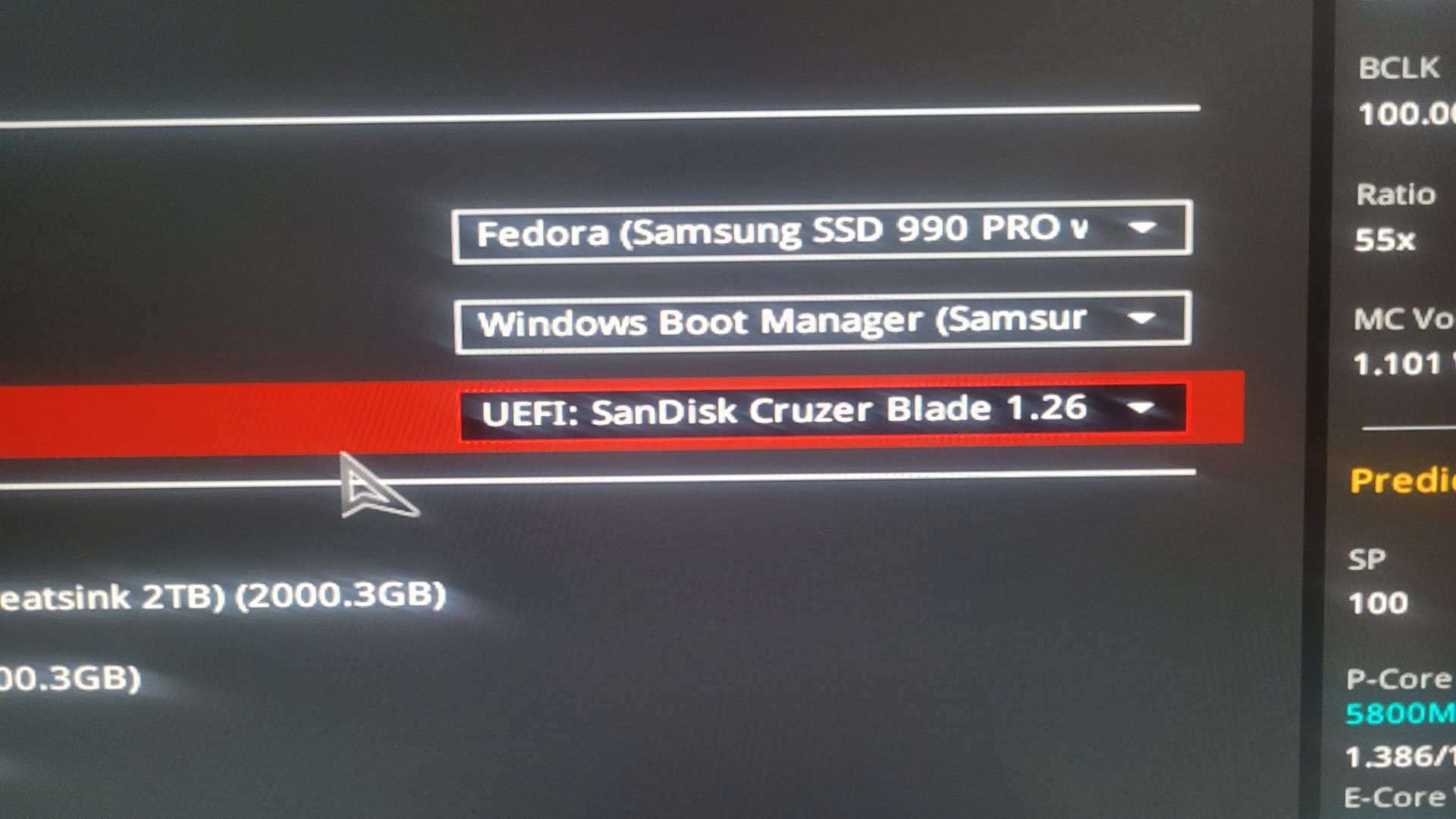
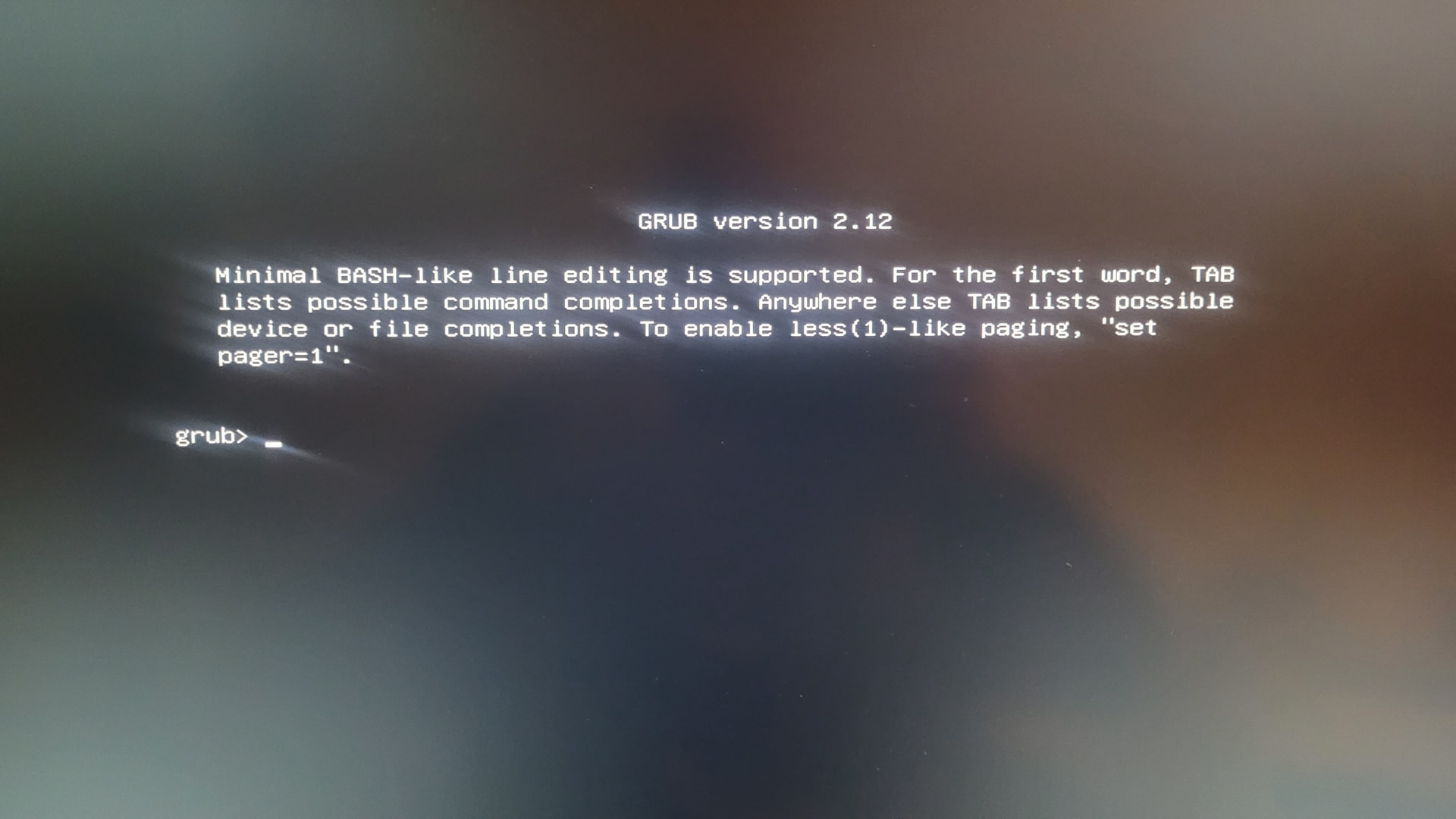
Hi dwpk20
Nice!!
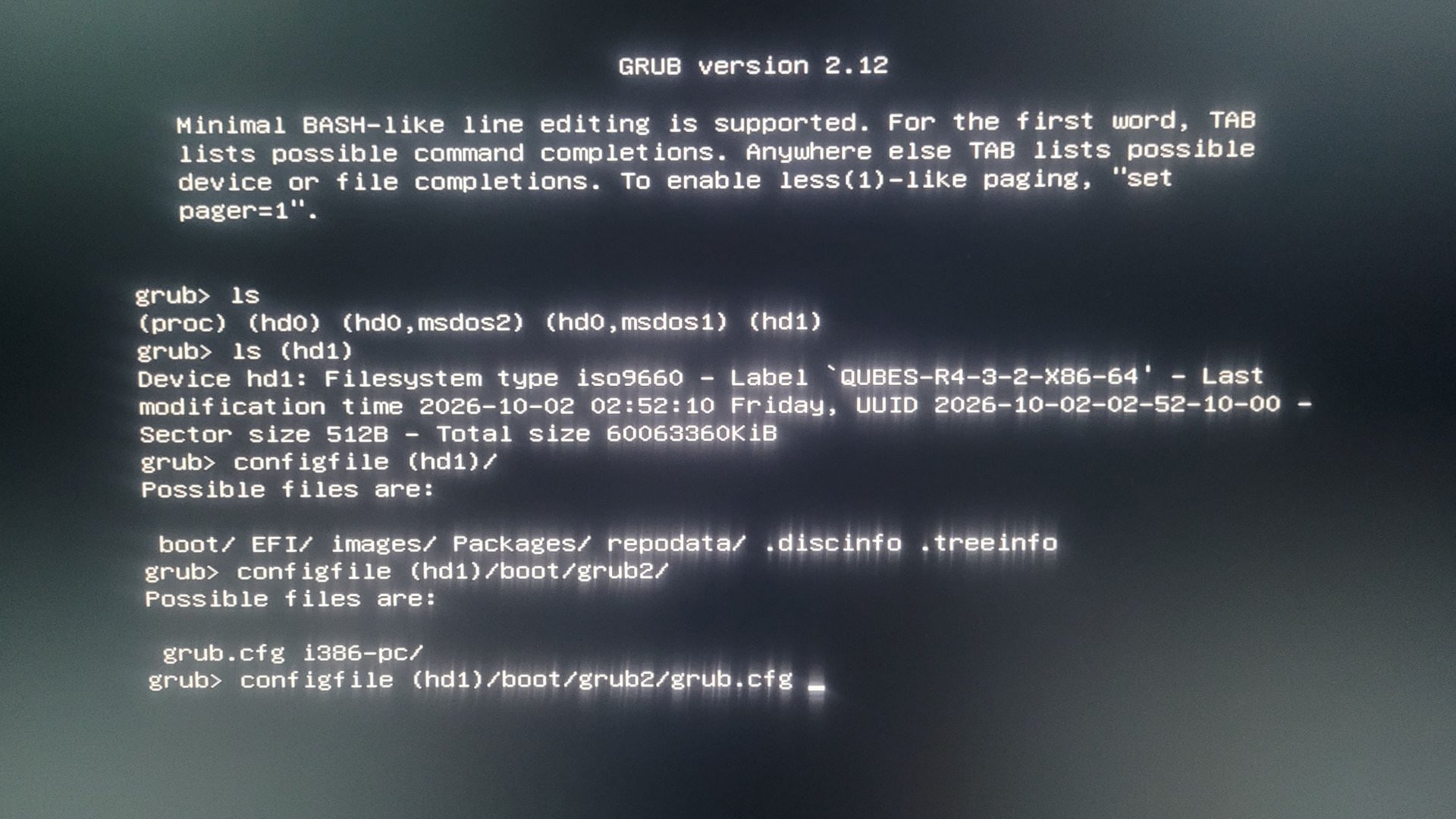
Next step it to try if you can load the config from a Qubes OS USB stick.
Try:
configfile (
and hit tab. You should see a list of “drives” - hd0, hd1 .. and maybe fd. If you start from the first (eg. hd0) and try with:
configfile (hd0
and hit tab again. You should see a list of partitions (hd0,msdos1, .. or hd0,gpt1, ..). If one of them is called something like QUBES-R4-3-2-X86-64 use that name (eg hdX,gptY and try:
configfile (hdX,gptY)/boot/grub2/grub.cfg
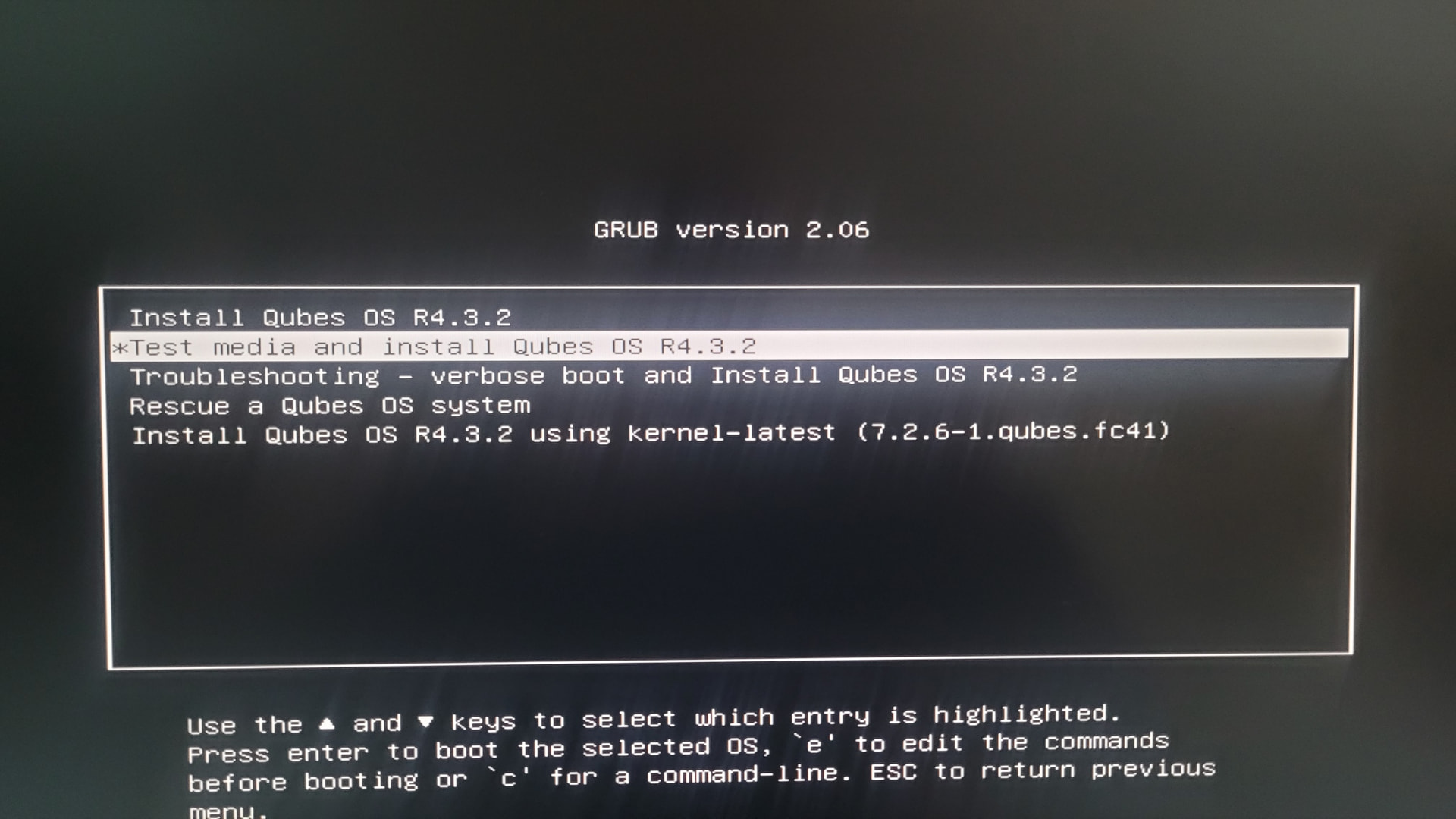
(you can use tab to autocomplete the names). It that works, try Ctrl-x and see if it boots.

I have the same problem. Motherboard: Asus Maximus Z790 Formula, Processor: Intel i9 14900 KS, Graphics Card: Asus RTX 4090
I installed and ran Qubes with the graphics card installed. When I tried to run the displays on the motherboard without the graphics card, Qubes didn’t work. My previous installation was done without CMS. When I removed the graphics card, it completely reverted to UEFI and doesn’t see the SSD where Qubes is installed. When I try a new installation, it gives an “out of memory” error. I tried installing and upgrading with older versions, but it still didn’t work. What I’m trying to do is install Qubes without the graphics card and then install the graphics card later to connect it to an AI Cube that can only use the graphics card. Is there a solution to this? I would be very grateful if you could help.
Hi dwpk20
I’m about out of (sensible) ideas. :-/
I’ve search a bit for “Asus Maximus Z790 Formula install linux out of memory”, without finding a good resource/suggestion for next step. 
I’ve been tempted to try something like:
-
Re-format the USB-stick, so the second partition is 3G (in post 45, step 7, change
+1Gto+3G). -
Recreate the filesystems (as in post 55)
-
Mount the USB like:
mkdir /mnt/usb/ mount /dev/sdY2 /mnt/usb mount /dev/sdY1 /mnt/usb/boot/efi -
Mount the Qubes OS iso like:
mkdir /mnt/iso mount -o loop -o ro -t iso9660 /tmp/Qubes-R4.3.2-x86_64.iso /mnt/iso -
Sync the files from
/mnt/iso/imagesto/mnt/usb/imagesrsync -a /mnt/iso/images /mnt/usb/ -
Copy the GRUB config to the USB:
mkdir /mnt/usb/boot/grub cp /mnt/iso/boot/grub2/grub.cfg /mnt/usb/boot/ -
Make a note, so we can see the difference:
cd /mnt/usb/boot/
sed -i 's/Install Qubes/Install MY Qubes/g' grub.cfg
.. and try to boot from the USB?