User Interface Improvement Project (Community Project)

I would like to welcome readers and contributors.

This project aims to improve the user interface.

Currently, this is being achieved by moving the user interface component out of dom0.
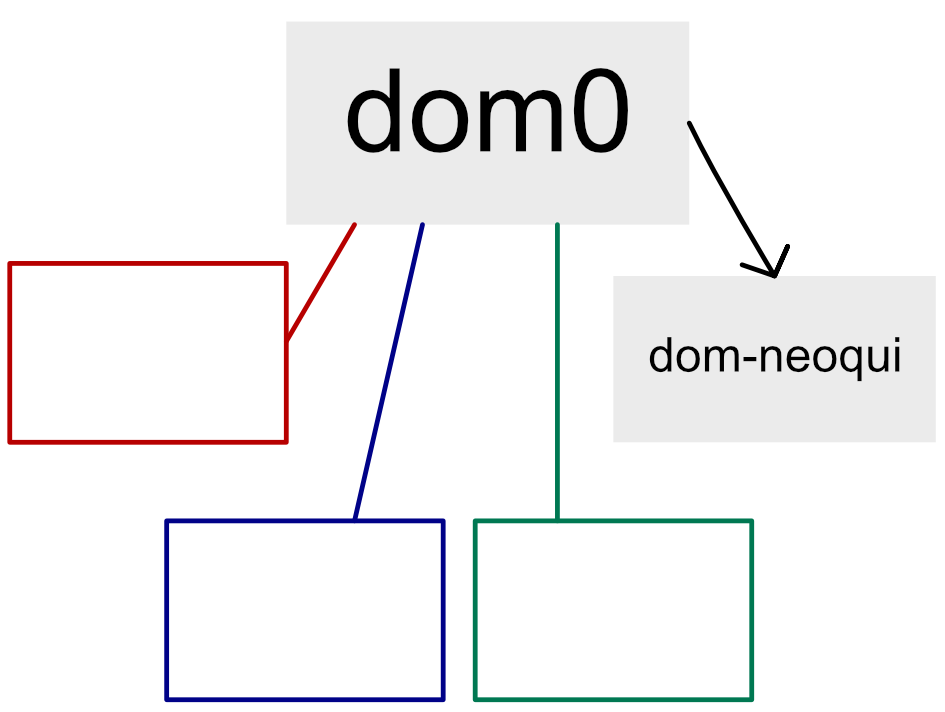
note: that the user interface in question refers only to the interface used by dom0 itself, not the component responsible for displaying applications from other VMs; the latter remains unchanged.

Exiting dom0 is the first step, given its inherent security sensitivity; this ensures that the project does not gain access to dom0, as it should not possess such privileges.

Nevertheless, there are still benefits to this. This will be achieved through an architecture that completely separates the processes from the graphical user interface.
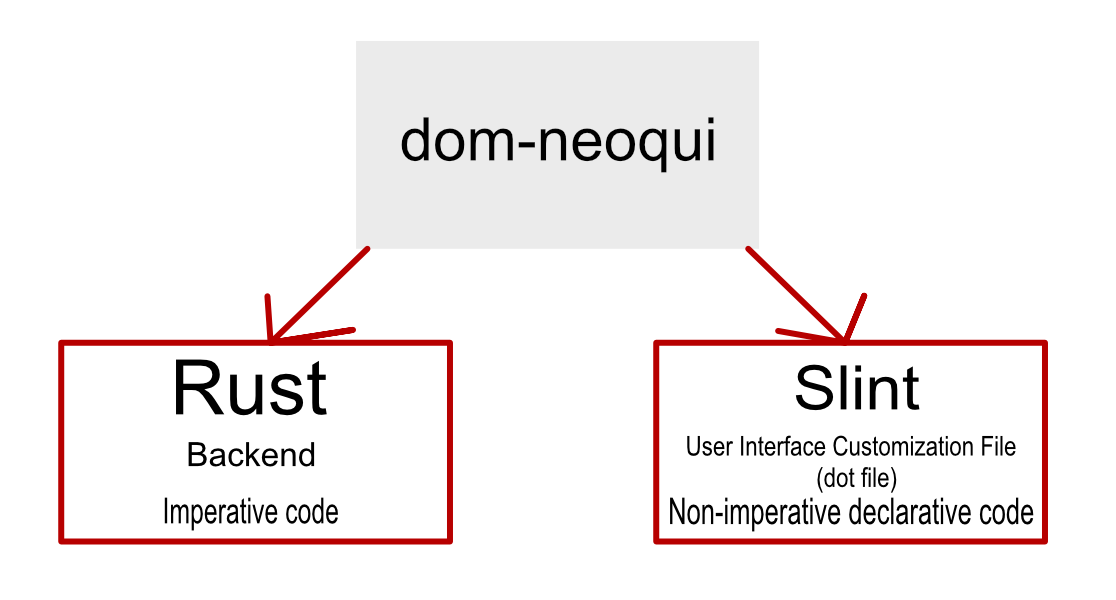
This architecture, which separates the user interface code, allows for modifications and the deployment of improvements without exposing the system to direct security risks (such as the “dot files” found in other systems that are shared among users).

(There are still significant security risks as the ease of changing them could be exploited to spread malicious files.)

As previously mentioned, the two parts will be separated, and here is an explanation of each:

Procedural code:
Its function is to activate the function for each button and ensure that no code contains a security vulnerability.
Languages ​​to be used: Rust, Qubes Admin API(maybe?), salt

Declarative Code:
It is the code responsible for rendering the user interface.
The slint language is used.

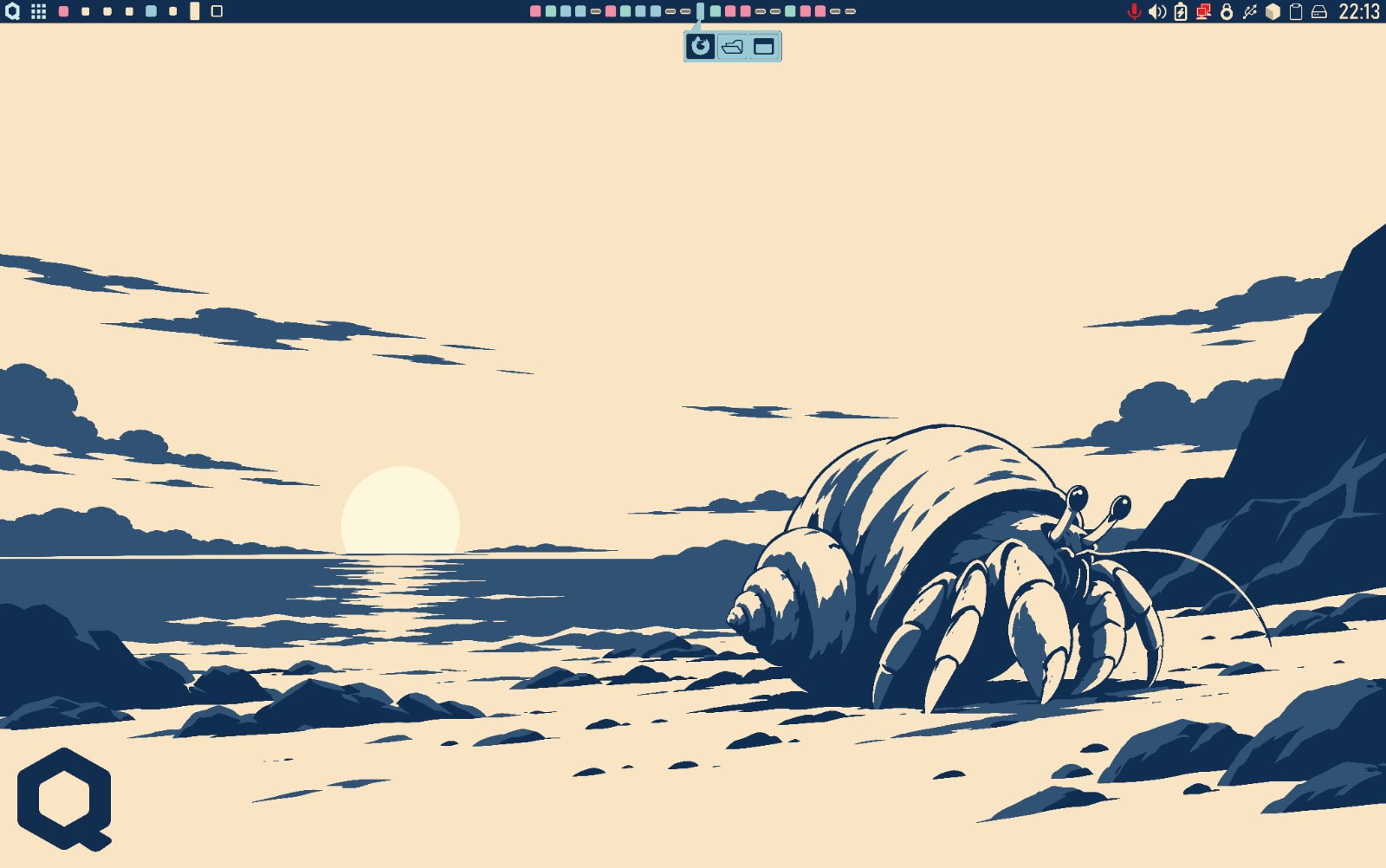
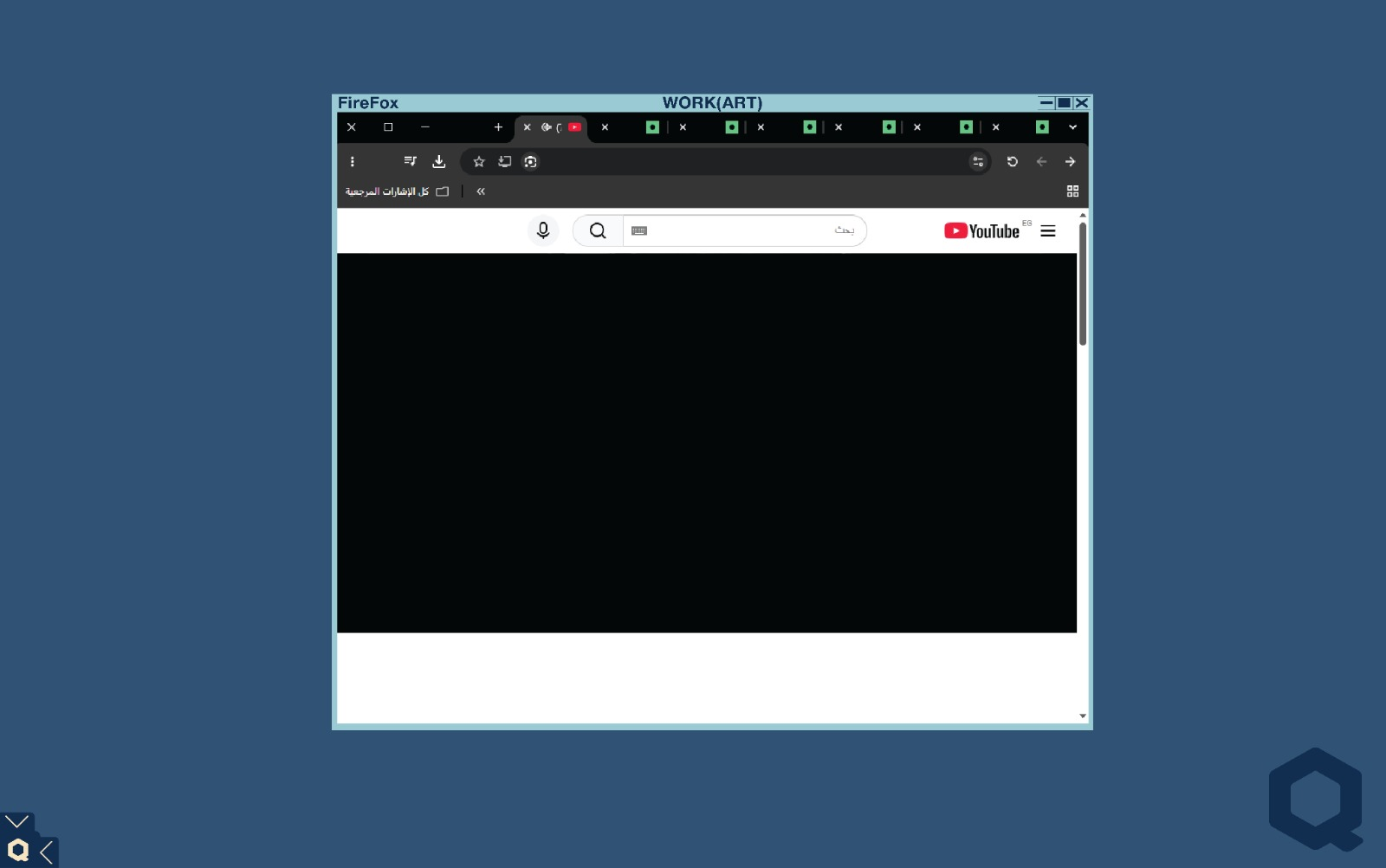
There will be three files(slint) already available by default (which have been voted for):

Important Information

Voting took place via this post.

Some of the concepts presented within it are:
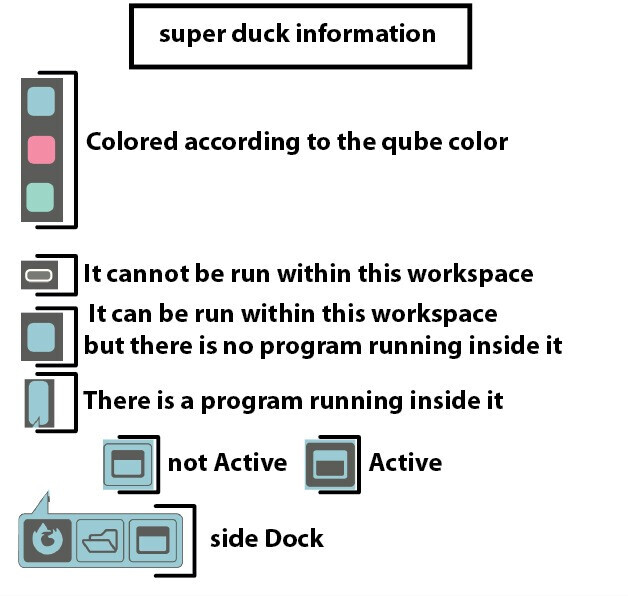
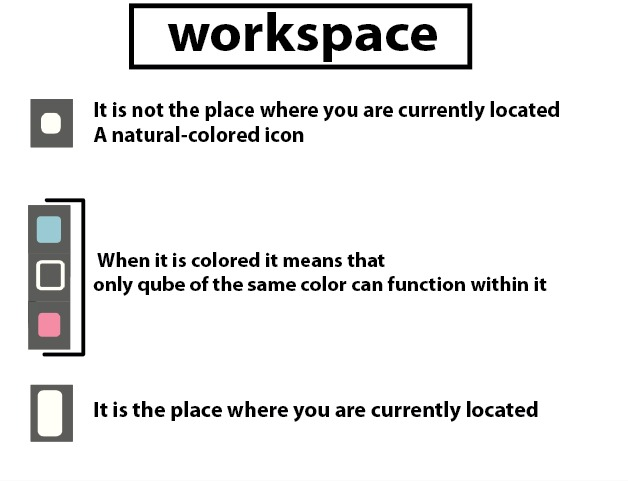
(duck = dock)

`
I like how large projects often adopt an animal as a mascot, so I think it would be nice to have one for this project as well.

I liked the hermit crab as the mascot.
More information in this post.

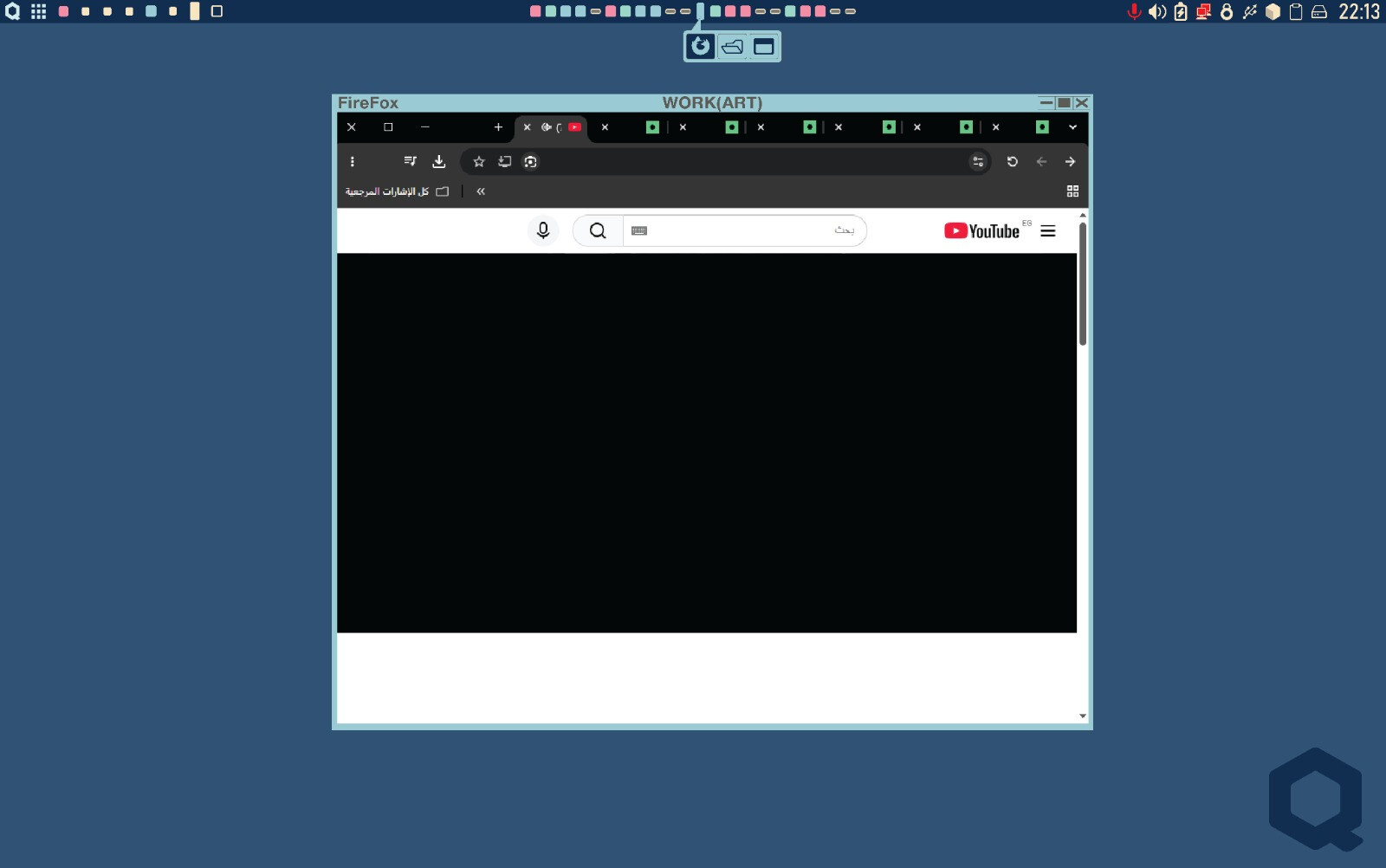
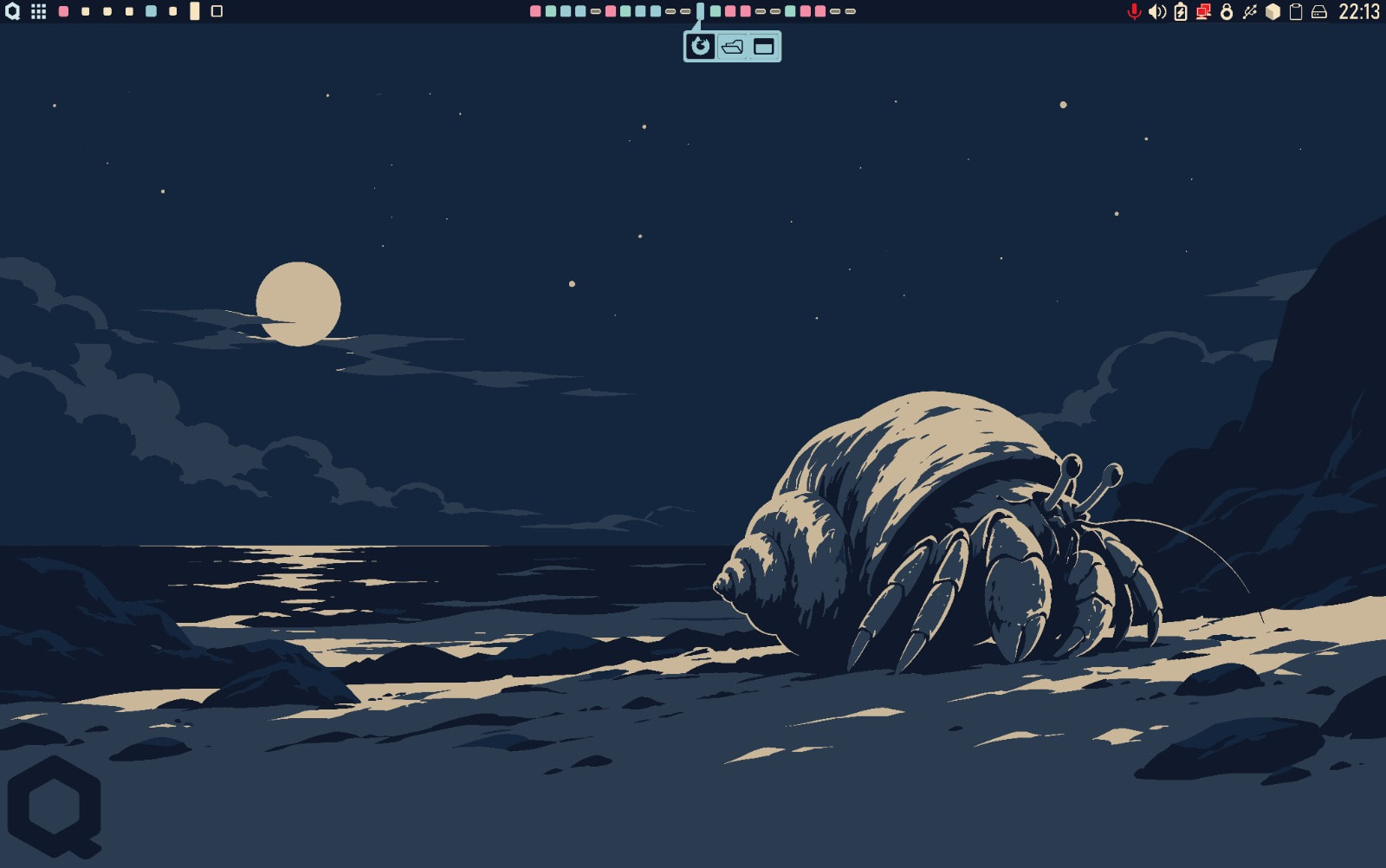
Top bar with super dock:
Additional content

Voted by @quber, @queen

(Suitable for advanced users, offering easy access to each “Qube” unit and its status (highly useful when managing a large number of these units).)

More photos:
mac os style:
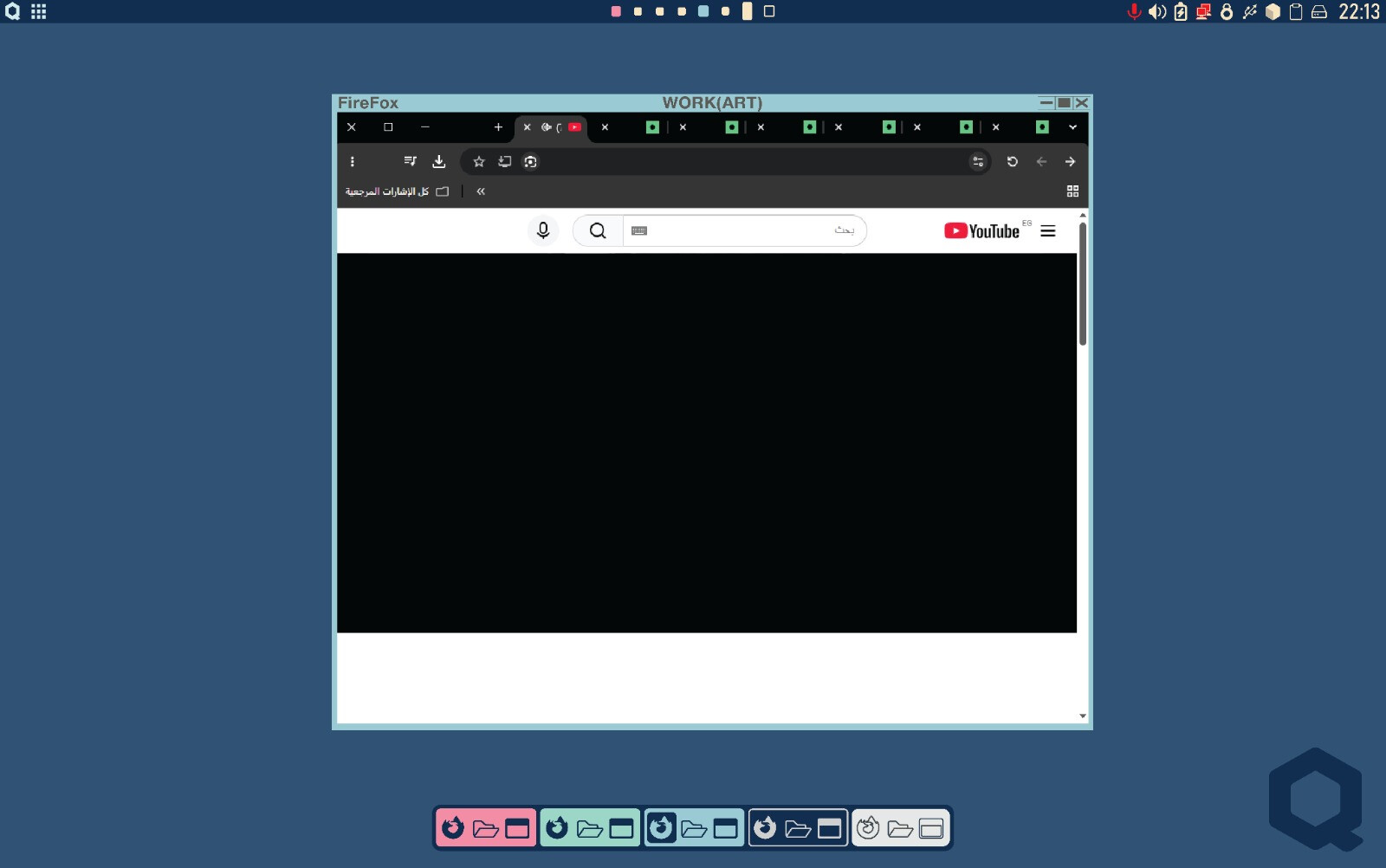
Additional content

Voted by @tofu,@Gandalfen

(Closely resembles macOS—a design proven to be both effective and visually appealing.)

More photos:(…)

minmalist setup:
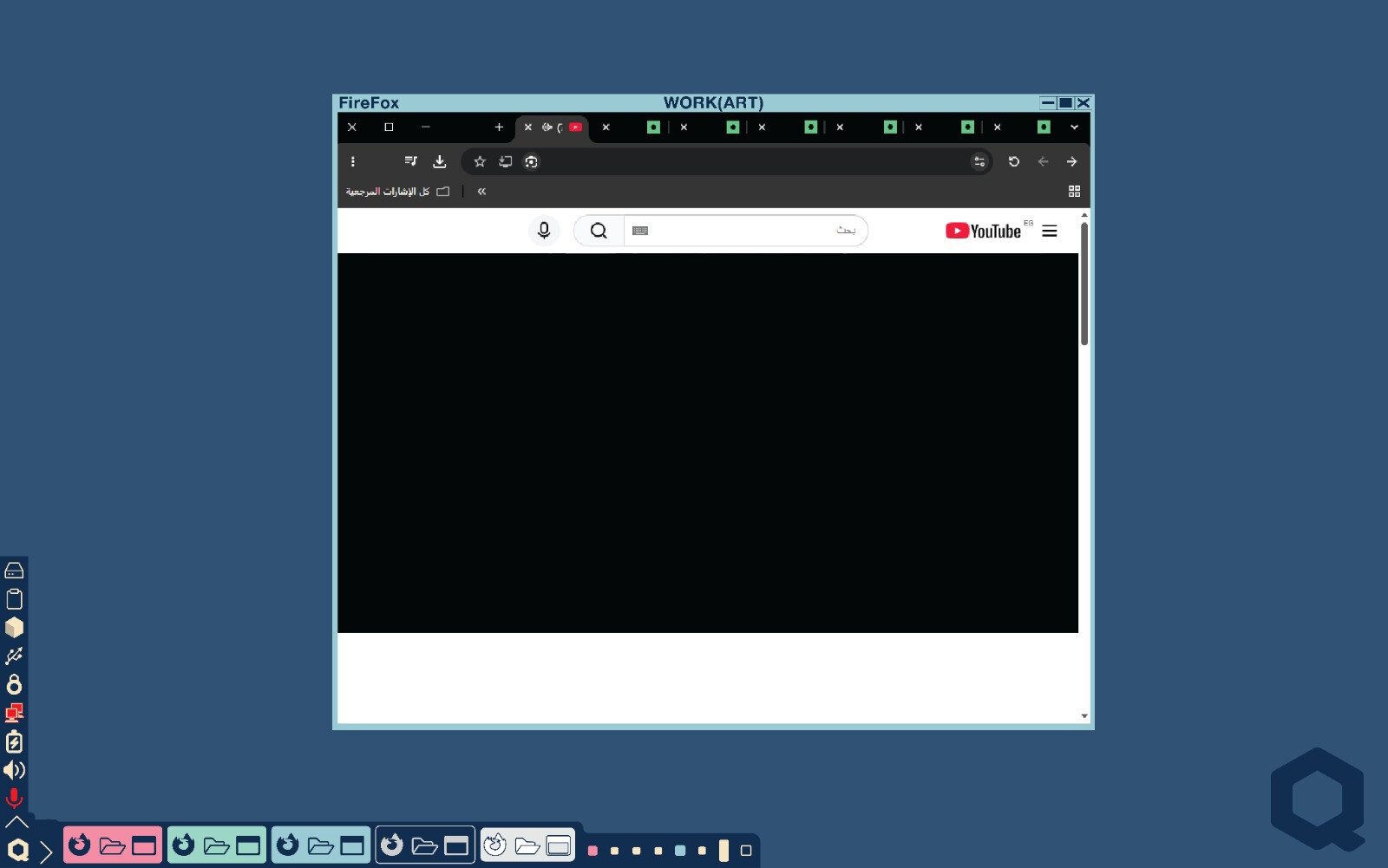
Additional content

Voted by @Gandalfen

(Embodies absolute simplicity: featuring a single fixed button and two collapsible menus.)

A message to contributors:
Thank you for your contribution.

Content of this post:
This publication addresses developments at the project level.

list of contributors

These are the current contributors who played a significant role in building the project through their proposals:

@tofu

@James369

@XenExplorer

@qubetip

@Gandalfen

@Zephir2008

@quber

@Torpedo

These are the individuals who shared the issues they encountered and played a key role in getting the work started:
@menaby0 (I welcome collaboration if you are interested)
(I have not yet compiled a complete list of names)

(The lists will be continuously updated over time.)

Original post

I am trying to improve the user interface myself.
The improvements are as follows:
Fixing the dark mode
Adding the Catppuccin theme
Adding a window tiling mode
Adding a better settings application than the default Xfce one
Of course, including the ability to revert to the original state at the touch of a button
(I am not an expert and have limited time, so I cannot promise a near-term completion date)
(I am trying to develop the project in a way that the Qubes OS team might accept for integration)
Are there any other suggestions for improving the user interface?

Development Stages

That’s all for the first Phase.


Work is currently underway on:

I am going to take a short break from working on this project; I want to learn some other things, but I will resume it soon.

8 Likes
4 Likes

Thank you for your suggestion; I will do my best to make it modern. I also welcome any more specific suggestions.

2 Likes

Yeah dark mode is probably way up there

4 Likes

Hi Ahmed_iMafraid!

I love dark mode.

I think fontsize/iconsize for high-resolution display is getting important. Some sort of professional use are with external display with very high-resolution. Some of recent models have high-resolution display. I confess I feel a need of a magnifier to read letters of some applications like Qube Manager.

I welcome modernization of Look and Feel.

5 Likes

Hello Tofu,

Thanks for sharing; I’ll do my best.

It is worth noting that I won’t be addressing the graphical interface issue related to high resolution, as—to my understanding—it is more closely linked to the transition to Wayland. (I don’t own a device with these specifications, so this is just what I gathered from my research; I welcome any clarification if I am mistaken.)

2 Likes

cool, I hope it’s minimal. Lots of these ‘Themes’ are massive,

3 Likes

Thanks for the reminder; I’ll follow your advice and try to keep everything to a minimum as possible.

2 Likes

HI Ahmed_iMafraid,

My issues are related with high-resolution but their solution should be universal.

Things wait for GUI way of control. ( I apologize lengthy description. )

  • Changing font size, icon size of the menu bar of the desktop as well as the vertical height of the menu bar. Currently, I am using the scaling “2x”. I want more flexibility. The icon size does not automatically get adjusted to the height when I change DPI. This prevents me from continuous control. I believe the control by DPI is better than the fixed rate of scaling.
  • The top frame of the window (with title indicating dom0/work/…) needs more flexibility. Currently, the theme Default-xhdip and Default-hdpi. But I feel the theme and the resolution are independent concepts. I wan the freedom to change the height (or width?) of the top frame of the window in any theme I choose. There are many reasons for larger font for the top frame: some people want the title bar for avoiding unwanted transfer of data across qubes; some people might have difficulty in visibility as they get older; sometimes, we demonstrate the use of Qubes OS through older projectors, we sometimes want to save bytes of photo of qubes with error messages.
  • Applications have its menu bar. The height of such a menu bar should accept control. Currently, I have difficulty even in Qube Manager, Qubes Template Manager,… Of course, I cannot configure numerous applications. So, I need a rather centralized control in each Qube.
  • We should be able to choose the font size of the content of the screen of application, for example, in the lines of qubes in the Qube Manager.
  • Different defaults for the background color of windows by qubes help correct use of qubes. (Correctness in choosing the destination of global copy-paste, Correctness in typing in data like customer’s name.) I have a certain application of Qubes-OS in mind. An expert offers service to several organizations with different and possibly overlapping customers. Entering data of an organization in another is an issue, which we want Qubes-OS to prevent. The number of organizations depends on the expert.
  • Docks for each of (some selection of ) qubes is a good idea. Each such qube should have docks with its own look and feel. Maybe the dock is to be associated with a collection of qubes, say organization1:work for transaction with the customer, organization1:untrusted for surfing through the internet. I think coupling or grouping qubes by special command for transfer of data is a nice way for avoiding mistakes in copy-paste.
  • Completing configuration, we move into regular use, where dom0’s capability should be avoided. Disabling/enabling GUI access to dom0 helps some users. (This is like having different accounts for the administrator and the “user”, even when the PC is personal.)
  • Improvement in some part of configuration of GUI saves overall labor of configuration of GUI. This is true even if the improvement saves labor in the other part than the user’s specific interest.
4 Likes

Thank you for sharing.
I found the post somewhat difficult to read (since I do not speak English and rely on Google Translate).

However, here is what I understood:
Adjusting general dimensions in Qubes OS, such as text, icons, and the taskbar.
A tool for controlling the graphical interface (a better settings application).
The post also included many details that helped clarify the nature of the problem.
There were some requests I did not understand, such as

Docks for each of (some selection of ) qubes is a good idea.
Disabling/enabling GUI access to dom0 helps some users
Different defaults for the background color of windows by qubes help correct use of qubes.

My comment:
I appreciate your contribution.
I will announce the development process model later, but in short: I will focus first on improving the default Qubes OS experience, then move on to enhancing customization options.
That said, I will try to find temporary solutions (manual workarounds via the terminal) for your issue.

Note: I would appreciate it if you could be concise and avoid going into tangential details—such as stories or the underlying reasons for your request—as I value all suggestions equally and do not require justifications.

2 Likes

I would like to welcome readers and contributors.

A message to readers:
This is a community-driven project that relies on contributions from the community.
As a community project, it may entail security risks—a fact that all users should be aware of.
I welcome any contributions or feedback.

A message to contributors:
To demonstrate my good faith, I apologize for not publishing the list of contributors earlier.
I look forward to receiving further contributions.

Content of this post:
This post acknowledges all past contributors who participated in public forum discussions.
It also includes all current contributors who have submitted concrete proposals for the project’s development.

I apologize, but I will not mention anyone from the Qubes team or the project maintainers to avoid misleading readers; this is a community initiative that may involve security risks—a point that must be made clear to all users. (However, I thank you all for your efforts.)

These are the current contributors who played a significant role in building the project through their proposals:
@tofu
@James369
@XenExplorer

These are the individuals who shared the issues they encountered and played a key role in getting the work started:
@menaby0 (I welcome collaboration if you are interested)
(I have not yet compiled a complete list of names)

(The lists will be continuously updated over time.)

A message to the moderators:
Please convert this specific post into a “Wiki post” so that I can update it regularly.
I also request that it be pinned to the top for easier reading.

2 Likes

Hi Ahmed_iMafraid,

I will explain the three ideas.

  • For competing with other OS, (macOS, Windows, ubuntu, …), Qubes OS should have some kind of Launcher/Dock with Icons of Applications. For example, the user might put a text editor, pdf-viewer, web-browser and some devoted application for the user’s purpose. Dock shows such palette on the desktop and Launcher has the icon on the desktop and shows the palette after invocation.
    • The user sometimes want to use different palette of applications. For example, games are on the Dock/Launcher of the private qube while devoted application for the user’s job is on the Dock/Launcher of work qube.
    • Another way of helping the user is to provide Dock for private qube, Dock for work1 qube, …, Dock for work 3 qube. Maybe they are on the same strip, but the color of the icon distinguishes the qube.
  • An idea for disabling/enabling dom0 access is to have a menu-item like this: from that menu-item, we can disable GUI access to dom0. This prevents accidental invocation of GUI application of Dom0. On the other hand, I am not strict about access from the menu-bar like connection to WIFI. The menu-item can enable GUI access to dom0 with authentication like the password.
  • An example with work1 qube and work2 qube. It is a nice idea to have colors for these qubes. For example, sky-blue for work1 qube and navy-blue for work2 qube. I have in mind the situation, the user wants to prevent unwanted traffic of data acroess work1 qube and work2 qube. The color of the frame helps experienced users. On the other hand, background color also help more users. The color of the qube is automatically the default of the background of most applications invoked in the qube.

Among these, the Dock has the higher priority. I will test if invoking a Dock (available through dnf) in two Docks can be configured for the idea described above. It cannot be immediate. My time is limited again by the job.

Please take these three as an evidence, GUI can improve access to the advantage of Qubes OS.

The configuration of font-size, icon-size, the width of the menu-bar, title-bar of the window, menu-bar of the application deserves much higher priority.

3 Likes

Hi Tofu,
Thank you for your contribution.
Your explanation was excellent, and I’ve grasped the three points.
I will take your suggestions into account and do my best.
A few notes:
I really appreciate your desire to develop more efficiently, but please prioritize security.
I am trying to set up a Qubes system within a virtual environment so I can work without worry, so please avoid experimenting on your main system.

I’d be happy to collaborate with you (provided it doesn’t compromise your safety).

As for time, I also have limited hours, so that’s fine.

2 Likes

I would like to use the Cinnamon or Mate desktop.

3 Likes

Hello,

I believe it is essential to announce the action plan,
following up on my previous initiative to compile a list of contributors
(I created that list primarily for documentation purposes, noting that forum interaction itself constitutes a contribution; I extend my thanks to all forum members).

Action Plan

Phase One
This phase aims to create a visual style for Qubes that is attractive, simple, Minimalist, and modern, while preserving and building upon the system’s existing security model. I will share initial drafts to gather feedback. Once the optimal design is finalized, I will restructure it to meet Qubes project contribution requirements; this phase concludes with the project accepting the design.

Phase Two
This phase focuses on addressing Graphical User Interface (GUI) issues and building a tool to facilitate GUI control and customization. It concludes with the completion of an improved UI settings application, designed in accordance with Qubes project contribution standards.

Phase Three
This phase focuses on enhancing Qubes applications—improving their appearance and aligning them with the new visual style—and adding custom control applications featuring user-friendly GUIs. This phase concludes when no practical or feasible feature requests are received for two consecutive months.

I welcome constructive criticism.

2 Likes

Thanks for the suggestion.
There may well be issues with Xfce that prompt such a view,
but the current focus is on creating a visually appealing design that aligns with the way Qubes OS operates.
Therefore, until this design is finalized, I will not attempt to move away from the Xfce environment.

It might be useful to know why you don’t prefer Xfce (if you have the time).

2 Likes

I don’t see any issue about the wiki part but I don’t think pinning that topic would be appropriate: it would just bring some noise to most of the forum members?

… and just a friendly reminder, to notify the moderation team, use @moderators next time :slight_smile:

3 Likes

I sincerely apologize; I was unaware of the correct procedure for submitting that request, and as a result, I went about it the wrong way.
I will make sure to follow your advice and avoid repeating this mistake.

Regarding the request itself, I apologize for not clarifying my intent sufficiently; my goal was not to pin the entire “topic,” but rather to pin a specific “post(Reply)” so that it would appear directly beneath the topic’s main post.

However, given that the topic is currently set up in “Wiki” format, there is no need to do that.

(I had intended for the post(Reply) itself to be a wiki, but I consider the current approach—making the topic itself a wiki—to be the most suitable.)

Thank you for your attention and assistance; I will ensure I avoid such errors in the future.

4 Likes

No need to apologize, there is nothing wrong :slight_smile:

You can achieve something similar by pasting a link to the post on one line, like this:

3 Likes

I tested invoking Plank from work. It does not show the dock. (I invoked Plank on Ubuntu and observed the dock appearing in the center of the bottom of the screen. I knew where to look for the dock.)

3 Likes