Thanks! I was relatively silent recent days not because I paced down but rather because remaining bugs are structurally hard. But there is some progress for sure.
3 Likes
Thinking about Win 10 support. It got about 2 years of healthy life from now (after mainstream ESU ends, apps like Office 365 will gradually cease to work properly). Is it important for Qubes users? RAM isnt getting really cheaper these times. Also will test retail registration for templates. Not sure if resealing online licenses makes sense. However! Probably can bake this into updater.
3 Likes
Makes sense in my opinion, since W10 is much (factor 3 or so) faster than W11, even if W11 has more resources - at least on my system (HP EliteBook 840G4 with 32 GiB of memory and a fast SSD). Also, there may be quite a lot of users having an offline version of Office, which will work even when support for O365 has ended.
3 Likes
Did you try Tiny11 btw?
Perhaps I’m a bit conservative, but I hesitate to use modified installation kits - possibly risky, and long-time support is more than doubtful. Tiny11 is based on 22H2, which is probably out of Windows support.
I’m afraid that we will have to get halfway decent support for the current, original version of W11 if this is to be accepted by the market. So I’m looking for the upcoming 26H2, though not without some fear.
Updates are working, so eventually it will upgrade itself. But this is the part I do not really have time to explore, any takers?
I think there is nothing wrong in removing unneeded system components using vendor-supplied tools and settings and a bit of custom automation to make things easier 
The rear is not for QWT, but W11! 
4.3.36 is out. actually a lot of subtle changes in inner machinery, not much public-facing. Less noisy, does not emit bogus errors.
1 Like
Damn Defender updates fire up every few hours. I think I will make a default option that they ARE downloaded during normal update, but do not change updater status when available. Otherwise WIndows VMs and templates will almost always show “an update is available” sign.
1 Like
I still think “grabbing the win key globally when your focus are on some guest window” is a bad idea. I’d prefer to have start menu as a qubes menu entry (native or openshell, does not matter), and never honor the win key click. Any objections? You may map it to your favorite windows qube start menu using dom0 settings if you wish
Why not have both? Using the Win key would be consistent with Windows 7 and the old QWT. So, dropping this functionality will confuse.
Some results for the new QWT 4.3.36:
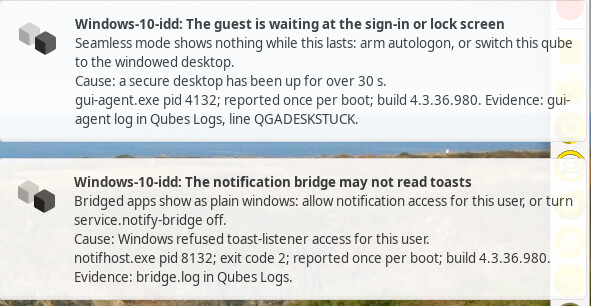
- Windows 10 now shows 2 messages on startup, but otherwise works like 4.3.35, which is okay:
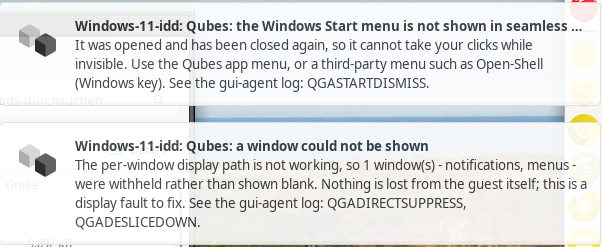
- When trying to start Explorer before Windows 11 has completely settled down after boot, 2 messages are shown, one complaining that it is not yet ready, giving the cause for not displaying the Explorer Window:
- After completing the boot process, Windows 11 shows 3 messages, the second giving the reason why the updater still does not work:
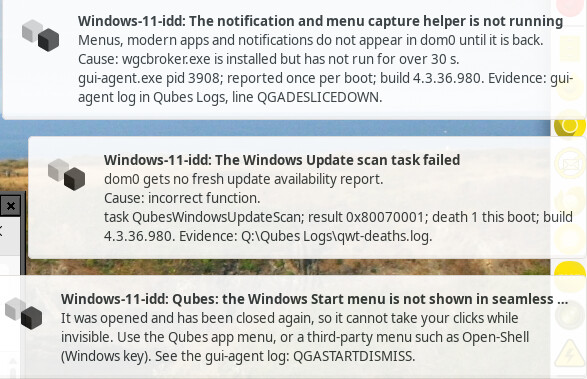
- Hitting the Win key gives the explanation shown above for not displaying the Windows menu. But repeating this several times once again showed the black, clickable (and working) rectangle.
So, Windows 11 still stays the problem child, which is no wonder given its low software quality (more than 2,500 documented security bugs since January).
3 Likes
oh shit. my tests seem to be broken, this eluded me. thanks for reporting, will correct.
3 Likes