I don’t know…
Worked for me once I figured out how to implement it.
- Searched my dom0 to see if I had anything like
qubesadminorqvm_run.pyviasudo find / qubesadminand found that I did indeed have a corresponding/usr/lib/python3.13/site-packages/qubesadmin/toolsdirectory - I copied the new
qvm_run.pyfrom qubes-core-admin-client/qubesadmin/tools/qvm_run.py at fix-qvm-run-root · marmarek/qubes-core-admin-client · GitHub (commit 9a31c4d) to the global clipboard and ran the following from dom0: -
# Changed to my corresponding directory
cd /usr/lib/python3.13/site-packages/qubesadmin/tools

# Inspected permissions for the existing qvm_run.py
ls -la qvm_run.py

# Backed up the existing qvm_run.py
mv qvm_run.py qvm_run.py.bak

# Created the new qvm_run.py
sudo mv /run/qubes/qubes-clipboard.bin qvm_run.py

# Matched existing permissions
sudo chown root qvm_run.py
sudo chmod 644 qvm_run.py

# Test 1 (succeeded)
qvm-run -user root <VM> xterm &

# Test 2 (succeeded)
qvm-console-dispvm <VM>
Hope this helps.
1 Like
Thanks, for the record that’s not how you are supposed to do that, I should have provided some guidance:
- Github is not trusted so you have to check that the commit is properly signed
- then, in our case, manually editing line 295, replacing it by:
…and removing line 287 to line 289 might be enough. No need to copy the content of the lines starting withelif args.user == "root" and vm.features.check_with_template( "supported-rpc.qubes.VMRootExec", False ):# - if you did some manual editing, copy back the file from dom0 to the qube containing the repo and use
diffor any tool to check that you have correctly copied the correct lines.
Ooof. Good catch @parulin.
Thank you for the correction and guidance. I wouldn’t fault you for not providing the initial guidance–I definitely could have done this more carefully. Really, I should have just made the specific modifications.
1 Like
Ok. Back on topic here.
After fixing the root access issue, my 4.2 → 4.3-migrated Debian-minimal TemplateVMs would throw the same error the OP posted about when updating through the Qubes OS Updater,
cat > /run/qubes-update/agent.tar.gz’ returned non-zero exit status 1.)
I installed qubes-dist-upgrade on dom0 and ran:
sudo qubes-dist-upgrade --releasever=4.3 --template-standalone-upgrade
Now the Qubes OS Updater indicates the following when upgrading those Debian-minimal TemplateVMs,
Progress reporting not supported.
Almost everything I came across indicated this was an Arch-specific problem, however this nearly two year old GitHub issue indicated,
That’s a side effect of minimal template being minimal. On Debian the updater needs extra package to be installed to get update progress -
python3-apt. But, you should still see some APT output if you click on the template name, and you can estimate progress based on that…
While installing the python3-apt package DID resolve this for me, I am curious why this has suddenly become an issue. I’ve been running (and updating) Debian-minimal templates for years.
Did dom0’s sudo qubes-dist-upgrade --releasever=4.3 --template-standalone-upgrade command somehow remove python3-apt from my Debian-minimal templates? I have never had to add this package to any of my templates before for this functionality.
Now, the correct way to test the update might be this in dom0, but I’m not totally sure:
sudo qubes-dom0-update --enablerepo=qubes-dom0-current-testing --action=update python3-qubesadmin
3 Likes
I am getting the error in all templates.
cat > /run/qubes-update/agent.tar.gz’ returned non-zero exit status 1.)
python3-apt is installed in my Debian templates but the directory /run/qubes-update/ does not exist in any template. Including templates existing in 4.2 before updating to 4.3 or templates added after.
Github issue now closed and this command solves the problem. I verified that both qubes-dist-upgrade and qvm-run -u root <debian-12-minimal-template> xterm work as expected now.
2 Likes
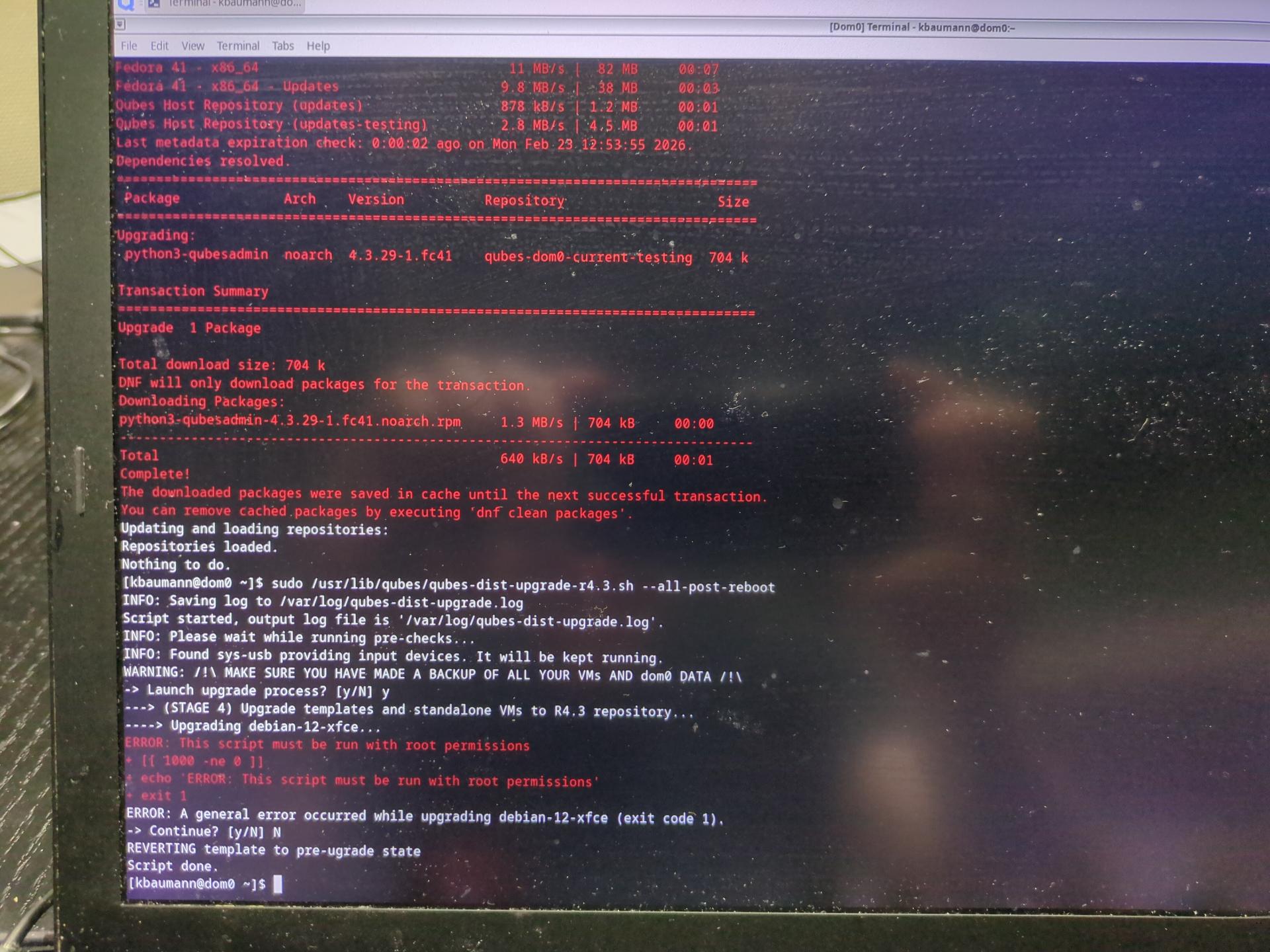
Just looking at your output two items stand out, that the new package was downloaded and cached, and that qubes-dist-upgrade failed on a debian-12-xfce template. I only tested on a debian-12-minimal template, which was successful.
If the package was downloaded and upgraded, then you should be able to see the following (new) lines of code (at lines 299 and 1487, respectively):
user@dom0:~$ cat /usr/lib/python3.13/site-packages/qubesadmin/tests/tools/qvm_run.py | grep too_old
    def test_040_run_root_shell_too_old(self):
user@dom0:~$ cat /usr/lib/python3.13/site-packages/qubesadmin/tools/qvm_run.py | grep force-user
            # got also force-user=root setting necessary for the below to work.
Thanks, that solved the problem for me. The following command finished now without errors:
sudo qubes-dist-upgrade --releasever=4.3 --template-standalone-upgrade
All my templates are up-to-date again and the problems with the debian 12 mininal and xfce templates are gone. Thanks to everyone involved in fixing the issue! 
Does the output of
dnf history list
dnf history info <id>
show that the package was actually upgraded? Like
dnf history info 6
...
Packages altered:
  Action   Package                                   Reason     Repository
  Upgrade  python3-qubesadmin-0:4.3.29-1.fc41.noarch Dependency qubes-dom0-cached
  Replaced python3-qubesadmin-0:4.3.27-1.fc41.noarch Dependency @System
1 Like
I appreciate the offered help from @ephile and @dhimh , but at this point I’m better off doing a new install.
I appreciate the offered help from @ephile and @dhimh , but at this point I’m better off doing a new install.
As workaround, doesn’t qubes-dist-upgrade --releasever=4.3 --template-standalone-upgrade just replace all occurrences of 4.2 by 4.3 in /etc/apt/sources.list.d/qubes-r4.list, so we might do that manually for now?
Also, I can use one of the following to get root inside minimal template:
qvm-run --service -u root <min-tpl> qubes.StartApp+debian-xtermqvm-console-dispvm <min-tpl>
Both excellent advice.
I never presume to speak for the Qubes team.
When I comment in the Forum I speak for myself.
are there any steps to take after entering this command in dom0?
My updates are still failing
It should be part of the regular updates now. Just check the version of python3-qubesadmin. Open a new topic if it is up-to-date.
rpm python3-qubesadmin --version printed RPM version 4.20.1 is this the lastest one?
I’m not familiar with rpm but I’m pretty sure you’re giving us the version of rpm
Try any of the following:
dnf info python3-qubesadmin
dnf list python3-qubesadmin
1 Like