Added “git” profile i removed the ability to a user to do “sudo git clone” and more other things
I will remove the ability for every browsers and file manager as well to be run as sudo too i didn’t think it was possible with apparmor i discover things everyday
Added thunar profile compatible with the package “qubes-core-agent-thunar” (but don’t use it yet i will modify the profile very soon) thunar was the most complicated profile it ask too much permission…
I was busy to learn things with apparmor but the librewolf profile is coming
I just added the librewolf profile i take a lot of time to write this one perfectly. The librewolf profile is the most well written i need to change firefox , mullvad a little bit
List of things that will be denied when using Librewolf :
You can’t run librewolf by using “sudo librewolf”
Librewolf can’t access curl , wget , bash command and more… (it’s for your safety it will not impact your experience this just increase the security)
Of course Librewolf can’t read write every home , file and foler inside the home directory except Downloads folder and Librewolf can’t access to the root filesystem
I don’t know if extensions such as keepassxc or bitwarden will work with the profile and the more i think about that the more i think i will deny access to a user to use extensions for his safety (don’t worry ublock will still work but a lot of them not). It need to be discussed but the things is extension is too much dangerous please read More malicious browser extensions uncovered - Chrome, Firefox, and Edge all affected | TechRadar
I didn’t do anything about the extensions potential issue in the future like i said it need to be discussed. But i don’t want to see random user complaining in the Qubes forum that he have been hacked when he was using Qubes and saying “qubes don’t protect you”
When i was doing the brave profile i’ve seen that some extensions like password manager is using command like “/usr/bin/curl” “/usr/bin/touch” and this is so dangerous…
Mullvad Browser is shipped with 3 extensions Noscript, Ubloc, and their vpn extension but they do not allow a random user to install easily a extension maybe i should do the same thing ? I don’t know like i said it need to be discussed
I removed the librewolf profile there is a little issue that need to be fixed immediately
Edit : Librewolf profile fixed
Every browser should be able to see correctly files and directories in “Downloads” the deny rules before was way too strict
File Manager no longer have network connections i finally find the rules in apparmor to do that
Improved the security i added the “sudo” profile to deny access to command like “sudo brave-browser , sudo firefox , sudo git , sudo mullvad-browser, sudo curl” the rules “deny /usr/bin/sudo rw,” was not working as i excepted
I accidentally create a duplicate of “deny network inet,” in the two manager profile (nautilus and thunar) earlier which was making all profile broken i removed the duplicate now everything works correctly
I still don’t understand why apparmor complain about a protocol error with some profile doing aa-enforce /etc/apparmor.d/nautilus make apparmor throw a protocol error and in that case the user need to do aa-enforce multiples times to make it work some profile doesn’t have this issue i’m going to check what’s going on with the nautilus profile maybe the issue is coming from apparmor itself?
Apparmor profile from Author: Daniel Richard G. <skunk@iSKUNK.ORG> added in the repository : “Xorg Display manager” every Qubes is using X11 as display we increase the security of the vm a lot more now. The profile is shipped in Whonix and Debian template but the profile missed a line to work properly in enforce mode in Qubes. In my testing on Whonix and Debian the “Xorg” profile is working completely fine i didn’t have any issue with it. I also put every profile in my repository in the Qubes kernel by using apparmor_parser -r i didn’t have any issue by doing that even with the Xorg profile.
Every apparmor profile for browser is stable, Nautilus , Signal, Proton-pass and mail is stable too i will make some minor change for protonmail.
In the future i would like qubes dev ship the apparmor profile from the repository in the debian template i will try to talk with them about that
I added a lot of changes for every browser in the repository they are really better now (except donutbrowser he need a rewrite but i will do it later this one is painful to deal with) The only little thing missing is the dbus rules and unix rules for mullvad-browser , librewolf , firefox but it’s not really important i will add this later
I would like to add a apparmor profile for Telegram , Tutanota desktop mail , Stremio but i need to create a telegram account and create a account now is almost impossible. Tutanota doesn’t have a official debian repository so i’m waiting. And the official stremio deb package have some issue with dependencies in debian trixie so i’m waiting a fix from them.
List of new profiles added in the apparmor qubes repository : Element-desktop , Session-desktop, Bitwarden, Metadata-cleaner, streamlink , Thunderbird
I also finished to write the Thunar profile it’s working fine with every qubes features.
Please update if you was using my previous profile i’ve made a lot of progress and improved the isolation for the browser (except brave) i have to do it
The donutbrowser is really hard to rewrite but it’s planned
Added new profiles : Transmission (work only with the gtk version for now) and i also added qbittorrent
I tried to build the tutanota-desktop version to create a apparmor profile but building the package doesn’t work depsite my effort to fix the issue i couldn’t build anything so i’m still waiting for a official repository from them
Next profile i’d like to add : Podman , Docker , ssh
Added “docker” profile in the repository the profile is in the folder “selfhost” i will do podman soon
Pulling image and running docker compose commands is working fine but i don’t know if the software need more command to run under apparmor properly if some permission are missing i will add them immediately
I also added a folder “screenshot” to show to people what apparmor is doing in the background
Yeah i forgot the “apparmor=1” i will update the post thanks
To be more clear the command
qvm-prefs x kernelopts "swiotlb=2048 security=apparmor"
must target the template because after you have created a appvm the appvm will inherit the kernelopts value. (every vm you will create from the template will inherit the apparmor value)
Your answer is clear, but think a moment about 30k+ users of QubesOS.
Could be that most of them believe in working apparmor in their Debian templates while they should setup it for each Qube via kernelopts?
Even for kicksecure and whonix templates.
I didn’t test if a users really need to do the qvm-prefs kernelopts commands i don’t know if apparmor will deny access correctly if you don’t do it. And the apparmor profile for tor browser in whonix seem to work without the qvm-prefs commands so i guess we probably not need to use the commands ? I won’t lie i don’t know at all some test are needed
qvm-prefs x kernelopts "swiotlb=2048 apparmor=1 security=apparmor"
According to docs, only place when apparmor mentioned also mention exactly that use case:
To view kernel options, you can use the GUI VM Settings tool; to view and change them, use qvm-prefs commandline tool:

qvm-prefs my-appvm kernelopts
swiotlb=2048

qvm-prefs my-appvm kernelopts "swiotlb=10240 apparmor=1 security=apparmor"
And usage is for AppVM, not for template.
@unman
Excuse me but maybe you know for sure should users change manually kernelopts for each template to activate apparmor in debian based qubes?
I want to give you some feedback don’t take it as negative
By default every app who reach internet can’t read the machine-id of the users
We cannot build an AppArmor profile for every app the user has installed. If there is no AppArmor profile for a specific app, that app can read the machine ID, which defeats the purpose.
One way to mitigate this is by modifying the machine ID in the template VM to a generic value, such as in Whonix, where all users share the same /etc/machine-id.
By default every apps can’t access to the filesystem of the users
By default apps can’t read and write in every home directories including QubesIncoming they can only access to the Downloads folder
Also, we’re using Qubes OS, where we separate all activities into isolated domains this isn’t a traditional Linux setup where everything runs in a single environment.
One more thing: in the features list, you mentioned that “every app can’t access the filesystem of the users” , and immediately after, that apps “can only access the Downloads folder” . However, since the Downloads folder is part of the user’s filesystem, this seems contradictory.
Mullvad-Browser they removed the abilitie to easily install extensions in their Browser
They removed it because if users install extensions later, it makes the browser fingerprint unique, distinguishing them from other Mullvad Browser users.
The main major drawback with this approach is we are running some gui tool on template vm for this to work which is huge security risk. Qubes OS warns users against running software on template VM. If the template VM is compromised then all those appvm, dispvm depending on it will be compromised too.
I spent a lot of times writing those apparmor profiles and testing them (3 weeks) to make them work correctly. A lot of documentation say it’s easy to create a apparmor profile but trust me it’s not specially on Qubes. I’ve done like 300 - 400 test something like that to makee sure it work correctly for everyone.
As a final note did you read the recent apparmor news if you have not read it i will put that link below you can check it out don’t waste your time on unnessary stuff before you try to start doing something check whether its worth your time or not and whether does this work adds any value to your future if it doesnot consider doing something elese. Time is precious don’t waste your time on unncessary stuff. I just created this covert acc for one day i am on vacation leave i thought i should help some one it makes me happy and also others happy.
First thanks you for your feeedback i appreciate any type of feedback
You’re 100% right about the machine-id i was thinking to modify the .sls file just for this. But is it very useful to change the machine-id ? VM Fingerprinting and see also this forum post How to hide the fact that I'm Qubes OS from Telegram Telegram was able to identify this user as a Qubes OS users on a Whonix VM. I don’t really see the point of “masking” the machine-id because a app have so many way to identify you as a Qubes user
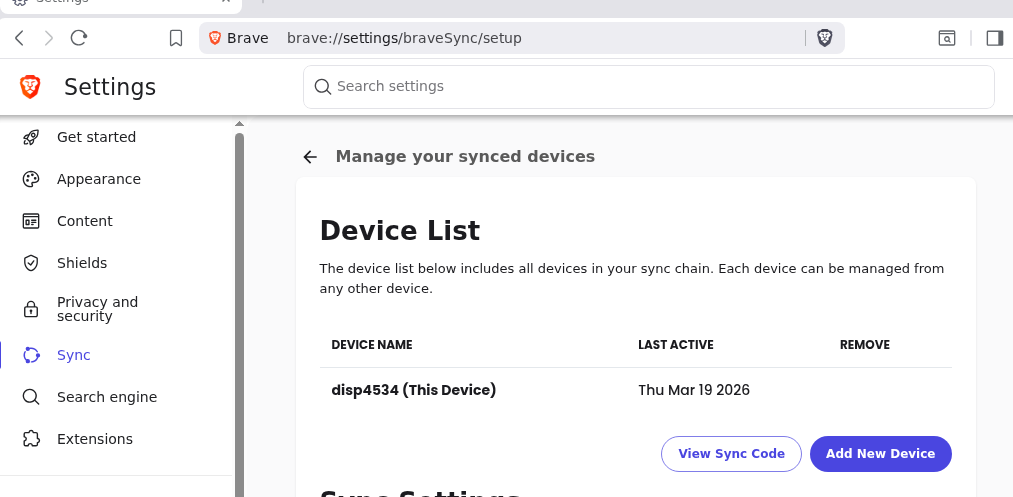
Example : When i was doing a apparmor profile for Brave-browser i realized that if a user click on “Sync” to sync his data in Brave then the browser will put the current hostname of the user.
Another example when i was (again) doing a apparmor profile for browser and other apps i’ve seen a lot of them is trying to read “proc/version”
If you enter this command in your terminal
cat /proc/version
This will display your current kernel version and it will show that your current kernel is Qubes. So basically every apps can easily detect you as a Qubes users. Apps doesn’t even need to access your machine-id to detect you as a Qubes users. Which is why in every apparmor profile (except those who doesn’t have access to network because i removed ) i added this line deny /proc/version r,
Another creepy example of why hiding the machine-id could be useless Brave can easily track and fingerprint you in Qubes in this Privacy Guides post this user showed which data the browser collect by default and some of them can easily track you.
Something that could solve the issue would be to create a apparmor profile to deny access to machine-id , proc version and some other things to every apps but i didn’t think about this until i saw your post this is maybe possible to do. I will do some test thanks for the idea but i don’t think this will be possible. I think doing /usr/bin/* and /usr/lib/** could work i will give some feedback about that.
Hm… apps like signal, firefox etc… need to download file somewhere i can’t completely deny access to every folder in home directory but you’re right i need to be more clear on this part
??? What are you talking about ? which gui tool you are referring to ? As far i’m aware you shouldn’t start a software in the template VM. Did i missunderstand something here?
This is normal security has a cost but i think some parameters can be removed but i don’t know which one should i remove in favor of performance maybe you could help me with that ?
Something that could solve the issue would be to create a apparmor profile to deny access to machine-id , proc version and some other things to every apps
Even if you create apparmor profiles there are too many ways to exploit it crackarmor, Unconfined Child Processes, Information Leaks via System Calls, etc.
Instead harden the template vm by hardening overall vm.
??? What are you talking about ? which gui tool you are referring to ? As far i’m aware you shouldn’t start a software in the template VM. Did i missunderstand something here?
I had checked the source code, where Python Tk (a GUI tool) is used. The code copies all AppArmor profiles to /etc/apparmor.d/ . To make this persistent across VM restarts, you run this on template vm.
Maybe we should only use SElinux ?
selinux is powerful but you need to have good understanding of linux and need to invest huge time in selinux to master it. Also there are not many good source out there to learn it so its may take years mastering it.
This is normal security has a cost but i think some parameters can be removed but i don’t know which one should i remove in favor of performance maybe you could help me with that ?
mitigations=auto,nosmt (dom0 already does this no need to use this here). disabling SMT impacts huge performance half your cpu cores will be gone by disabling SMT.
kvm_amd.sev=1, kvm_amd.sev_es=1, kvm_amd.sev_snp=1, kvm-intel.vmentry_l1d_flush=always, kvm.mitigate_smt_rsb=1 (unncessary kvm parameters for Qubes VM. Qubes OS uses xen not kvm).
iommu=force , intel_iommu=on , iommu.passthrough=0 , iommu.strict=1 — Controlled by Xen in dom0, not guest VMs.


 this is maybe possible to do. I will do some test thanks for the idea but i don’t think this will be possible. I think doing /usr/bin/* and /usr/lib/** could work i will give some feedback about that.